Hi,
Suppose I have a simple Fetch XML based report that shows all the contact’s Full name and their Email Id.
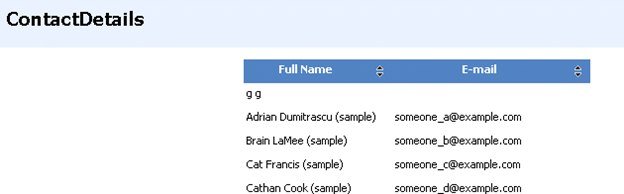
The query for it
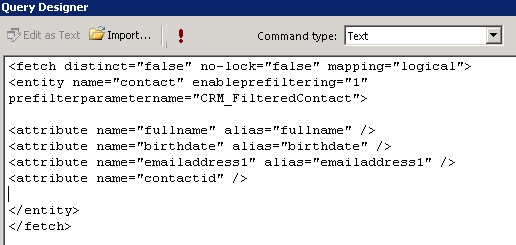
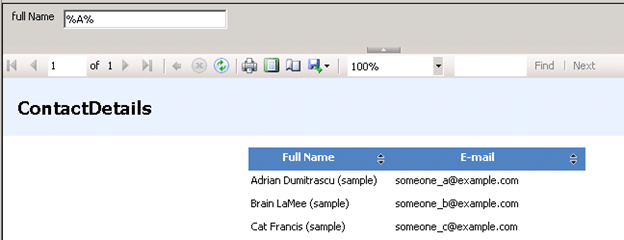
Now let us add a like condition to it. (i.e. get all the contacts where fullname like)

The full name parameter will appear in the report.
Now comes the tricky part.
Suppose we have to find all the contact records based on the owners selected.
For owners we will have drop down field in the report.
The fetch xml query would look like below (if we specify two owners)

But here the issue is that value (tag) part would be dynamic, it has to be equal to the values selected by user in the drop down owner parameter of the report. It seems that we can’t dynamically change the Fetch Xml query in runtime for the report.
So the “In” operator won’t be of much use in case of fetch xml based report.
One way we can overcome this issue is by using Default filters.
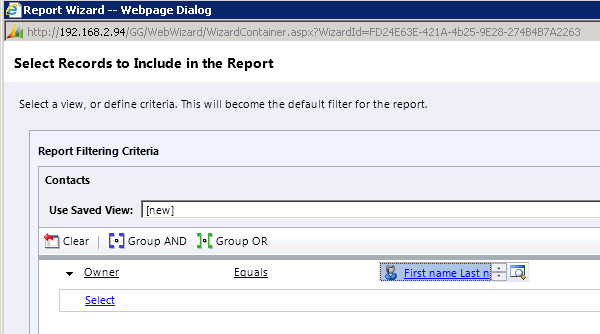

Here users will have option of editing the filter and specifying the values for the owner which would be then passed down to the report.
This is one way I can think of getting the multiselect thing working in Fetch XML based report.
Please share and suggest your ideas for the same.
Update :-
The multivalue can be passed in the following comma separated way, so we can make use of Multiselect Report Parameter here.
<fetch mapping="logical" count="50" version="1.0">
 <entity name="contact">
 <filter>
 <condition attribute="ownerid" operator="in">
 <strong><value>48379161-2782-e111-b0d1-78e3b5178a51,48379161-2782-e111-b0d1-78e3b5178a52,A81F00C-D4E4-E011-B58C-00155D2A49C7</value></strong>
 </condition>
 </filter>
 </entity>
</fetch>
The fetch XML will have condition in the following format
<condition attribute=”ownerid” operator=”in” value=”@ActivityOwner”>
Bye.