MB2-712 Certification: (Microsoft Dynamics CRM 2016 Customization and Configuration) – Revision Guide


IPluginExecutionContext Depth is 2 in Create Plugin during Import of records in CRM 2015 (and earlier)


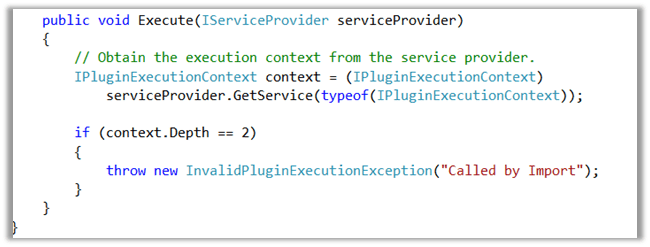
We had one of our plugins on Create of Opportunity however during the import of the Opportunity record it was not working properly. We had the Depth check in our plugin code to check for infinite loop as the same plugin was being used for Update also.

After some debugging we realized that Depth value is 2 instead of 1 during import.

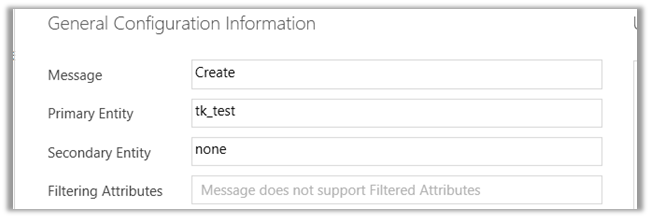
To test this, we created a sample plugin for create of Test entity record and then imported the Test entity records.

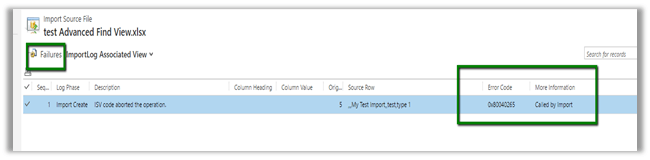
As expected the import failed and we got our custom exception in it.

Hope this helps..

Sample code to update Access Mode of System User in C# (CRM 2016 or earlier)


Recently had a requirement to set Access Mode of around 500 users to Administrative from Read – Write. We wrote an on demand workflow for that. However, running that workflow on those 500 records in a batch of 100 records was causing them to stuck in waiting stage and we had to then manually resume those workflow instance. So we ended up writing a Console Application for that.


   QueryExpression queryExpression = new QueryExpression();
            queryExpression.EntityName = "systemuser";
            queryExpression.ColumnSet = new ColumnSet();
            queryExpression.ColumnSet.AddColumn("fullname");

            ConditionExpression conditionExpression1 = new ConditionExpression();
            conditionExpression1.AttributeName = "tk_businessarea";
            conditionExpression1.Values.Add("EE286698-AF08-E311-B55E-1CC1DE6DAA0B");
            conditionExpression1.Operator = ConditionOperator.Equal;

            ConditionExpression conditionExpression2 = new ConditionExpression();
            conditionExpression2.AttributeName = "isdisabled";
            conditionExpression2.Values.Add(false);
            conditionExpression2.Operator = ConditionOperator.Equal;

            // access mode ==> 0 --> Read Write and 1 --> Adminstrative
            ConditionExpression conditionExpression3 = new ConditionExpression();
            conditionExpression3.AttributeName = "accessmode";
            conditionExpression3.Values.Add(1);
            conditionExpression3.Operator = ConditionOperator.Equal;
            
            queryExpression.Criteria.AddCondition(conditionExpression1);
            queryExpression.Criteria.AddCondition(conditionExpression2);
            queryExpression.Criteria.AddCondition(conditionExpression3);

            queryExpression.Criteria.FilterOperator = LogicalOperator.And;

            EntityCollection entityColl = organizationProxy.RetrieveMultiple(queryExpression);
            foreach(var entity in entityColl.Entities)
            {
                Entity userEntity = new Entity("systemuser");
                userEntity.Id = entity.Id;
                userEntity.Attributes["accessmode"] = new OptionSetValue(0);
                organizationProxy.Update(userEntity);
            }

Hope it helps !!

Generic SQL error in CRM 2015 Online (and earlier)


Recently we were getting the Generic SQL Error in one of our Plugin which was registered in Create of Opportunity Line.

The scenario was that on qualifying the lead, opportunity was getting created and we had Async Plugin on Create of Opportunity that will create an Opportunity Line and had Sync Plugin on Create of Opportunity Line that was updating the parent Opportunity. This issue was occurring randomly.

We observed the following, that if both the Plugin are registered as Sync or Async the issue doesn’t occur. It also doesn’t occur if we have Opportunity Plugin on Create as Sync and the one on Opp. Line as Async.

The other way of solving the issue was to introduce delay before updating the Parent Opportunity from the child opportunity line create Plugin.

Hope this helps..

RetrieveMultiple performance on large datasets


Using TPL in CRM

Natraj Yegnaraman's avatarDreaming in CRM & Power Platform

EDIT (21/05/15): After DMing with @maustinjones, I have added stat for paged RetrieveMultiple as well. I have updated the post to include this.

EDIT (22/05/15): Updated post to reflect correct behaviour of no-lock when parallelising. Thanks @maustinjones. Please also refer to the follow up post -> http://dreamingincrm.com/2015/05/22/redux-retrievemultiple-on-large-datasets/ on why paging cookie, is the recommended approach.

MSCRM limits the maximum result size to 5000 records, when you use the RetrieveMultiple request. In order to overcome this and retrieve all the records, you’ll have to use paging. PFEDynamics team have also released an open-source library called PFE Xrm Core Library that utilises Task Parallel Library.

There is also ExecuteMultipleRequest that you can use to send bunch of requests in one go, and process the responses. This just wanted to document by findings, about the performance of these options:

  1. Just using Parallel.ForEach
  2. ExecuteMultipleRequest
  3. PFE Xrm Core
  4. Paged RetrieveMultiple

Run 1 (Batch…

View original post 529 more words

Sample code to close a quote as won using WinQuoteRequest in CRM 2016 (and earlier)


Just sharing a sample code to close quote as won through C#


WinQuoteRequest winQuoteRequest = new WinQuoteRequest();
Entity quoteClose = new Entity("quoteclose");
quoteClose.Attributes["quoteid"] = new EntityReference("quote", new Guid("015816C2-2F10-E611-8112-3863BB353ED0"));
quoteClose.Attributes["subject"] = "Quote Close" + DateTime.Now.ToString();
winQuoteRequest.QuoteClose = quoteClose;
winQuoteRequest.Status = new OptionSetValue(-1);
organizationProxy.Execute(winQuoteRequest);

Hope it helps..