Hi,
Got the below error while trying to install the Report Authoring Extension for CRM 2015.

To fix the issue, open the log file, check for the registry path and delete it

Hope it helps !

Hi,
Got the below error while trying to install the Report Authoring Extension for CRM 2015.
To fix the issue, open the log file, check for the registry path and delete it
Hope it helps !

Hi,
We were getting the Duplicate Column Heading Existing while trying to download template for data import for Opportunity Entity.
Through Customizations we changed the Display Name of the fields that were duplicate and it fixed the issue for us.
Solution:
https://community.dynamics.com/crm/f/117/t/169282
I had the same issue. In Settings> Customizations, display the Entities that causes the error. Sort the fields by display name and scroll through the list until you find two identical display names. Rename one, save and publish your changes. You should now be able to download the Import template.
Do check out this awesome article
http://missdynamicscrm.blogspot.in/2014/09/understanding-import-template-crm-2011-2013-fields.html
Hope it helps ..

Hi
Recently we upgraded one of our CRM 2013 Online to CRM 2015 Online Update 1. The approach was installing the solution from our dev to new CRM 2015 environment.
After the update when trying to create a new product we were getting the following error message
“2 is not a valid state code on product with Id 0977da8e-3368-e511-80fc-3863bb359f30”
We raised the support ticket and the resolution was to add the following line of code to the customization.xml file. It seemed that few of the State Code and Status Code were gone missing for the product entity.
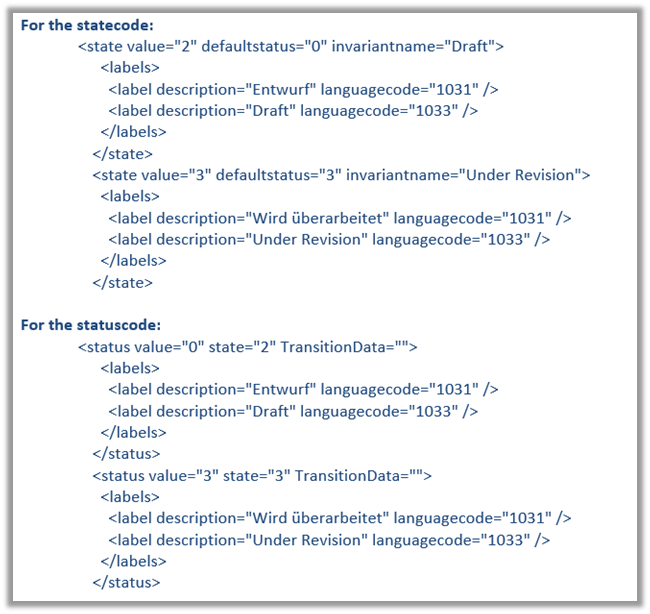
Adding them back resolved the issue.
Hope it helps..

Hi,
Update – Check if the class used for defining Plugin / Workflow Activitiy is PUBLIC
Was getting below error while trying to register Custom Workflow Activity in CRM 2013 Online.

The solution we found out was to use CRM 2015’s Plugin Registration Tool to register it.
Hope it helps.

Hi,
We were getting the error while importing a managed solution exported from dev environment to the test environment in CRM 2013 online.
It might be the case that the particular report was modified by the user in the test environment. As we weren’t updating that report we removed that report from the new exported managed solution from our dev environment and the import was successful.
Hope it helps.

Sharing sample code to check if a user belongs to a team or not
public static bool IsTeamMember(Guid teamID, Guid userID, IOrganizationService service)
{
QueryExpression query = new QueryExpression("team");
query.ColumnSet = new ColumnSet(true);
query.Criteria.AddCondition(new ConditionExpression("teamid", ConditionOperator.Equal, teamID));
LinkEntity link = query.AddLink("teammembership", "teamid", "teamid");
link.LinkCriteria.AddCondition(new ConditionExpression("systemuserid", ConditionOperator.Equal, userID));
var results = service.RetrieveMultiple(query);

if (results.Entities.Count > 0)
{
return true;
}
else
{
return false;
}
}
Hope it helps.

 Nishant Rana's Weblog