Hi,
With CRM 2016 Update 1 now we have got this option of creating custom attribute of data type Customer for any entity à system as well as custom.
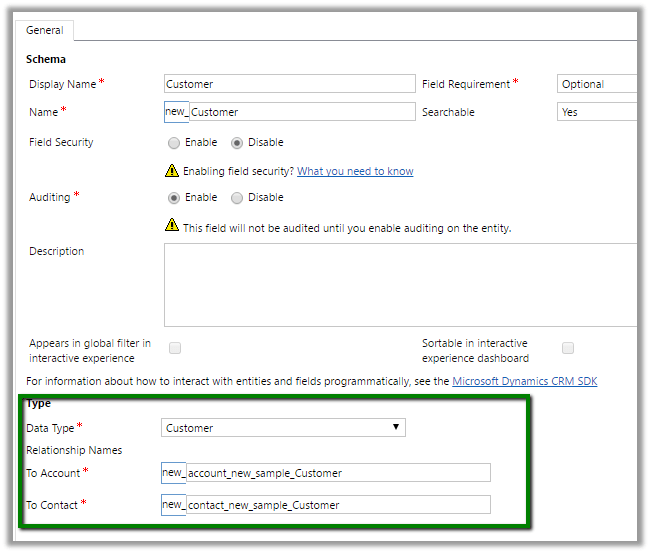
This in turn will create 2 new relationships with account and contact entity.

Hope it helps.

Hi,
With CRM 2016 Update 1 now we have got this option of creating custom attribute of data type Customer for any entity à system as well as custom.
This in turn will create 2 new relationships with account and contact entity.
Hope it helps.

Recently we faced a strange issue with translations. It was showing correct translated value in the Form, however the same field in the Header was showing the label in English instead of German.
In Development environment it was working properly only in TEST we were facing this issue after deployment.

Then just to give it a try, I opened the form for customization, removed the City field form Header and added it back and did publish.
Surprisingly it started showing correct translated label in the header.

Hope it helps..

Nice artilce on Early binding vs Late Binding Performance
Early binding versus late binding, which is faster?
Late.
View original post 353 more words

Understanding Reparent
There’s a feature of Dynamics CRM (that’s been in the product since version 3, I believe) that actually lives outside of the “front-and-center” security model that you normally think of with Dynamics CRM security roles.
I’m talking about the cascading functionality defined in entity relationships. Specifically, there is a cascading property called “Reparent.” There’s an old (but still relevant) article here about how this reparent functionality works. As this article explains, if you have a 1:N relationship between accounts and opportunities, and in this relationship, you have set the “reparent” property to “cascade all,” this means that the owner of an account (Acme INC) will see any opportunities created with Acme INC as the related account, and any opportunities whose related account is updated to be Acme INC.
To go a bit deeper though, it’s important to understand exactly when this reparent property comes into play. If…
View original post 604 more words

Nice post on Retrieve from N:N relationship

This post explains how the QueryExpression class can be used in conjunction with IOrganizationService.RetrieveMultiple() in CRM 2013 to retrieve related records for an entity in an N:N relationship. This is something that I could not find much documentation on, and it is not very straightforward – at least for someone starting out in CRM dev.
I have two custom entities that have an N:N relationship between them: Course (logical name ng_course) and Subject (logical name ng_subject). The relationship is named ng_course_subject. The query that I need to write is to retrieve all Subjects assigned to a given Course.
The QueryExpression class is where you define your query. You can learn more about this class here: http://msdn.microsoft.com/en-us/library/microsoft.xrm.sdk.query.queryexpression(v=crm.6).aspx.
The key property of this class that enables us to retrieve the related records is the LinkEntities property, which is a collection of LinkEntity objects. Essentially LinkEntity
View original post 352 more words

Hi,
Got this error while trying to import a managed solution in CRM 2016 Online.
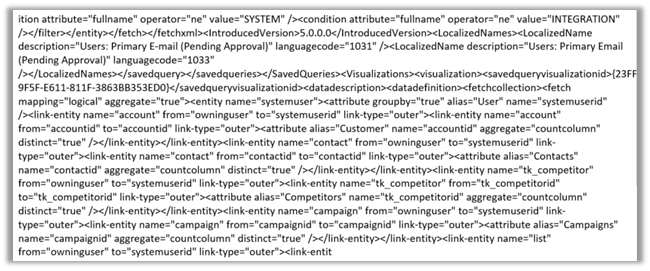
During analysis we figured out that it was pointing to one of the charts created for System User Entity. It seemed like chart’s xml was modified after export and then imported. The xml definition of the chart contained distinct keyword.
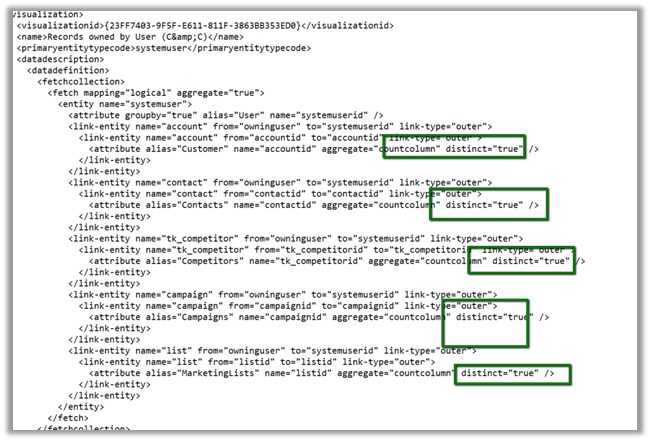
Removing the distinct keyword from the Chart definition and importing it back and then importing the managed solution with this updated chart got imported without any error.
Hope it helps..


 Nishant Rana's Weblog