Sample Plugin code to run on Reactivate Case (Incident) in Dynamics 365


Just sharing a sample code that runs on the Activation of case (incident) record and updates one field in it.

We need to register the plugin in both SetState and SetStateDynamicEntity message. Interestingly what we found was the plugin runs perfectly even if it is registered only for SetStateDynamicEntity. It triggers properly either we update it from CRM UI or through the CRM SDK for SetStateDynamicEntity message.


protected override void ExecuteCrmPlugin(LocalPluginContext localContext)
{
if (localContext == null)
{
throw new InvalidPluginExecutionException("localContext");
}

// TODO: Implement your custom Plug-in business logic.

var context = localContext.PluginExecutionContext;
var tracingService = localContext.TracingService;

if (context.InputParameters.Contains("EntityMoniker"))
{
tracingService.Trace("Inside Entity Moniker");

var targetEntity = (EntityReference)context.InputParameters["EntityMoniker"];
if (targetEntity.LogicalName == "incident")
{
tracingService.Trace("Inside Incident");

int state = ((OptionSetValue)context.InputParameters["State"]).Value;

tracingService.Trace("State = " + state);

// if status is active
if (state == 0)
{
tracingService.Trace("State Active");

// update one field in the record
Entity incident = new Entity("incident");
incident.Id = context.PrimaryEntityId;incident.Attributes["sab_fash_casestatusid"] = new EntityReference("sab_fashioncasestatus", new Guid("6F456BDC-CD7D-E811-813C-5065F38B15F2"));
localContext.OrganizationService.Update(incident);
tracingService.Trace("Record Updated");
}

}
}

}
}

Hope it helps..

MVP’s around the World


Interesting data !

Michel de Rooij's avatarEighTwOne (821)

mvpUpdated July 3rd:  Includes newly registered awardees and awardees who changed category. Added overview of Office Servers and Services numbers over last couple of years.

With the latest annual award cycle, one might be curious which impact it had on the MVP population. I performed a similar exercise last year to compare the impact of the start of the new award cycle. This year, all the MVP’s previously on the January and October cycles were also included in the reviews, making this year the first one where MVP leads and others had to perform the dauntless task of reviewing community contributions of over 3,500 people.

For comparison, I had a look at the public MVP statistics of July 1st against those of June 26th, to exclude significant noise from the monthly awardees. To start, let us first have a look at the total population of MVP’s. From the numbers…

View original post 618 more words

{Quick Tip} Manage your Entity Forms when your CRM is exposed to Web and Mobile App


Debajit's avatarDebajit's Dynamic CRM Blog

Spoiler alert! Unlike other blogs, I am not going to update you about any new feature. Rather I am going to share my project experience in handling multiple forms designed for your Web and Mobile layouts.

You have exposed you CRM recently to Mobile Apps. When you expose your CRM to Mobile Application development, in most of the scenarios you would end up designing separate forms. Let’s take the example of Account entity. Say you have designed two forms

  • Account Web Form – This form is displayed to users while accessing CRM to Web
  • Account Mobile Form – Form displayed to users while browsing CRM on Mobile

And you have your users who will just access CRM through desktop and then some users accessing CRM through both Desktop and mobile.

First of all, as I have been across client locations, I find that some consultants still assume that to expose…

View original post 415 more words

My Interview at MSDynamicsWorld.com


Check out my interview at MSDynamicsWorld.com

https://msdynamicsworld.com/story/dynamics-crm/microsoft-dynamics-profile-nishant-rana-goes-man-series-cricket-mvp

2018-06-16_0941

Thanks MSDynamicsWorld.com and Linda Rosencrance.

Fixed – Invalid Export Business Process Not Activated error while exporting solution in Dynamics 365


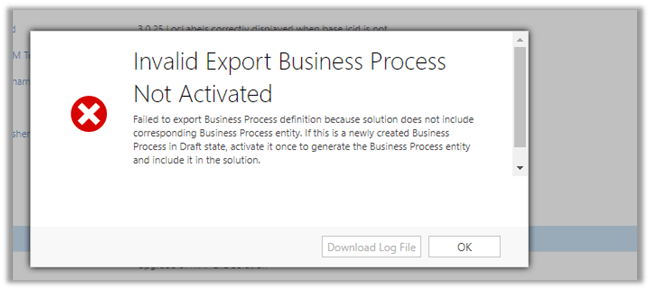
While exporting a solution from our DEV, we got the below exception.

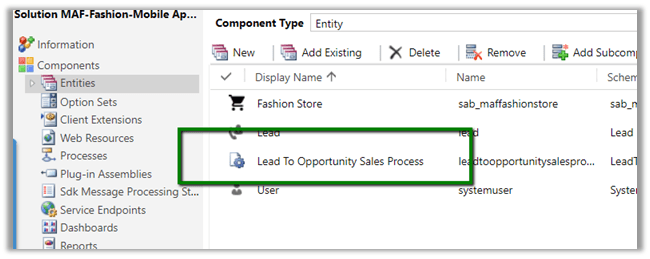
As the messages suggests to fix it we need to activate the process (which will create the corresponding entity for the BPF and add the entity in the solution). Or if already created simply add that entity if missing in the solution.

So we Activated the BPF.

Added the BPF specific entity.

Which then allowed us to export the solution.

Hope it helps..

3 Million Views. Thank you!


Today, I reached the milestone of 3 million views in my blog.

Thanks to everyone for reading, commenting and sharing it.