

Recently we had a requirement to remove an existing plugin, as that was no more required.
Of course, we can simply disable the step here, but then going forward we might end up with too many such plugins and we will always have an overhead to make sure those steps are disabled, whenever we deploy the plugin to other environments,
As a first step, we can remove the plugin class from the project, either exclude or delete

Here, if we try to update the assembly we will get the error about the missing Plugin Type.
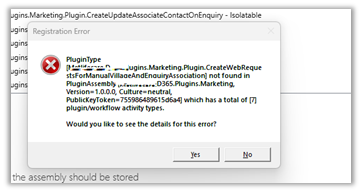
So as a next step, we need to Unregister the plugin from the Assembly through the Plugin Registration Tool.

Now we will be able to update our Plugin Assembly successfully.

Lastly, when we have to move the Solution having this plugin assembly to another environment, we can first remove the same Plugin Type from that environment through the Plugin Registration tool, before importing the solution.
Please refer to the helpful post – https://d365demystified.com/2021/12/19/renaming-or-deleting-a-plugin-in-dynamics-365-crm/
Hope it helps..
Discover more from Nishant Rana's Weblog
Subscribe to get the latest posts sent to your email.
Share It -


 Nishant Rana's Weblog
Hello Nishant, why this is not handled with upgrade solution? I would like to see a solution where we don’t have to action on target environment and we can still achieve it with solution upgrade? Kindly advise.
LikeLike
Yes for the target environment we can achieve the same using the managed solution + upgrade – https://nishantrana.me/2016/10/16/how-to-delete-components-from-managed-solution-in-dynamics-crm-2016-without-using-holding-solution/
Here we had unmanaged environment because of which we after deleting it in dev, had to do it manually for uat.
LikeLike