

Below are a few ways we can upload files to the File Column type field using KingswaySoft’ s Integration Toolkit and Premium Flat File Source and Premium Derived column which are part of the SSIS Productivity Pack of KingswaySoft
Using the Import column – https://nishantrana.me/2022/08/10/how-to-upload-files-to-file-column-attribute-using-ssis-kingswaysoft-and-import-column-dynamics-365-crm/
Using the Script Component – https://nishantrana.me/2022/08/09/how-to-use-script-component-to-upload-files-to-file-column-attribute-in-ssis-kingswaysoft-dynamics-365-crm/
Here instead of uploading the files from the local drive, we will be uploading the files stored in the Azure Blob Storage to the corresponding contact records inside CRM.
Below is our Blob Container – here to make things simple we have the mobile number of the contact records used as the pdf file name uploaded, and which will be used for updating the contact records.

The contact records in CRM

Below is how our package looks like
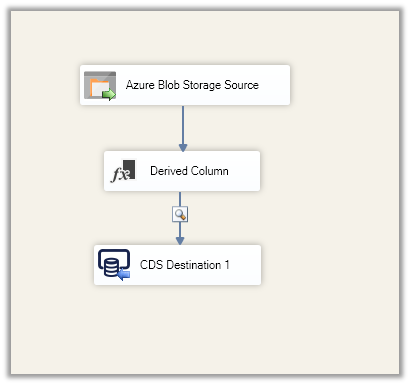
Here we have specified the Item Selection Mode as Recursive (File Only) to make sure it picks the files only and not the folder.

Within the Derived Column, we are replacing the pdf extension from the file name i.e. mobile number, and using it to find the contact records and update them.

Finally, in the CDS / CRM Destination Component, we are performing an upsert using the dervied Mobile Phone Formatted derived column as a match.
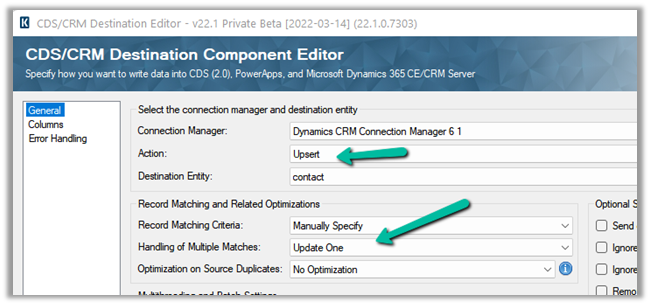
The mapping –

Let us now run the package.


Let us now open the records and check.
As expected we can see the file uploaded.

Thanks to Venkata for this solution https://www.linkedin.com/in/venkata-satya-kumar-nagumalli-77923972
Also, check out –
To extract attachments from notes-https://nishantrana.me/2021/02/10/extracting-attachments-from-notes-in-dynamics-365-dataverse/
To download files using Download Block Request –https://nishantrana.me/2022/03/14/how-to-download-file-from-file-column-using-initializefileblocksdownload-and-downloadblock-request-dynamics-365-crm-dataverse/
To upload files using Upload Block Request –https://nishantrana.me/2022/03/15/how-to-upload-file-to-file-column-using-initializefileblocksupload-and-uploadblock-request-dynamics-365-crm/
Understand File and Image Data Type –https://nishantrana.me/2021/10/01/using-file-and-image-data-type-in-dataverse-dynamics-365/
Try out the wonderful, feature-rich, and powerful SSIS Integration Toolkit for Dynamics 365 by KingswaySoft –https://www.kingswaysoft.com/products/ssis-integration-toolkit-for-microsoft-dynamics-365/download
Check other articles on SSIS plus CRM – https://nishantrana.me/2018/11/26/ssis-and-microsoft-dynamics-365/
Hope it helps..
Discover more from Nishant Rana's Weblog
Subscribe to get the latest posts sent to your email.
Share It -


 Nishant Rana's Weblog
Thanks for sharing your quick guide. Much helpful!
LikeLike