

Continuing our previous posts on Custom API
- Create a Custom API –https://nishantrana.me/2021/01/13/use-custom-api-to-create-custom-messages-in-dynamics-365/
- Execute Privilege Name property –https://nishantrana.me/2021/01/14/execute-privilege-name-executeprivilegename-property-of-custom-api-in-dynamics-365-microsoft-dataverse/
Here we will look at the CustomAPIRequestParameter entity.
- This entity can be used to define input parameters to the Custom API.
- It is not a mandatory entity for Custom API i.e. we can define a custom API without any input/request or output/response parameter.
- In the case of multiple parameters, ordering is not important as they are identified using the name.
- One parameter can be associated with only one Custom API.
- We can have multiple parameters with the same Unique Name as long as they are associated with different Custom API.
Say e.g. below is our Custom API

And this is our Custom API Request Parameter associated with the above API of type String
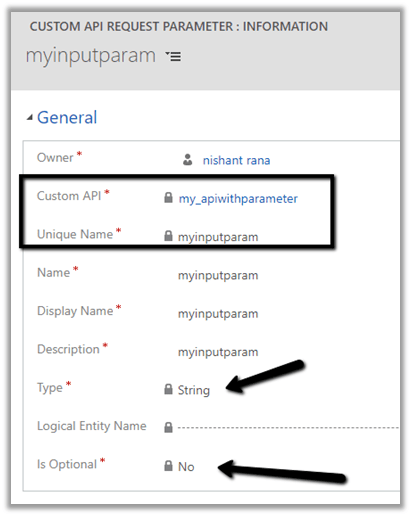
The different data type for the request parameter

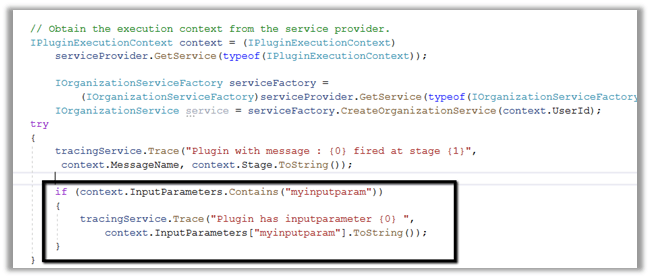
Below is our plugin registered for the custom message.
We are checking for the input parameter and writing it in the trace log.
 Let us call our custom API

And let us check the plugin trace logs.
We can see the message being called successfully.

Get more details –
Hope it helps..
Discover more from Nishant Rana's Weblog
Subscribe to get the latest posts sent to your email.
Share It -


 Nishant Rana's Weblog
Hi Nishant, is Dynamics crm 365 Custom API Restful? will I be able to apply select & filter clause over it.
LikeLike