

In the previous post, we created a simple custom API https://nishantrana.me/2021/01/13/use-custom-api-to-create-custom-messages-in-dynamics-365/
Let us look at its different properties starting with ExecutePrivilegeName
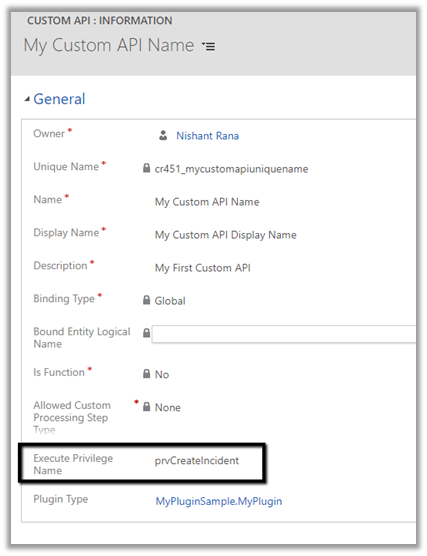
Execute Privilege Name attribute of custom API allows us to specify the name of the privilege that allows execution of the custom API.
Let us update the custom API and specify the privilege name.
For simplification, we have used prvCreateIncident here i.e. Create Case / Incident Privilege.
To get the Privilege name
https://%5Borgname%5D.api.crm.dynamics.com/api/data/v9.1/privileges?$select=name

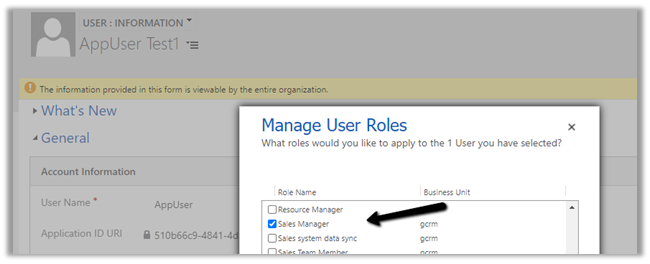
To test, we updated the security of the Application User to Sales Manager role which doesn’t have the create incident privilege.
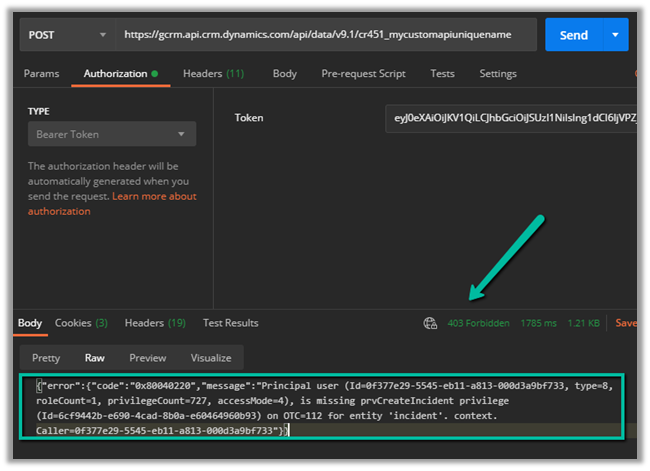
Calling the custom API this time as expected gave us the below error
{“error”:{“code”:”0x80040220″,”message”:”Principal user (Id=0f377e29-5545-eb11-a813-000d3a9bf733, type=8, roleCount=1, privilegeCount=727, accessMode=4), is missing prvCreateIncident privilege (Id=6cf9442b-e690-4cad-8b0a-e60464960b93) on OTC=112 for entity ‘incident’. context.Caller=0f377e29-5545-eb11-a813-000d3a9bf733″}}
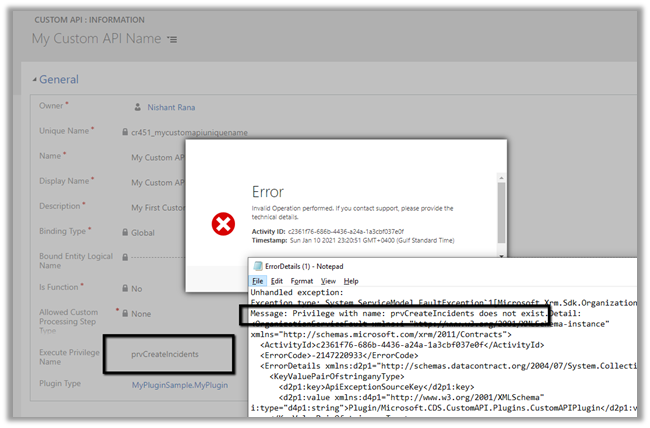
If we specify an incorrect privilege name we would get the below error and will not be able to save the record.
Hope it helps..
- Multiple Active Business Process Flow Instances for a record in Dynamics 365 / Dataverse
 We recently worked on a requirement where we had to sync Business Process Flow (BPF) data between two different Dataverse environments for the Case (Incident) table. At first glance, the requirement looked straightforward — pick the active BPF instance and replicate it. However, while analyzing the source environment, … Continue reading “Multiple Active Business Process Flow Instances for a record in Dynamics 365 / Dataverse”
 - “Transaction not started. There is no active transaction” error (Dynamics 365 / Dataverse)
 We recently ran into an interesting and slightly frustrating issue while trying to mark an activity (Appointment/Phone Call/ Task) as Completed in Dynamics 365. Whenever we tried to mark the activity as completed, we were getting the following error. We were only getting the exception when the activity … Continue reading ““Transaction not started. There is no active transaction” error (Dynamics 365 / Dataverse)”
 - Plugin Registration Tool Login with Multi-Factor Authentication (MFA) – Uncheck “Show Advanced”
 If we’re logging into the Plugin Registration Tool using an account protected with Multi-Factor Authentication (MFA), there’s one small setting that can cause login failures — Show Advanced. We need to make sure “Show Advanced” is unchecked before clicking Login. When this option is selected, the tool exposes … Continue reading “Plugin Registration Tool Login with Multi-Factor Authentication (MFA) – Uncheck “Show Advanced””
 - No Dependencies Shown… But still can’t delete the component? Check Your Cloud Flows (Dataverse / Dynamics 365)
 Recently, while performing cleanup in one of our environments, we were removing unused components to reduce clutter and technical debt. As part of this activity, we attempted to delete an old Business Process Flow (BPF) that was no longer required. However, when trying to delete the Business Process … Continue reading “No Dependencies Shown… But still can’t delete the component? Check Your Cloud Flows (Dataverse / Dynamics 365)”
 - Solution Failed to Import – Missing Lookup View Dependency in Dataverse / Dynamics 365
 Recently, while trying to import a solution, we got the below dependencies error. Solution ” Configuration” failed to import: The dependent component SavedQuery (Id=50658a7f-473b-ec11-8c64-000d3a8ead20) does not exist. Failure trying to associate it with SystemForm (Id=a00da85e-5fc4-f011-bbd3-000d3ad2506c) as a dependency. Missing dependency lookup type = PrimaryKeyLookup. The error indicated that … Continue reading “Solution Failed to Import – Missing Lookup View Dependency in Dataverse / Dynamics 365”
 - Renaming Sitemap Display Name in Dataverse / Dynamics 365
 While working with a model-driven app in Dataverse, we needed to change the display name of the sitemap. What made this interesting was that there is no option in the UI to rename the sitemap display name directly. After exploring the UI options and confirming that the sitemap … Continue reading “Renaming Sitemap Display Name in Dataverse / Dynamics 365”
 - Fixed: Audit History Page Not Loading (Dataverse / Dynamics 365)
 Recently, we ran into an issue where the Audit History page stopped loading on the form. Interestingly, the problem was limited only to the Account forms. Whenever we tried to open Audit History, we received the generic error below: An error has occurred. Try this action again. If … Continue reading “Fixed: Audit History Page Not Loading (Dataverse / Dynamics 365)”
 - Why We Switched Our Plugin from PreOperation to PreValidation – Dataverse / Dynamics 365
 We had a business requirement to block the closing of a Quote as Lost under certain conditions. Instead of leaving the quote in an Active state, we wanted the system to explicitly move it back to Draft and show a clear error message to the user explaining why … Continue reading “Why We Switched Our Plugin from PreOperation to PreValidation – Dataverse / Dynamics 365”
 - Using the Restore Message to Recover Deleted Records in Dataverse
 Accidental data deletion in Dataverse happens more often than we expect. A bulk delete job, an incorrect Power Automate flow, or incorrect manual delete can remove important records in seconds. Instead of restoring the environment, Dataverse provides a much better alternative: the Restore message, which allows us to … Continue reading “Using the Restore Message to Recover Deleted Records in Dataverse”
 - Advancing and Finishing a BPF Using RetrieveProcessInstancesRequest and RetrieveActivePathRequest (Dataverse / Dynamics 365)
 In earlier posts, we looked at how to move a Business Process Flow (BPF) stage and finish the process by directly updating the BPF entity instance. In this post, we’ll use RetrieveProcessInstancesRequest and RetrieveActivePathRequest to move a Business Process Flow to its final stage and finish it, using … Continue reading “Advancing and Finishing a BPF Using RetrieveProcessInstancesRequest and RetrieveActivePathRequest (Dataverse / Dynamics 365)”
Discover more from Nishant Rana's Weblog
Subscribe to get the latest posts sent to your email.
Share It -


 Nishant Rana's Weblog
4 thoughts on “Execute Privilege Name (ExecutePrivilegeName) property of Custom API in Dynamics 365 / Microsoft Dataverse”