

We might get below error while trying to consume Organization Service through the client application
- Unable to Login to Dynamics CRM

- An unsecured or incorrectly secured fault was received from the other party. See the inner FaultException for the fault code and detail.

Chances are the Security Defaults are enabled on the account you are using.


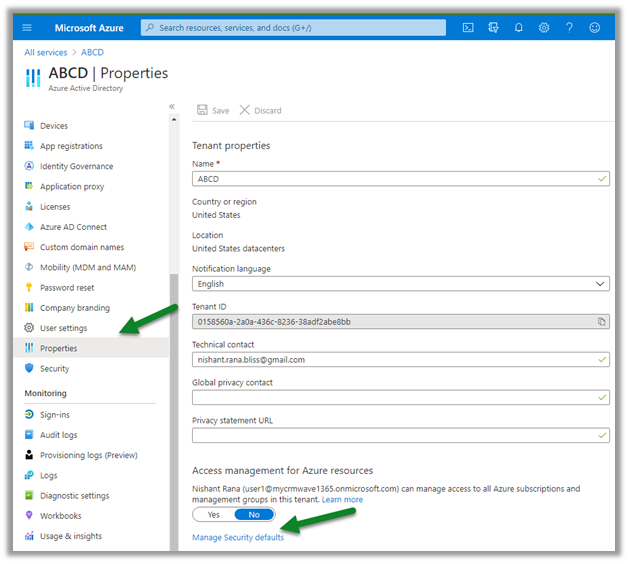
If not required, login to
Select Azure Active Directory > Properties > Manage Security Roles
And disable it
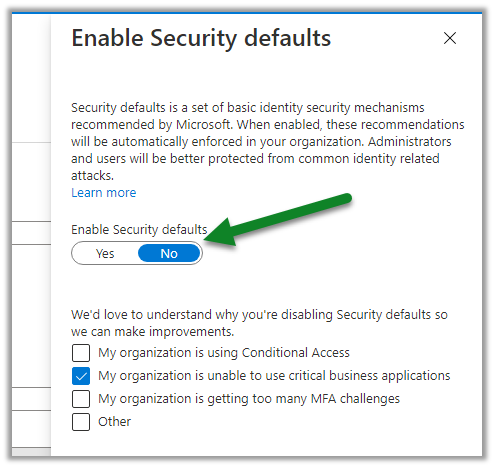
This time the connection will be successful.
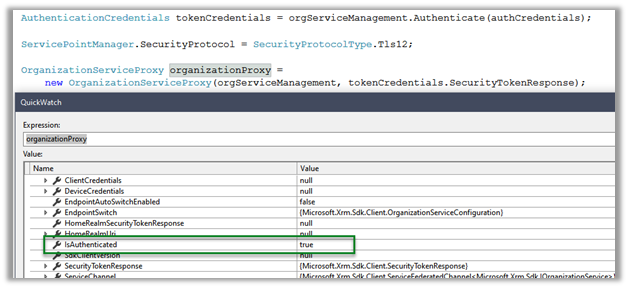
Try below as well –
SecurityProtocolType.TLS12 –
Server Clock out of sync –
MFA –
Hope it helps..
Advertisements
Discover more from Nishant Rana's Weblog
Subscribe to get the latest posts sent to your email.
Share It -


Thanks Nishant. Even I have noticed this error and managed to fixed by replacing with non MFA enabled user.
When we try to make connection with d365 web service using user credentials having MFA enabled we encounter similar issues.
Thanks for providing full proof solution.
Regards
Megh
LikeLiked by 1 person
Thanks for sharing your thoughts MeghShyam
LikeLike
hi. i use the tool CRM configuration Migration that v8.2 CRM on premise of Server1 to V9.1 CRM on premise of Server2.
can’t login Server2.
error log:
Microsoft.Xrm.Tooling.Connector.CrmServiceClient Error 2 unable to login to Dynamics CRM 192.xxx.xxx.xx:443
can you help me ? thanks
LikeLike
how to set Security Defaults in on premise CRM ?
LikeLike