
above and under were the 2 new operators introduced with Dynamic CRM 2015.
Let us see some of the examples.
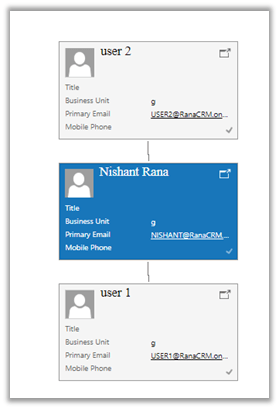
Suppose I have the following hierarchy defined, wherein User 2 is manager of user Nishant Rana who in turn is manager of User 1.
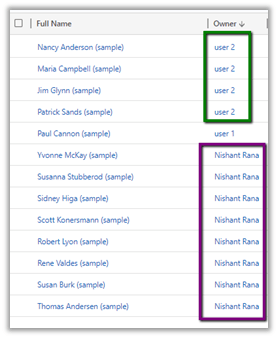
And following are the contacts record owned by them.
In context of user Nishant Rana, if I apply Under operator, we’d get the following result
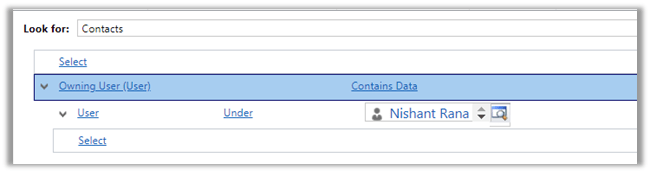
Only the records owned by child

And for Not Under
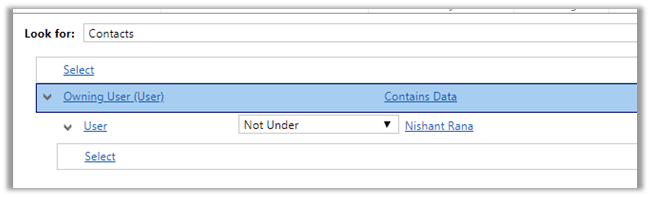
All the records owned by the user and its manager(s) or parent.
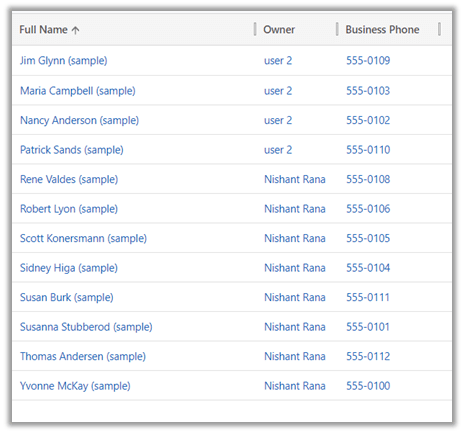
Now we do not have the Above operator in Advanced Find

So, using our favorite tool Fetch XML Builder, the above operator shows only the records owned by the parent(s) of current user.
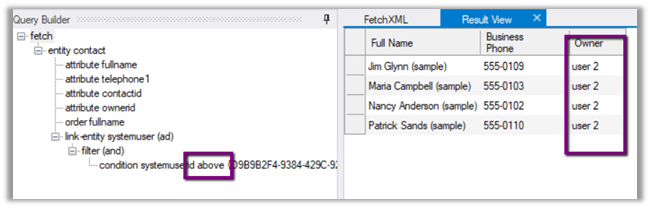
We also have Above or equal, Under or equal operator which aren’t there in Advanced Find.

Hope it helps..
Discover more from Nishant Rana's Weblog
Subscribe to get the latest posts sent to your email.
Share It -


 Nishant Rana's Weblog
2 thoughts on “Above and Under operator to query hierarchical data in Dynamics 365”