Xrm.Utility.openEntityForm with Regarding field in CRM 2015.


Hi

We recently had a requirement to open new Task form on click of a ribbon button with Regarding field prefilled.

And as mentioned in the SDK, we can’t set the values for regarding lookups.

https://msdn.microsoft.com/en-us/library/gg334375.aspx#BKMK_SetLookupFieldValues

The workaround is to create custom parameters, set its value in JavaScript and use these values on the onLoad of the Form.

http://www.crmnerd.com/customizations/using-xrm.utility.openentityform-with-custom-parameters/

http://butenko.pro/2013/01/ms-crm-2011-open-new-activity-form-with-regarding-field-prefilled/#comment-134

Hope it helps..

Administration Mode Enabled. Only system administrators and system customizers can sign in at this time in CRM 2015 Online.


Hi,

After we copied our Dev instance to another Sandbox instance we got this message on opening CRM.

To disable it.

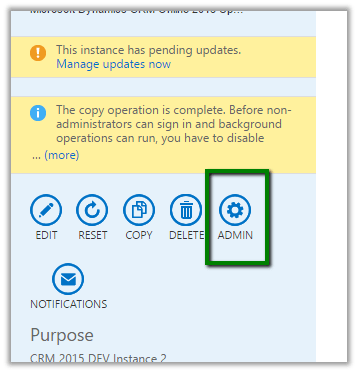
Go to Office 365 Administration Section

Select your sandbox instance.

Select Admin

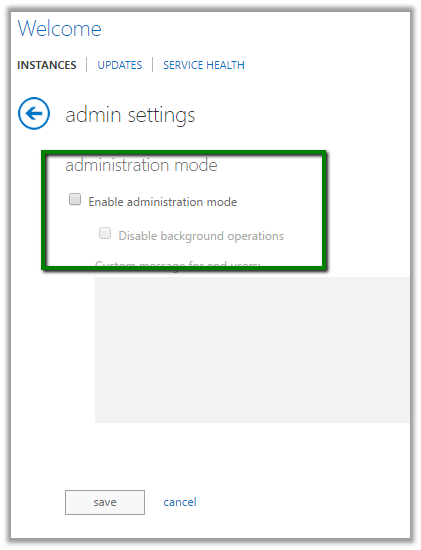
Uncheck Enable Administration Mode

Hope it helps.

DateTime fields in CRM 2015


Hi,

We recently had a requirement wherein we were working with DateTime fields in a Plugin. It was related to Time Zone.

These articles were of extreme help.

http://develop1.net/public/post/Dynamics-CRM-DateTimes-the-last-word.aspx

http://inogic.com/blog/2015/06/handling-datetime-fields-in-microsoft-dynamics-crm-update-1/

http://ttidbit.blogspot.com/2013/01/crm-timezone-codes.html

Sample Code to use LocalTimeFromUtcTimeRequest


var currentUserSettings = organizationProxy.RetrieveMultiple(
new QueryExpression("usersettings")
{
ColumnSet = new ColumnSet("timezonecode"),
Criteria = new FilterExpression
{
Conditions =
{
new ConditionExpression("systemuserid", ConditionOperator.EqualUserId)
}
}
}).Entities[0];

var timeZoneCode = currentUserSettings.Attributes["timezonecode"].ToString();

DateTime time1 = DateTime.UtcNow;

LocalTimeFromUtcTimeRequest convert = new LocalTimeFromUtcTimeRequest();
convert.UtcTime = time1.ToUniversalTime();
convert.TimeZoneCode = Convert.ToInt32(timeZoneCode);
LocalTimeFromUtcTimeResponse response = (LocalTimeFromUtcTimeResponse)organizationProxy.Execute(convert);
MessageBox.Show(response.LocalTime.ToString());


The interesting part was that our plugin was running under the context of System account, so to get the logged in user from UI, we added an additional field and populated the value of time zone in it on on load using current logged in user’s information, and used the same field in plugin.

Hope it helps..

Plugin on Retrieve Multiple in CRM 2015.


Recently we had a requirement to filter sub grid on one of the forms. We thought of using Plugin on Retrieve Multiple for this.

Here we were showing Opportunity Sub Grid on Account form.

So we created a view for Opportunity that will be used as Sub Grid. Used it as Related Record Sub Grid so that we can have the GUID of the Account record being passed to the plugin.

The problem we faced à Sorting and Paging stopped working for the Sub Grid.

http://crmtipoftheday.com/2015/10/05/limitations-of-retrieve-plugins/v

</p>
<p>void IPlugin.Execute(IServiceProvider serviceProvider)<br />
{<br />
// Obtain the execution context from the service provider.<br />
IPluginExecutionContext context = (IPluginExecutionContext)<br />
serviceProvider.GetService(typeof(IPluginExecutionContext));</p>
<p>// Obtain the organization service reference.<br />
IOrganizationServiceFactory serviceFactory = (IOrganizationServiceFactory)serviceProvider.GetService(typeof(IOrganizationServiceFactory));<br />
IOrganizationService service = serviceFactory.CreateOrganizationService(context.UserId);</p>
<p>// The InputParameters collection contains all the data passed in the message request.<br />
if (context.InputParameters.Contains("Query") &amp;&amp; context.InputParameters["Query"] is QueryExpression &amp;&amp; context.MessageName == "RetrieveMultiple")<br />
{<br />
QueryExpression qe = (QueryExpression)context.InputParameters["Query"];<br />
if (qe.EntityName == "opportunity")<br />
{<br />
string currentCustomerId = string.Empty;<br />
ConditionExpression[] filters = qe.Criteria.Conditions.ToArray();<br />
foreach (var filter in filters)<br />
{<br />
currentCustomerId = filter.Values[0].ToString();<br />
}</p>
<p>FetchXmlToQueryExpressionRequest req = new FetchXmlToQueryExpressionRequest();<br />
req.FetchXml = "&lt;fetch version='1.0' output-format='xml-platform' mapping='logical' distinct='false'&gt;" +<br />
"&lt;entity name='opportunity'&gt;" +<br />
" &lt;attribute name='name' /&gt;" +<br />
"&lt;attribute name='customerid' /&gt;" +<br />
"&lt;attribute name='estimatedvalue' /&gt;" +<br />
"&lt;attribute name='statuscode' /&gt;" +<br />
"&lt;attribute name='opportunityid' /&gt;" +<br />
"&lt;order attribute='name' descending='false' /&gt;" +<br />
"&lt;link-entity name='account' from='accountid' to='parentaccountid' alias='ad'&gt;" +<br />
" &lt;filter type='and'&gt;" +<br />
" &lt;filter type='or'&gt;" +<br />
" &lt;condition attribute='accountid' operator='eq' uiname='aaass' uitype='account' value=' " + currentCustomerId + "' /&gt;" +<br />
" &lt;condition attribute='accountid' operator='under' uiname='aaass' uitype='account' value='" + currentCustomerId + "' /&gt;" +<br />
"&lt;/filter&gt;" +<br />
"&lt;/link-entity&gt;" +<br />
"&lt;/entity&gt;" +<br />
"&lt;/fetch&gt;";<br />
FetchXmlToQueryExpressionResponse resp = (FetchXmlToQueryExpressionResponse)service.Execute(req);<br />
context.InputParameters["Query"] = resp.Query;</p>
<p>}<br />
}</p>
<p>

Hope it helps..

Advertisements

{KnowHow} How to show all related contacts in entire customer hierarchy in Dynamics CRM 2015 onwards


Using Under Operation

Debajit's avatarDebajit's Dynamic CRM Blog

Recently my friend called up for a requirement where they needed to show all contacts in customer hierarchy. Let me explain the scenario here before moving further

Suppose Account A is parent customer for Account B and Account B is the parent customer for Account C.

So the requirement is when Account A form is loaded, a sub-grid should on the form should show all the contacts of Account A + Account B + Account C. If Account B is loaded then the sub-grid should show all the contacts of Account B + Account C.

Let us approach the solution here. Ideally it is a two step solution.

Now for the first part, CRM 2015 introduces the new ‘ operator which eases out our task like anything. After some discussion, my friend came up with a perfect fetchxml to achieve this. For e.g the following is the fetchxml to show…

View original post 149 more words