Fixed: Application Server Administration job failed for service instance Microsoft.Office.Server.Search.Administration.SearchServiceInstance error in SharePoint 2013


Hi,

We were getting the below error in the event log every time we were clicking on Populate Containers button while creating a new synchronization connection for User Profiles.


Error :

Application Server Administration job failed for service instance Microsoft.Office.Server.Search.Administration.SearchServiceInstance (90579710-4ed5-47e9-a3d8-de997f96262e).

Reason: An update conflict has occurred, and you must re-try this action. The object SearchDataAccessServiceInstance was updated by CONTOSO\administrator, in the OWSTIMER (2720) process, on machine CRM2011. View the tracing log for more information about the conflict.

Stopping the Timer Service, clearing the Configuration Cache and restarting the Timer Service helped us to fix the issue.

http://www.social-point.com/sharepoint-2010-event-id-6482-application-server-administration-job-failed-for-service-instance-microsoft-office-server-search-administration-searchserviceinstance

Bye.

Advertisements

Fixed: The given key was not present in the dictionary error in Register Managed Account in SharePoint 2013


Hi,

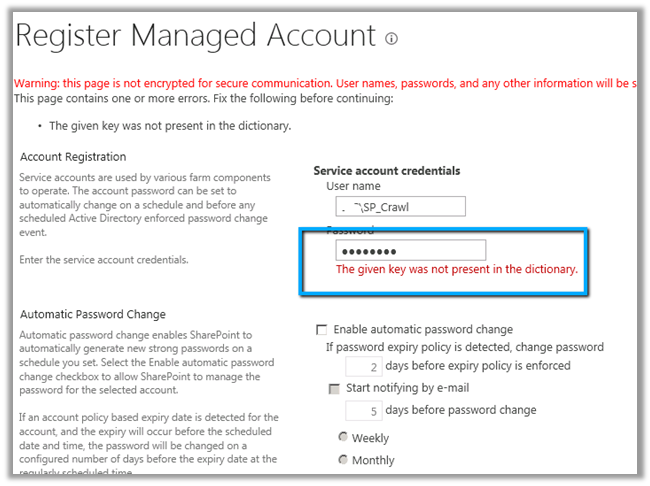
While trying to register a new managed account in SharePoint 2013 through Central Administration we were getting the below error.

To resolve this issue, we need to open the Active Directory Users and Computers console and select the account, right click Properties, select Authenticated Users in Security tab and
give Allow Permissions for Read Account Restrictions.

Hope it helps.

Fixed: Failed to create the configuration database. An exception of type System.Security.AccessControl.PrivilegeNotHeldException was thrown. Additional exception information: The process does not possess the ‘SeSecurityPrivilege’ privilege which is required for this operation.


Hi,

Got the below error while running the Configuration Wizard in SharePoint 2013.

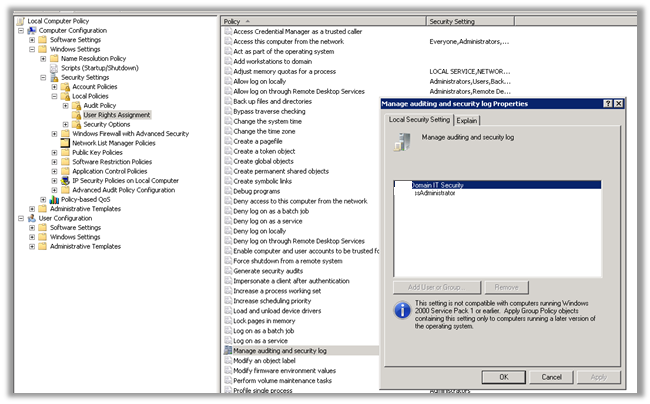
Adding the user under which the installation was running to the Manage Security and Audit Log resolved the issue for us.

gpedit.msc àcomputer configurationàWindows Settings àSecurity Settings àUser Rights Assignment

Hope it helps.

Cross-domain iframe requests are blocked in Office 365 SharePoint Online.


Hi,

I was currently working on some integration tasks between SharePoint 2013 online and CRM 2011 online. Here we wanted to use one of the search pages configured in SharePoint 2013 online inside an iframe of Case form in CRM 2011 online.

SharePoint 2013 online and CRM 2011 online were part of different Office 365 domain. After specifying the url for the iframe we got the following error

Found the following kb article

http://support.microsoft.com/kb/2795602

Then tried hosting the SharePoint 2010 online search page that is part of same domain in which CRM 2011 online is. That worked properly.

Hope it helps.

Hiding SharePoint:FormField in list forms


The easiest way to hide a SharePoint form field inside form is to wrap up it in inside XSl:IF condition,

In the below example, we are giving a condition which would always be true to hide the form field named Country in the form.

<xsl:if test=”1 = 2″>

<SharePoint:FormField runat=”server” id=”ff1{$Pos}” ControlMode=”New” FieldName=”Country” __designer:bind=”{ddwrt:DataBind(‘i’,concat(‘ff1′,$Pos),’Value’,’ValueChanged’,’ID’,ddwrt:EscapeDelims(string(”)),’@Country’)}” />

</xsl:if>

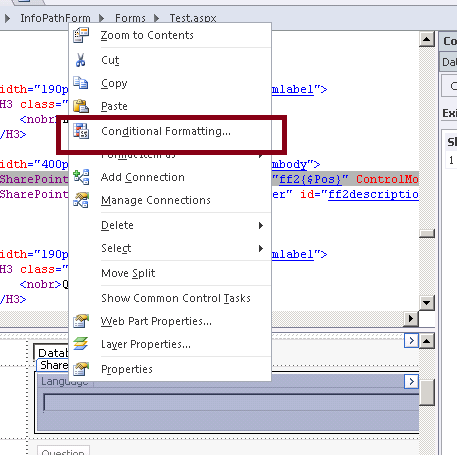
Select the Field within SharePoint designer, right click and select Conditional Formatting

And specify the show or hide condition in the Conditional Formatting dialog box

Hope it helps.

Customize Search Results Web Part to include Rating in SharePoint 2010


Hi,

I was recently working on a task that required me to add the rating column and few custom columns to the search result.

Basically this is the step we need to follow

  1. Create Metadata property for each of the column that we want to show in search results.
  2. Associate them with  Crawled Property.
  3. Add Columns to the Fetched Properties of the web part.
  4. Modify the XSL to include these new columns.

The post that made it possible

http://www.sharepointblog.co.uk/2012/04/add-rating-stars-to-the-search-results/

Bye.