Multi-Currency in Dynamics 365


Multi-currency was introduced in the product with version 4.0

Thought of just revisiting it as we were recently having certain requirements around it.

Below are few points for quick reference  (Nothing new, as most of the things remains the same with Multi-currency in the product) à

  • There can only be one Base currency that can be defined while setting up the organization or the instance. The base currency cannot be updated.
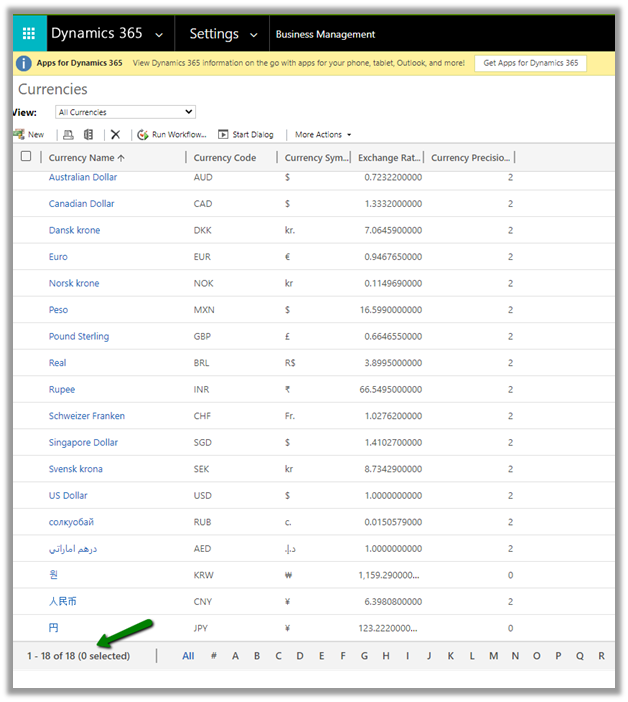
  • To define additional currency, navigate to Settings à Business Management

By default, we can see 18 currencies defined.

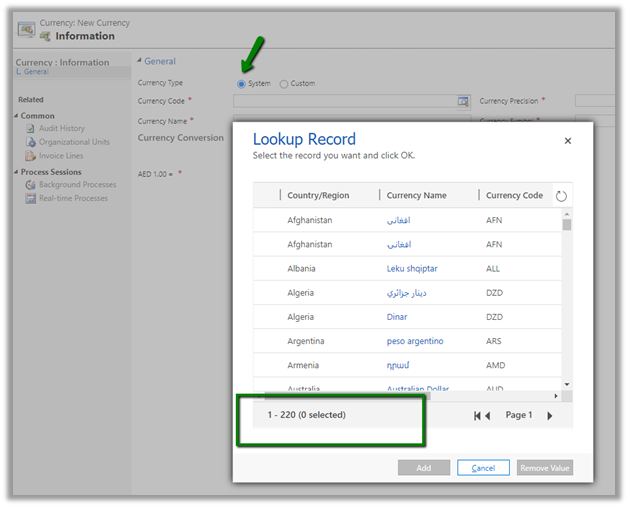
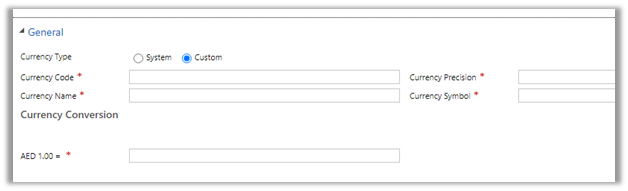
  • We can create additional currencies either system or custom.

For system currency, we can select any of the existing currency code.

If we do not find our currency in the system, we can define Custom Currency

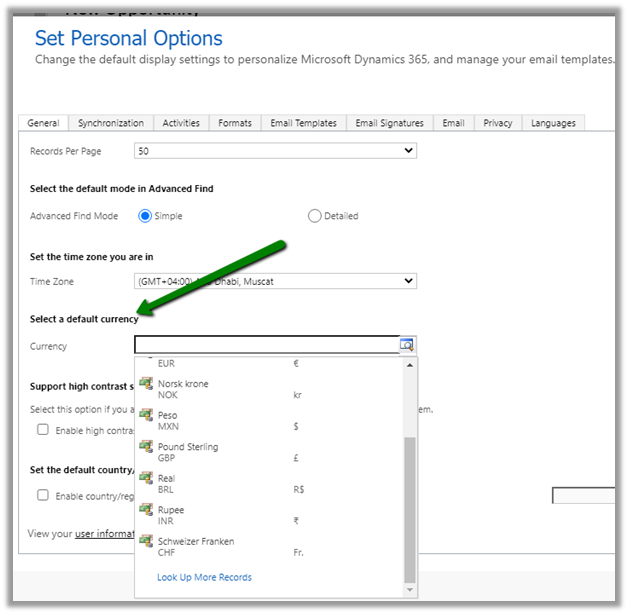
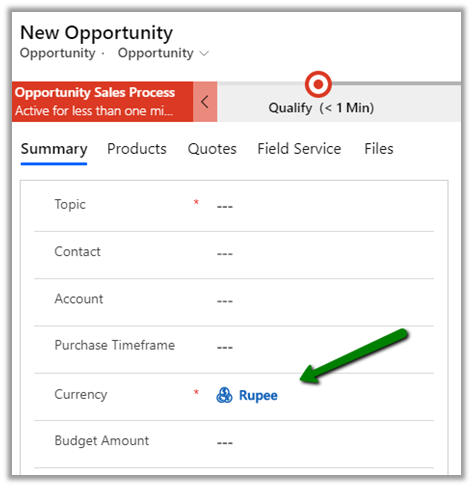
  • Through Set Personal Options, the user can specify default currency

The default currency will be set as the currency for the user while creating a record as shown below.

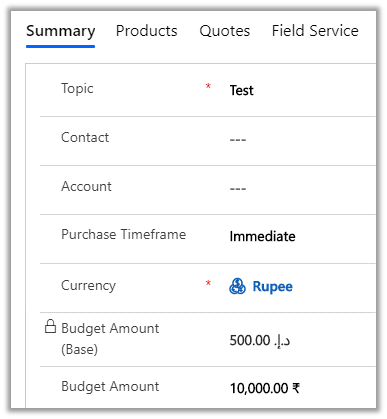
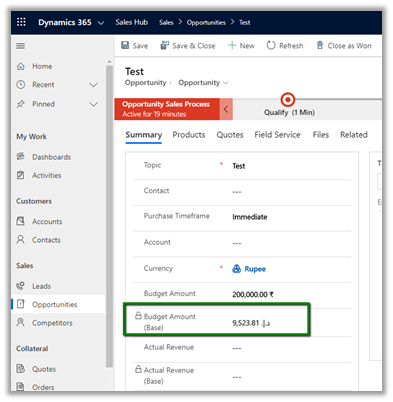
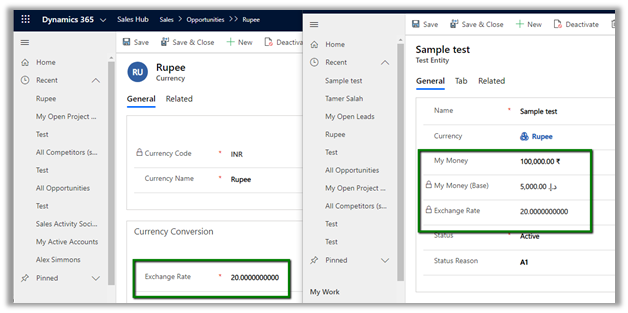
  • The base amount is calculated after the record is saved.

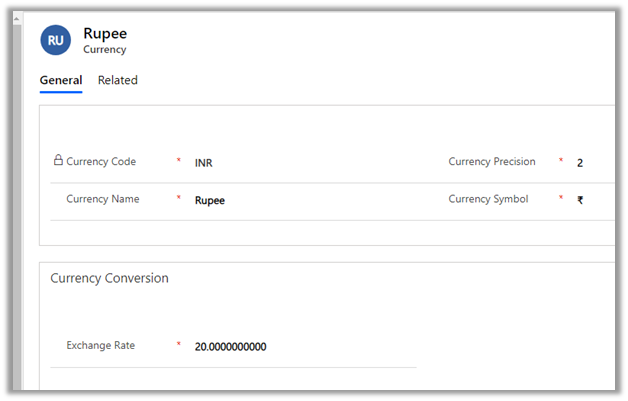
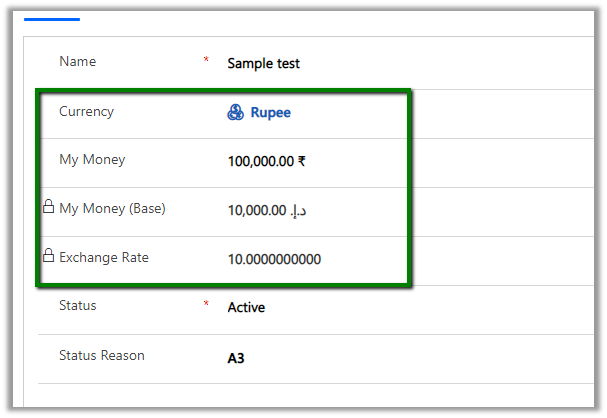
The calcuation considers the Exchange Rate defined in the Currency record.

  • Exchange Rates are not updated automatically. We should have some mechanism in place to update the exchange rate.
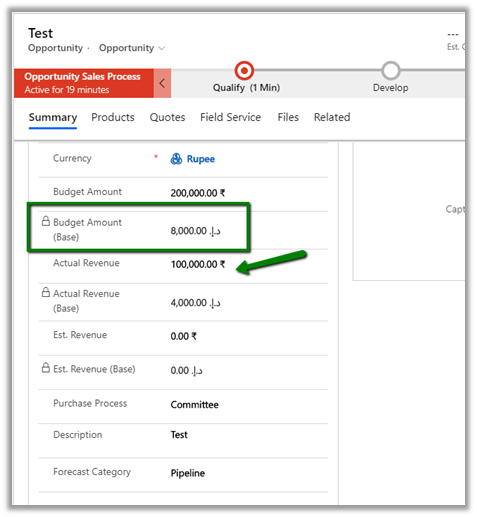
  • The base amount is re-calculated if the money field in the record is updated or state of the record is changed.

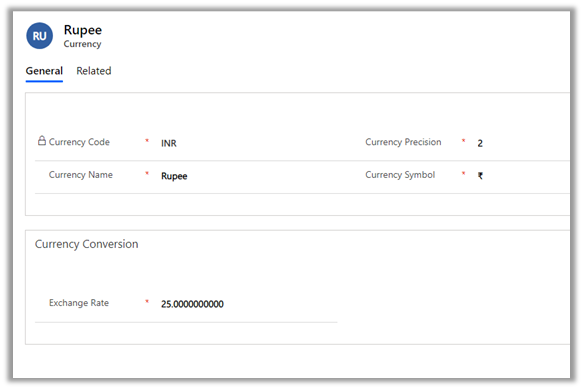
E.g. we have updated the exchange rate to 25.

The record still shows the old base value.

Here updating any of the currency fields will trigger the recalculation.

Below we have updated the value for the Actual Revenue field and saved the record which triggered the calculation for the base fields using the new exchange rate defined.

  • We can write a console application or SSIS packages that will update the money field of the existing records, whenever the exchange rate is updated to trigger the recalculation of the base currency field if needed.
  • Create a new currency field for an entity will create a corresponding base currency field. It will also create Currency and Exchange rate field if this is the first currency field created for the entity. Any subsequent new currency field created will not create the currency and exchange rate field.

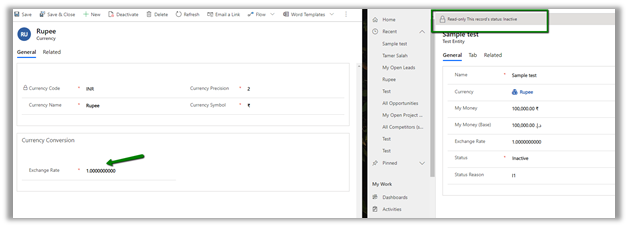
  • Updating the status of the record will also update the base currency as shown below.

Below are some of the helpful articles with regards to currency and exchange rate in Dynamics 365.

  • Using Power Automate to update the exchange rate

https://2die4it.com/2018/10/01/schedule-update-of-currency-exchange-rates-in-dynamics-365-ce-with-flow/

https://alphabold.com/dynamics-365-update-currency-exchange-rates-using-power-automate/

https://www.dxrms.com/blogs/d365blog/2019-11-07-schedule-dynamics-365-currency-rate-updates-using/

  • Exchange Rate Control in PCF Gallery

https://pcf.gallery/exchange-rate-control/

  • Update exchange rate through a Console app

https://blog.crgroup.com/keeping-the-exchange-rates-of-currencies-in-dynamics-crm-up-to-date/

  • Through XrmToolBox plugin

https://www.xrmtoolbox.com/plugins/CRMGG.ExchangeRates/

  • Using workflow and dialog (deprecated)

https://alphabold.com/update-opportunities-based-on-exchange-rate/

Hope it helps..
Advertisements

Few points to consider -Status Reason transitions in Dynamics 365


We can specify Status Reason Transitions for Case as well as custom entities. Using the status reason dialog box, we can define (filter) which values are available to be set as next status reason.

Let us take a scenario where we have the following values defined for Status Reason for Active State in a custom entity named Test Entity.

Just to keep it simple we have a just on transition defined i.e. from A1 we can only select A2.

So now when a user creates the Test entity record with A1, the only other option user can select is A2.

Now let us try updating it through backend and set value as A3 for the same record with value A1 as status reason. (Here we have used SQL 4 CDS plugin)

Well, it updates the record with value A3 and doesn’t throw any error.

This would make us think that it only works from the client side and will not work from the server side.

Let us now create a workflow to update the value to A3.

Let us update the subject of the record to trigger the workflow for the below record.


Interestingly we get the error and are not able to set it to A3 as expected.

That was with the real-time workflow, for the asynchronous workflow also we get the error.

Let us give it one more try and update it through service.

Through the service call, we can update it.

So basically, the State transition rules will work as expected from user interface and workflows, however, through service we are still able to override it, which we need to be aware of before using this feature.

Hope it helps..
Differences between Subject and Category Entity in Dynamics 365


Subject entity \ feature has always been an integral part of Dynamics CRM at least since 3.0.

It gives a nice hierarchical way of organising and maintaining information.

To create or update Subject, navigate to Service Management area.

Similar to Subject entity, Category entity was introduced in CRM 2016 Update 1 (Service Pack 1 – On-Premise).

Navigate to Service Management area, to work with Category entity.

  • Can we customize Subject or Category Entity?

We cannot customize Subject. It is available for Case, KB Articles, Product Catalog items and Sales Literature.

We can customize Category Entity.

We can create forms, add fields, views, business rules, dashboards etc.

Can create 1 – N relationship from Category to other entities.

We cannot create N- 1 or N-N relationship.

It has N-N relationship with Knowledge Article entity

  • Is category User Owned or Organization Owned entity?

User Owned

  • How are they rendered inside form?

Subject are rendered as tree structure


Category are rendered as lookup

We can also specify Auto-numbering for Categories

  • What happens if a delete a Subject or category?

Deleting the subject will not delete its child record.

Deleting the category will delete its child record.

  • Can we run advanced find on Subject and Categories?

We can do it on Categories, not on Subject.

  • How does Subject render when used in advanced find filter condition? Tree view?

It renders like a lookup


Few considerations while migrating  Subject records

https://crmchap.co.uk/importing-exporting-subject-records-between-dynamics-365-customer-engagement-environments/

Hope it helps..

Advertisements

Check Dynamics 365 App and Power Platform features availability at different geography


Recently we had to find out what all Dynamics 365 Apps and Power Platform features are available in our UAE region.

To get these details navigate to

https://dynamics.microsoft.com/en-cy/geographic-availability/

and open the report

Below are the different Products and Geography available.

Below is the report filtered for UAE for Power Platform.

For Dynamics 365 App

Hope it helps..

Using Data Anonymizer component (SSIS) to mask data in Dynamics 365


At times to ensure compliance, we need to mask the data, especially in our sandbox environments, while still maintaining the structure of the data.

Here we can make use of the Data Anonymizer component of KingswaySoft’s SSIS productivity pack to mask the existing data.

Create a new SSIS package, add CDS Source, Data Anonymizer, and CDS Destination component.

CDS Source and CDS Destination are connected to the same sandbox environment where we are going to mask the data.

We have selected email address1, mobile phone, website URL field of Contact entity to be masked in CDS source along with contactid primary key to be used for Upsert action in CDS Destination.

Open the Data Anonymizer component and specify the property for each of the fields.

Email Address 1 –

Select Anonymization Type as Email (Personal)

Mobile Phone –

Select Anonymization Type as Regex and specify the Pattern for the Regex.

URL –

Select Anonymization Type as URL

Inside the CDS Destination component, select Upsert Action with matching Criteria as Primary Key as we are using contactid.

Map the fields

Execute the package

We’d see the updated contact records inside Dynamics 365

Get all the details of Data Anonymizer Component here

https://www.kingswaysoft.com/products/ssis-productivity-pack/help-manual/data-generation-and-anonymization/data-anonymizer

Here are few other articles on SSIS (KingswaySoft)

https://nishantrana.me/2018/11/26/ssis-and-microsoft-dynamics-365/

Hope it helps..

How to – Different ways of getting record count (total) in Dynamics 365


Let us take a scenario, where a data migration package is running, and it either creates or updates (or deletes) a large number of records into Dynamics 365, and we want to get the count of records created/updated/deleted in the last x hour or so.

With views, we are limited to just 5000 records.

One option is to write the console app having the required QueryExpression or FetchXML condition using the Dynamics 365 SDK to get the count.

Or use the Record Counts tool of CDS.Tools

https://xrm.tools/RecordCounts

count

We can also make use of SSRS reports here.

Create a report using the report wizard, specify the criteria

In the LayOut fields window, specify Count as the summary type for grouping.

Run the report to get the count.

Another option that we have used the most is to use the FetchXML
Builder
plugin to build the query, copy it.

And use it in the FetchXML / View Record Counter plugin of XrmToolBox.

Select the entity, contact, in this case, paste the FetchXML query and click Execute Count.

We will get the count.

Along with FetchXML / View Record Counter we can also use
SQL 4 CDS plugin.

Within the FetchXML builder click on Edit in SQL 4 CDS button.

The result

And now with CDS T-SQL endpoint (preview), we can use SQL Server Management Studio as well to directly write the T-SQL instead of fetch xml

https://nishantrana.me/2020/05/21/setting-up-using-sql-to-query-data-in-dynamics-365-preview/

We can also use the CDS T-SQL endpoint within the SQL 4 CDS Plugin.

https://markcarrington.dev/2020/05/24/sql-4-cds-2-1-0-the-t-sql-edition/

What if we want total record count for an Entity?

Apart from all the methods above,

  • we can use Record Counter XrmToolBox Plugin for that

https://www.xrmtoolbox.com/plugins/AndyPopkin.RecordCounter/

  • or use RetrieveTotalRecordCountRequest

https://dreamingincrm.com/2019/07/22/getting-entity-record-counts/

  • or use Count aggregrate function

https://docs.microsoft.com/en-us/previous-versions/dynamicscrm-2016/developers-guide/gg309565(v=crm.8)?redirectedfrom=MSDN#count

however, it will fail in case of more than 50000 records


‘AggregateQueryRecordLimit exceeded. Cannot perform this operation.’

To increase the limit (on-premise)- https://nishantrana.me/2012/09/06/aggregatequeryrecordlimit-exceeded-cannot-perform-this-operation/

  • Will returntotalrecordcount property of FetchXML help ?


It will be helpful if total records are less than 5000.


Hope it helps..
Advertisements