Get the Plugin assembly stored in database in CRM


One of my colleagues faced a situation where he had installed a plugin assembly into database but was not able to locate its dll, and now he wanted to deploy it in some other server.

These are the steps he followed

Get the encoded base 64 string representation of the plugin from PluginAssemblyBase table.

select name,content,*
from PluginAssemblyBase

Use that content and get the dll from the following site.

http://www.motobit.com/util/base64-decoder-encoder.asp

Set decode and export to binary file option there with filename having extension as .dll

Open the dll in the reflector tool and use the source code to build that assembly.

http://reflector.red-gate.com/download.aspx

Bye..

Get quotenumber (Quote ID) on PostCreate plugin


Hi,

I got the following comment on my blog.

“I wrote a plugin that creates a folder in SharePoint. It works just fine. However, I need to be able to use the quotenumber as the folder name. I am having problems figuring out how to retrieve that value. I am able to retrieve values of other fields, but the quote number is assigned when the record is saved. I am guessing that the quote number is not getting assigned until after the plugin is being called. I am not sure what to do. Any ideas?”

So i thought of trying it out. I created a Post Create plugin (synchronous) against quote entity. Than wrote code to retrieve the value for quotenumber from the inputparameters property bag. As it was create event i thought the value must be there for it. However i saw that the quotenumber property is not being passed as a part of inputparameters.

So than I used ForceSubmit method to get its value. However this time i was getting blank value. Than tried by registering the post entity image, but was still getting the blank value.

Finally i tried by registering the plugin in child pipeline, and to my surprise the value was there for the quotenumber attribute.

So to get the quotenumber we need to register our plugin in post create and childpipeline. ( no need of ForceSubmit method or PostEntityImage)

I hope it helps !


Bye.

LINQ to Microsoft Dynamics CRM


Suppose this is our entity’s schema name “new_test

and it contains following fields

new_name

new_lastname

Using CrmSvcUtil  we have created the Entities classes and Data Context class.

https://nishantrana.wordpress.com/2010/08/11/using-crmsvcutil/

Now this is how we could use LINQ to query data using query expression as well as method based query.

Create the instace of DataContext class named xrm

var myXrm = new xrm(“CRMOnPremise”);

To loop through all the test records


foreach (var testRecord in myXrm.new_tests)
{
// print the information
}

To select a specific record


var singleRecord = (from myTest in myXrm.new_tests
where myTest.new_lastname == “Rana”
select myTest).Single();

var singleRecord1 = myXrm.new_tests
.Single(t => t.new_lastname == “Rana”);

To select all the records having last name as Rana

var allRecord = from myTest in myXrm.new_tests
where myTest.new_lastname == “Rana”
select myTest;

var allRecords1 = myXrm.new_tests.
Where(t => t.new_lastname == “Rana”);

To order the records

var allRecOrder=from myTest in myXrm.new_tests
orderby myTest.new_name  ascending
where myTest.new_lastname==“Rana”
select myTest;

var allRecOrder1 = myXrm.new_tests
.OrderBy(t => t.new_name)
.Where(t => t.new_lastname == “Rana”);

To select  specific field instead of the entire record


var singleField = from myTest in myXrm.new_tests
select myTest.new_name;

var singleField1 = myXrm.new_tests
.Select(t => t.new_name);

To return specific fields

var specificFields = from myTest in myXrm.new_tests
select new { myTest.createdby, myTest.createdon };

var specificFields1 = myXrm.new_tests
.Select(t => new { t.createdby, t.createdon });

Use of Take and Skip function
Take returns the given number of elements and ignores the rest
Skip skips the given number of elements and yielding the rest

var takeField = (from myTest in myXrm.new_tests
select myTest.new_name).Take(2);

var takeField1 = myXrm.new_tests
.Take(2)
.Select(t => t.new_name);

var skipField = (from myTest in myXrm.new_tests
select myTest.new_name).Skip(2);

var skipField1 = myXrm.new_tests
.Skip(2)
.Select(t => t.new_name);

Join – similar to inner join
The ‘select’ and ‘orderBy’ calls may only reference

a single common entity type.
We will get above error if we try to retrieve value from  the other entity involved in join
var joinRecords = from t in myXrm.new_tests
join s in myXrm.systemusers on
t.ownerid.Value equals s.systemuserid
select new {t.new_name  };

var joinRecords1=myXrm.new_tests
.Join(myXrm.systemusers,
t=>t.ownerid.Value,
s=>s.systemuserid ,
(t,s)=>new {t.new_name});

Where conditions with Contains,StartsWith, EndsWith and

Equal string functions

var test1 = from p in myXrm.new_tests
where p.new_name.Contains(“R”)
select p;
var test2 = from p in myXrm.new_tests
where p.new_name.StartsWith(“R”)
select p;
var test3= from p in myXrm.new_tests
where p.new_name.EndsWith(“D”)
select p;

var test11 = myXrm.new_tests
.Where(t => t.new_name.Contains(“R”));
var test22 = myXrm.new_tests
.Where(t => t.new_name.StartsWith(“R”));
var test32 = myXrm.new_tests
.Where(t => t.new_name.EndsWith(“D”));

Download the project :-

http://www.box.net/shared/xbg0xd5p7m

Bye..

using CrmSvcUtil


Use CrmSvcUtil to generate the strongly types entity and datacontext classes

crmsvcutil

/connectionString:"Authentication Type=Integrated; Server=http://servername/orgname"

/out:"Xrm.cs" /namespace:"Xrm.solution"

/dataContextClassName:"xrm"

conntectionString–> specifies the connection string.
out –> determines the name of the .cs or .xml output file and whether there is one file or one per entity.To generate one file per entity omit .cs or .xml from the file name.
namespace –> to specify the namespace
dataContextClassName –> to specify the name of the dataContext class.

Add references to the following dlls in the project

  • System.Data.Entity, System.Data.Services, System.Data.Services.Client.
  • System.Web.Services.
  • Microsoft.Crm.Sdk, Microsoft.Crm.SdkTypeProxy.dll, Microsoft.Crm.SdkTypeProxy.XmlSerializers
  • Microsoft.Xrm.Client, Microsoft.Xrm.Portal, Microsoft.Xrm.Portal.Files

Add the generated Xrm.cs file to the project.

Add the connection string information in the config file of the application

<add name="CRMOnPremise" connectionString="Authentication Type=Integrated; Server=http://servername/orgname" />

Add following using Statements

using Xrm;
using Xrm.solution;
using Microsoft.Crm.Sdk;
using Microsoft.Crm.SdkTypeProxy;

And the code for creating a new custom entity record.

            new_test testEntity1 = new new_test();
            testEntity1.new_name = "Nishant";
            testEntity1.new_lastname = "Rana";
            myXrm.AddTonew_tests(testEntity);
            myXrm.SaveChanges();


or could also be written as

            // create the instace of DataContext class named xrm
            var myXrm = new xrm("CRMOnPremise");
          
// use concept of Implicitly type local variable 
           
// and object intializer
            var testEntity = new new_test()
            {
                new_name = "Nishant",
                new_lastname = "Rana"
            };
            myXrm.AddTonew_tests(testEntity);
            myXrm.SaveChanges();


Similarly to update a record and delete a record we need to use

UpdateObject() and DeleteObject() function followed by call to

SaveChanges() method.

Bye.

CrmService in CRM 3.0 and CRM 4.0.


Suppose we have a custom entity named Test

having

Name, First Name and Last Name as varchar field.

And Picklist field called Hobby with default value as Music.

If we are creating a new record for this entity using CrmService from an external application, by only specifying value of First Name field.

It would create the record for us, however the value for Hobby picklist field would be null (it won’t consider the default value set for it)

mf1CRM3

However if we create the same record in CRM 4.0 either by using CrmService’s 3.0 end point or 4.0 end point, in both the cases the value for Hobby field would be set to Music, even though we hadn’t specified any value for it while creating the record.

mf1

CRM 4.0 does take in to account the default value set for the fields. So the records created would have proper default value set for those fields even if no value has been assigned to them, while creating the record.

Bye..

Using CRM_URL Report Parameter


Hi,

Just posting a very simple example on how to use the CRM_URL report parameter for drill down.

Create a new report, create a new dataset pointing to ORG_MSCRM database and add the following query string

select opportunityid,name from filteredopportunity.

Add a hidden report parameter named CRM_URL to the report.

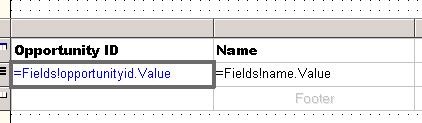
Add table to report layout.

g1

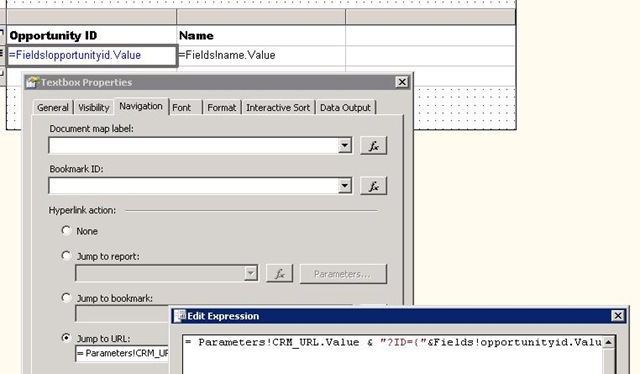
Right click the Opportunity ID text field, select Properties, Go to Navigation tab, select Jump to URL

g2

Put the following value over there

= Parameters!CRM_URL.Value
& "?ID={"&Fields!Opportunityid.Value.ToString()&"}&OTC=3"

i.e.

= Parameters!CRM_URL.Value & "?ID={"& GUID &"}&OTC=otc"
or
better use LogicalName parameter instead of OTC as OTC code might we change when we import it to
some other organization.

=Parameters!CRM_URL.Value & "?ID={"&Fields!guidFieldName.Value.ToString()&"}&LogicalName=entitySchemaName"

Upload the report in CRM and run it.

The value for CRM_URL would be filled by CRM.

CRM_URL would have the following value passed to it from CRM

http://servername:%5BPort%5D/orgname/CRMReports/viewer/drillopen.aspx

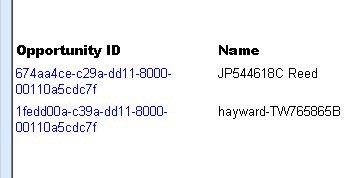
Clicking on Opportunity ID value would take us to the actual record within CRM.

g3

Bye…