Check out these wonderful tools to lear Linq and oData Query
Bye.

Check out these wonderful tools to lear Linq and oData Query
Bye.

Hi,
While searching for how to use Organization.svc within a silverlight application, i found these 2 helpful posts
http://msdn.microsoft.com/en-us/library/gg594452.aspx#Y1145
http://erikpool.blogspot.com/2010_12_01_archive.html
The other easier option that i can think of is creating a custom wcf service that uses Organization.svc and using this custom wcf service in the silverlight application.
Download the solution here
http://www.box.net/shared/pgditixq1o
Bye.

After restoring the database to the server, I got the following error while importing the organization using the Deployment Manager
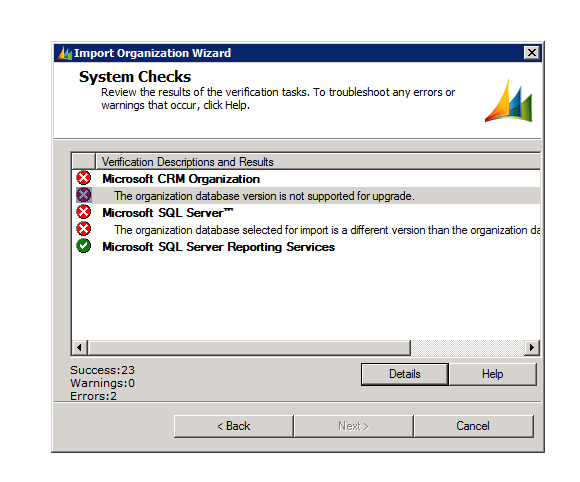
The build version of the database that I was importing was different than the build version of the database of the organization that I already had there.
http://support.microsoft.com/kb/946594 ( to find the build version of the database)
The one we were importing had higher build version.
Than we installed the update for Microsoft Dynamics CRM 2011 Release Candidate
http://support.microsoft.com/kb/2461082
Restarted the server and was able to import the organization successfully.
Hope it helps.

Dynamics CRM 2011 Developer Training Kit is available now.
It has got presentations, videos, hands on labs etc. on different topics.
http://www.microsoft.com/downloads/en/details.aspx?FamilyID=78498c29-28ac-440b-9c20-ec5da6ee6e98
Bye.

Recently we had a requirement to write a workflow which would be sending mail to the manager of the owner if a record is not updated within 5 days of it being created or updated.
So here we created two workflows over here one for create and other for update.
For create it would look like this
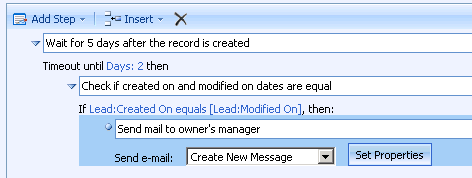
First we’ll have wait condition where we will set the timeout duration to 5 days. After 5 days the workflow will come out of its wait condition and will check if the “created on” and “modified on” values are equal or not. If equal it means the record has not been updated. So it will send a mail to owner’s manager.
In case of update, things would be little tricky as we need to store the “modified on” date value. This value would later be used to compare against the “modified on” date of the record after workflow comes out of the wait condition.
So here we need to write a custom workflow activity with one input and one output parameter. It will take current modified on date value as input and would pass the same value to the output parameter.
Code would be something this
[CrmWorkflowActivity(“Save Date Variable Value”)]
public partial class WorkflowVariable: SequenceActivity{
public WorkflowVariable(){
InitializeComponent();
}
protected override ActivityExecutionStatus Execute(ActivityExecutionContext executionContext){
this.InitialDateOutput = this.InitialDate;
return
ActivityExecutionStatus.Closed;}
public static DependencyProperty InitialDateProperty = DependencyProperty.Register(“InitialDate”, typeof(CrmDateTime), typeof(WorkflowVariable));
[CrmInput(“Initial Date Input”)] //Input Label
public CrmDateTime InitialDate {
get{
return (CrmDateTime)base.GetValue(InitialDateProperty);}
set{
base.SetValue(InitialDateProperty, value);}
}
public static DependencyProperty InitialDateOutputProperty = DependencyProperty.Register(“InitialDateOutput”, typeof(CrmDateTime), typeof(WorkflowVariable));
[CrmOutput(“Initial Date OutPut”)] //Input Label
public CrmDateTime InitialDateOutput {
get {
return (CrmDateTime)base.GetValue(InitialDateOutputProperty);}
set{
base.SetValue(InitialDateOutputProperty, value);}
}}
This is how the final workflow would look for update

Bye.

I had written a pre-update plugin, it was working properly on my environment.
But after sending it across to the client, after he had deployed it we started getting the below mentioned error.
“XmlException: An error occurred while parsing EntityName”
We were actually passing secure configuration information to the plugin in the following format
<Config>
<url>http://CrmServer/MSCRMServices/2007/CrmService.asmx</url>
<orgname>OrgName</orgname>
<username>UserName</username>
<password>Password</password>
<domain>Domain</domain>
</Config>
And the issue was the password that was being used, it had ‘&’ character, which we then replaced with ‘&’ and the error got resolved.
Hope it helps!

 Nishant Rana's Weblog