Business Unit in CRM 2011 – New features


Hi here i am just putting down all the new features that i have found while learning about business unit in CRM 2011.

Root business unit can now be renamed.

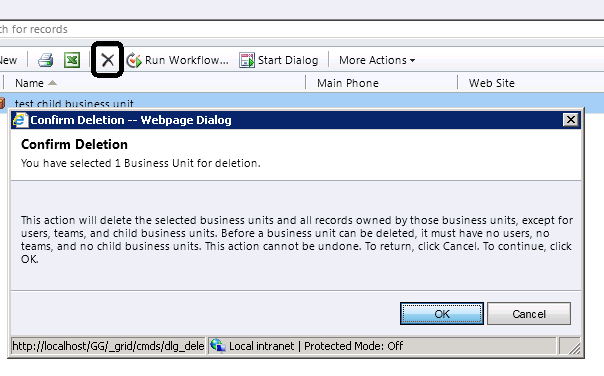
As in CRM 4, we cannot delete or disable root business unit. If we try to delete it we get the following message.
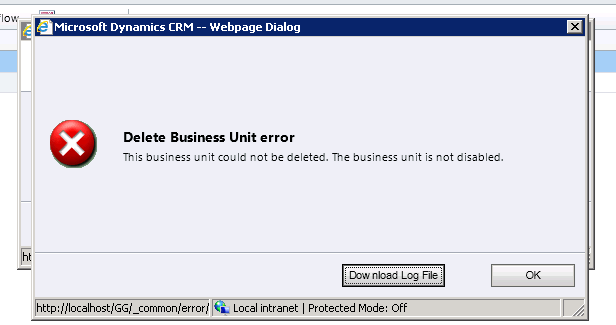
If we try disabling the root business unit we get the following message

Let us create a new business unit and try deleting it.
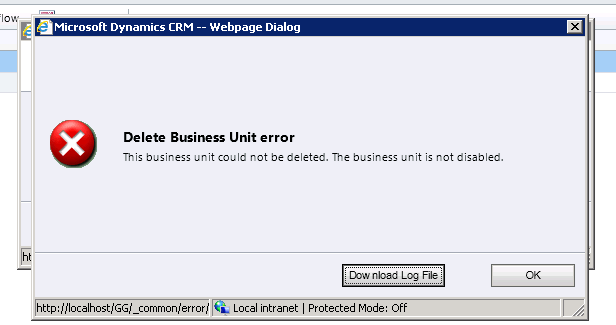
Again the same message that we need to disable it before we can delete it.
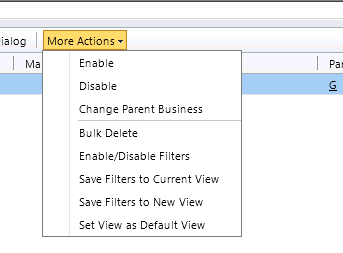
Clicking on Disable from More Actions, disables the record and clicking on delete deletes it.
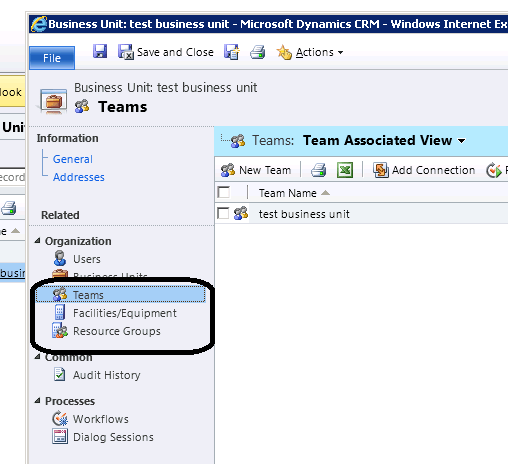
A default team gets created for every business unit having named same as the business unit.

The user that belongs to business unit automatically becomes the member of the default team created.
If we try removing the member added to the default team, we get the following error message.
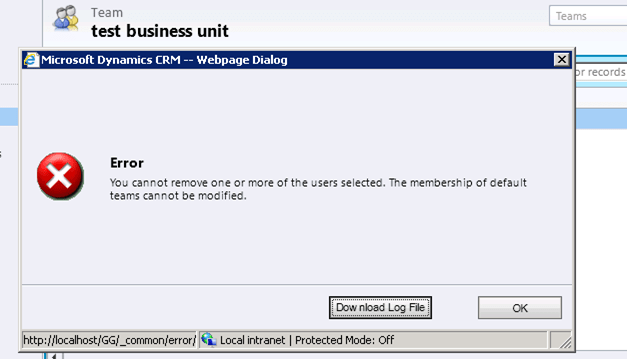
And if we trying adding members to it, we get the following error message

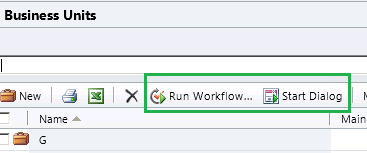
We can write workflows and dialogs against business unit entity.
When a BU is disabled: – Although the Users cannot access MICROSOFT DYNAMICS CRM, the user records themselves are not removed or disabled. Therefore, the licenses of those users will not be withdrawn. If a user is disabled when the Business Unit was disabled, the user must be enabled before he or she can access Microsoft Dynamics CRM after the Business Unit is enabled.

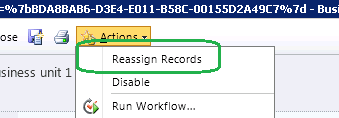
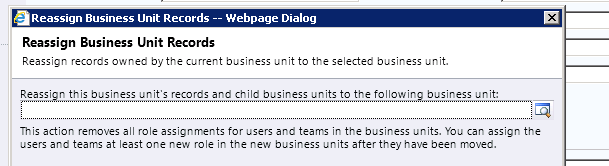
Before we can delete permanently a Business Unit, you must remove any child Business Units, Users or Teams. This can be done by deleting or re-assigning them individually, or by using the Reassign Records option as mentioned above. The exception to this is the default team of the Business Unit, which will be deleted with the Business Unit. Facilities/Equipment and Resource Groups do not have to be removed beforehand (though they can be if you want to preserve them).
Check this informative post also

http://www.magnetism.co.nz/blog/11-03-24/Business_Units_and_Teams_in_Dynamics_CRM_2011.aspx

Hope this helps.

Creating a Custom Permission Levels with minimum rights for Managing Documents and Creating Folder in SharePoint 2010


In one of our project we were using out of box integration feature of SharePoint 2010 with CRM 2011.

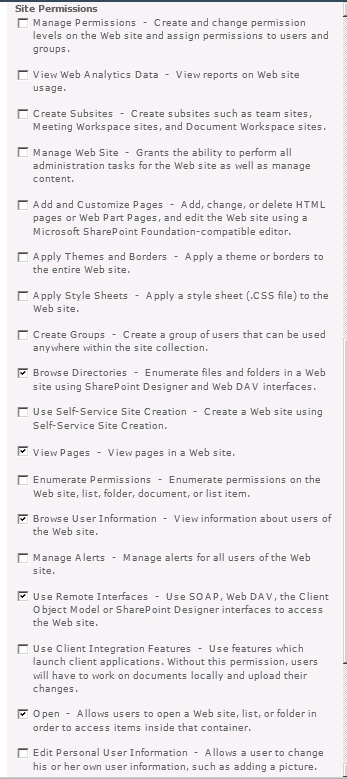
So we thought of creating a new permission levels that would allow users to manage the documents i.e. upload, delete etc. and create folder.

Below is the screenshot of the ribbon when user is inside a document library.

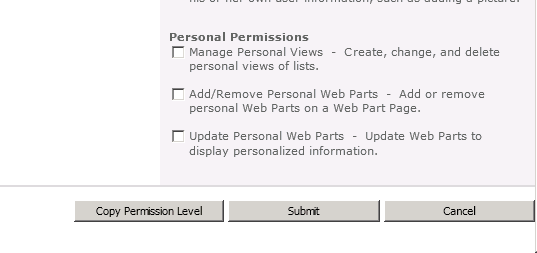
Below are the minimum sets of permissions we need to have

Hope it helps..

“Need to start a transaction before commit” Fault Exception in crm 2011


Hi we were getting this error on our plugin on post update of an entity.

The plugin was using Associate message to associate one entity record to other.

If the records were already associated, it was throwing “duplicate key” error, so we were catching that fault exception and then were updating few other records in our plugin. However just after the execution of our plugin, we were getting the CRM’s Error dialog box having a error log file mentioning the above error.

Later we realized that once a Fault Exception is thrown then the execution of the plugin is no longer in transaction. We can’t catch the faualt exception and still be in transaction. This post clarified that.

http://social.microsoft.com/Forums/en-US/crmdevelopment/thread/ca1301ca-cef9-4940-9cb4-e968641199f6

Hope it helps !

Enabling button in SubGrid on selection of record (SelectionCountRule) in CRM 2011


We had a requirement to have a custom button on a subgrid for an entity, and the button should only be enabled if and only if one record is selected.

It should get disabled in case if no records are selected or more than one record selected.

Used the below ribbondiffxml to achieve that

   <RibbonDiffXml>
        <CustomActions>
          <CustomAction Id="MyOrg.CustomAction" Location="Mscrm.SubGrid.entitySchemaName.MainTab.Management.Controls._children" Sequence="50">
            <CommandUIDefinition>
              <Button Id="MyOrg.Button" ToolTipTitle="Upload Required Document" ToolTipDescription="Upload Required Documents for the Case" Command="MyOrg.Command" Sequence="50" LabelText="Upload Document" Alt="Upload Document To Portal" Image16by16="/_imgs/ribbon/AddEmail_16.png" Image32by32="/_imgs/ribbon/Email_32.png" TemplateAlias="o1" />
            </CommandUIDefinition>
          </CustomAction>
        </CustomActions>
        <Templates>
          <RibbonTemplates Id="Mscrm.Templates"></RibbonTemplates>
        </Templates>
        <CommandDefinitions>
          <CommandDefinition Id="MyOrg.Command">
            <EnableRules>
              <EnableRule Id="MyOrg.EnableRule"></EnableRule>
            </EnableRules>
             <DisplayRules />
            <Actions>
              <JavaScriptFunction Library="$webresource:new_test" FunctionName="showvalue">
                <StringParameter Value="Guid(s) Selected"></StringParameter>
                <CrmParameter Value="SelectedControlSelectedItemIds"></CrmParameter>
              </JavaScriptFunction>
            </Actions>
          </CommandDefinition>
        </CommandDefinitions>
        <RuleDefinitions>
          <TabDisplayRules />
          <DisplayRules />
          <EnableRules>
            <EnableRule Id="MyOrg.EnableRule">
              <SelectionCountRule AppliesTo="SelectedEntity" Maximum="1" Minimum="1"></SelectionCountRule>
            </EnableRule>
          </EnableRules>
        </RuleDefinitions>
        <LocLabels />
      </RibbonDiffXml>
	  

Hope it helps


Sample Code for adding a button for SubGrid and passing id of the selected records (CRM 2011)


Simply replace the entity schema name with your entity

  <RibbonDiffXml>
        <CustomActions>
          <CustomAction Id="MyOrg.CustomAction" Location="Mscrm.SubGrid.entitySchemaName.MainTab.Management.Controls._children" Sequence="50">
            <CommandUIDefinition>
              <Button Id="MyOrg.Button" ToolTipTitle="Upload Required Document" ToolTipDescription="Upload Required Documents for the Case" Command="MyOrg.Command" Sequence="50" LabelText="Upload Document" Alt="Upload Document To Portal" Image16by16="/_imgs/ribbon/AddEmail_16.png" Image32by32="/_imgs/ribbon/Email_32.png" TemplateAlias="o1" />
            </CommandUIDefinition>
          </CustomAction>
        </CustomActions>
        <Templates>
          <RibbonTemplates Id="Mscrm.Templates"></RibbonTemplates>
        </Templates>
        <CommandDefinitions>
          <CommandDefinition Id="MyOrg.Command">
            <EnableRules />
            <DisplayRules />
            <Actions>
              <JavaScriptFunction Library="$webresource:new_test" FunctionName="showvalue">
                <StringParameter Value="Guid(s) Selected" > </StringParameter>
                <CrmParameter Value="SelectedControlSelectedItemIds"></CrmParameter>
              </JavaScriptFunction>
            </Actions>
          </CommandDefinition>
        </CommandDefinitions>
        <RuleDefinitions>
          <TabDisplayRules>
          </TabDisplayRules>
          <DisplayRules />
          <EnableRules />
        </RuleDefinitions>
        <LocLabels />
      </RibbonDiffXml>

Function for the jscript web resource.

function showvalue(){

alert(value);

}

Hope it helps.

Sample code for adding a custom button on a custom tab for SubGrid of an entity in ribbon (CRM 2011)


Just replace the schema name of your entity.

 <RibbonDiffXml>
        <CustomActions>
          <CustomAction Id="Sample.SubGrid.entitySchemaName.CustomTab.CustomAction" Location="Mscrm.SubGrid.entitySchemaName.ContextualTabs._children" Sequence="40">
            <CommandUIDefinition>
              <Tab Id="Sample.SubGrid.entitySchemaName.CustomTab" Command="Sample.SubGrid.entitySchemaName.CustomTab" Title="Custom Tab" Description="Custom Tab Description" Sequence="500">
                <Scaling Id="Sample.SubGrid.entitySchemaName.CustomTab.Scaling">
                  <MaxSize Id="Sample.SubGrid.entitySchemaName.CustomTab.FirstGroup.MaxSize" GroupId="Sample.SubGrid.entitySchemaName.CustomTab.FirstGroup" Sequence="10" Size="LargeMedium" />
                </Scaling>
                <Groups Id="Sample.SubGrid.entitySchemaName.CustomTab.Groups">
                  <Group Id="Sample.SubGrid.entitySchemaName.CustomTab.FirstGroup" Command="Sample.SubGrid.entitySchemaName.FirstGroup" Sequence="10" Title="Custom First Group" Template="Mscrm.Templates.3.3">
                    <Controls Id="Sample.SubGrid.entitySchemaName.CustomTab.FirstGroup.Controls">
                      <Button Id="Sample.SubGrid.entitySchemaName.CustomTab.FirstGroup.FirstButton" ToolTipTitle="ButtonToolTipTitle" ToolTipDescription="ToolTipDescription" Command="Sample.SubGrid.entitySchemaName.FirstButton" Sequence="10" LabelText="LabelText" Alt="LabelText" Image16by16="/_imgs/ribbon/AddEmail_16.png" Image32by32="/_imgs/ribbon/Email_32.png" TemplateAlias="o1" />
                    </Controls>
                  </Group>
                </Groups>
              </Tab>
            </CommandUIDefinition>
          </CustomAction>
        </CustomActions>
        <Templates>
          <RibbonTemplates Id="Mscrm.Templates"></RibbonTemplates>
        </Templates>
        <CommandDefinitions>
          <CommandDefinition Id="Sample.SubGrid.entitySchemaName.FirstGroup">
            <EnableRules>
              <EnableRule Id="Mscrm.Enabled " />
            </EnableRules>
            <DisplayRules>
            </DisplayRules>
            <Actions />
          </CommandDefinition>
          <CommandDefinition Id="Sample.SubGrid.entitySchemaName.CustomTab">
            <EnableRules>
              <EnableRule Id="Mscrm.Enabled " />
            </EnableRules>
            <DisplayRules>
            </DisplayRules>
            <Actions />
          </CommandDefinition>
          <CommandDefinition Id="Sample.SubGrid.entitySchemaName.FirstButton">
            <EnableRules />
            <DisplayRules />
            <Actions>
              <JavaScriptFunction Library="$webresource:new_test" FunctionName="showvalue">
                <StringParameter Value="Guid(s) Selected" > </StringParameter>
                <CrmParameter Value="SelectedControlSelectedItemIds"></CrmParameter>
              </JavaScriptFunction>
            </Actions>
          </CommandDefinition>
        </CommandDefinitions>
        <RuleDefinitions>
          <TabDisplayRules>
            <TabDisplayRule TabCommand="Sample.SubGrid.entitySchemaName.CustomTab">
              <EntityRule EntityName="entitySchemaName" Context="SubGridStandard" />
              <EntityRule EntityName="entitySchemaName" Context="SubGridAssociated" />
            </TabDisplayRule>
            <TabDisplayRule TabCommand="Sample.Form.entitySchemaName.CustomTab">
              <EntityRule EntityName="entitySchemaName" Context="Form" AppliesTo="PrimaryEntity" />
            </TabDisplayRule>
            <TabDisplayRule TabCommand="Sample.Grid.entitySchemaName.CustomTab">
              <EntityRule EntityName="entitySchemaName" Context="HomePageGrid" />
            </TabDisplayRule>
          </TabDisplayRules>
          <DisplayRules />
          <EnableRules />
        </RuleDefinitions>
        <LocLabels />
      </RibbonDiffXml>

This is the helpful post

http://dynamicscrm2011.wordpress.com/tag/adding-a-button-to-the-crm-2011-sub-grid-ribbon/

Hope it helps !