Notes on Calculated Fields in CRM 2015


Data Type supported

  • Single Line of Text
  • Option Set
  • Two Options
  • Whole Number
  • Decimal Number
  • Currency
  • Date and Time

Operator and Function Supported

Math Operator
à =, +, -, /, *

String Functions
àCONCAT, TRIMLEFT, TRIMRIGHT

Date Time
à ADDHOURS, ADDDAYS, ADDWEEKS, ADDMONTHS, ADDYEARS, SUBTRACTHOURS, SUBTRACTDAYS, SUBTRACTWEEKS, SUBTRACTMONTHS, SUBTRACTYEAS

Creating a new Calculated Field

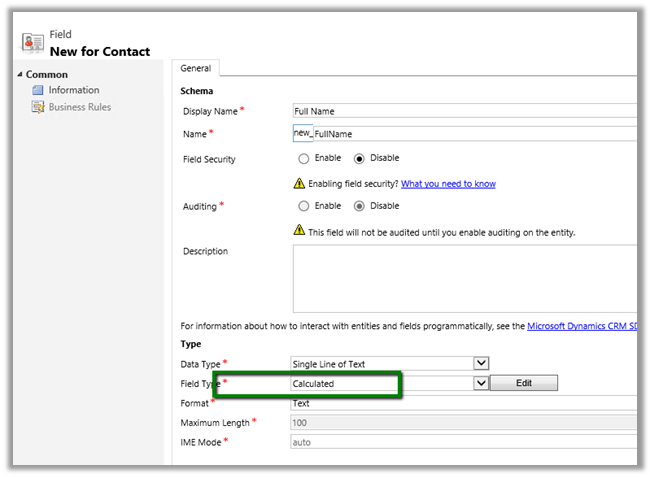
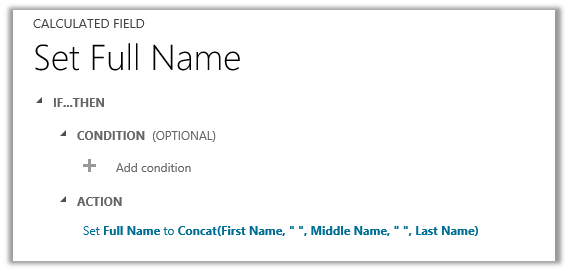
For e.g. let us create a calculated field of string type that will concat first name, middle name and last name for Contact Entity.

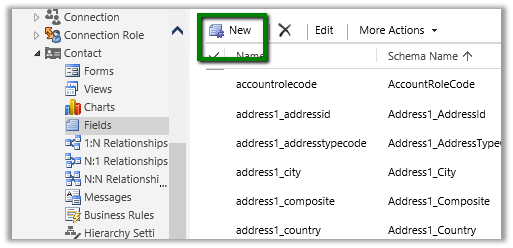
Open Contact entity for customization à Fields à Click on New
Click on Edit to define the Calculated Field

The editor has IntelliSense


Add the field to form.

  • Calculated Field are not saved in database.
  • They are executed during Retrieve.
  • Can be used by another calculated field.
  • Calculations is done using System Account.

JavaScript runtime error: Unable to get property ‘get_code’ of undefined or null reference in CRM


We can get the ‘get_code’ error if we are using Assign Step in Action/Workflow and the value is null for the field selected.

Here we need to use If condition to check if the value exist for that particular field before using Assign Step.

Differences between Standard SLA and Enhanced SLA in CRM 2015


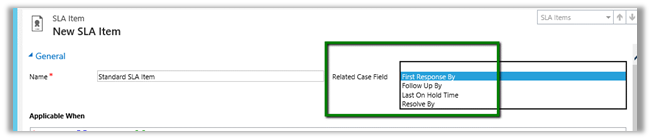
  • In Standard SLA the Related Case Field will show the Date Time Field available in the Case entity.

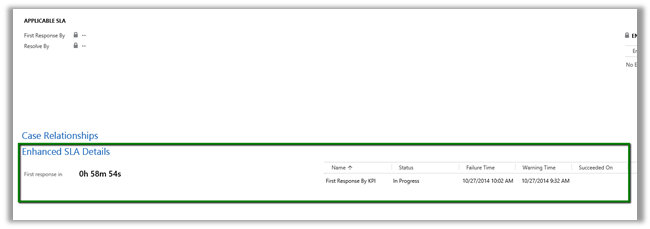
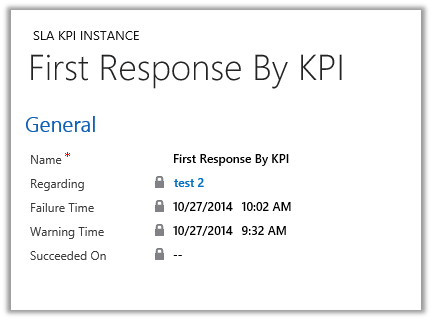
  • Enhanced SLA – Shows Lookup Field in the Case Entity that references SLA KPI Instance Entity.

  • We can create our own Lookup Field which references the SLA KPI Instance entity.
  • Enhanced SLA now supports Success Action.

  • Standard SLA on supports Success Criteria

  • In Standard SLA – First Response By and Resolve By values are stored in the Case Entity.

  • Enhanced SLA – stores this information in the associated SLA KPI Instance entity.


Advertisements

CRM 2013 – Understanding Business Rules


Hosk's avatarHosk's Dynamic Blog

What are business rules

Business rules were added to CRM 2013 and a way to provide client side scripting/validating/field or section hiding without having to write any JavaScript.  For context server side customization’s are plugins/workflows (e.g. code written in C# is executed on the server)

Business rules are also known as portable business logic (although I don’t know anyone who calls them that) because they also work on the mobile app.

What can business rules do

  • Set field values
  • Show/hide fields – Visibility
  • Enable/disable fields
  • change the requirement levels on fields (e.g. business required, recommend)
  • Show error messages

All the features above were usually done using Javascript in CRM 2011.

I have written a quick guide to business rules here

Why are business rules useful

Business rules are useful because they allow non developers to provide the functionality mentioned above on forms.  Business rules can be used on Main and…

View original post 1,180 more words

Types of fields in Dynamics CRM 2013


CRMCONSULTANT's avatarMicrosoft Dynamics CRM Blog

As you use fields in your customizations the first thing you need to understand are the types of fields you can create and edit and some of the system fields an entity may have. The following table summarizes field types available in Dynamics CRM 2013.

Field data typeDescription
Single Line of TextUp to 4000 characters of text can be in this field. You can set a maximum length to less than this. This field has several format options that will change the presentation of the text. These options are Email, Text, Text Area, URL and Ticker Symbol and Phone.
For more information check Single line of text format options below.
Multiple Lines of TextUp to 1,048,576 characters of text can be in this field. You can set a maximum length to less than this. When you add this field to the form you can specify the…

View original post 1,247 more words

Sample code: Using jqGrid in ASP.NET page to show CRM data


Sample code: Using jqGrid in ASP.NET page to show CRM data

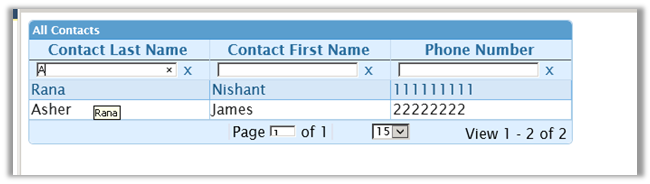
Just sharing a simple ASP.NET page that uses jqGrid to show contact records in CRM and allows user to search.

Here is the code SampleJQGrid.zip (remove .doc)

Hope it helps ..

Nishant Rana's Weblog

Everything related to Microsoft .NET Technology

Skip to content ↓