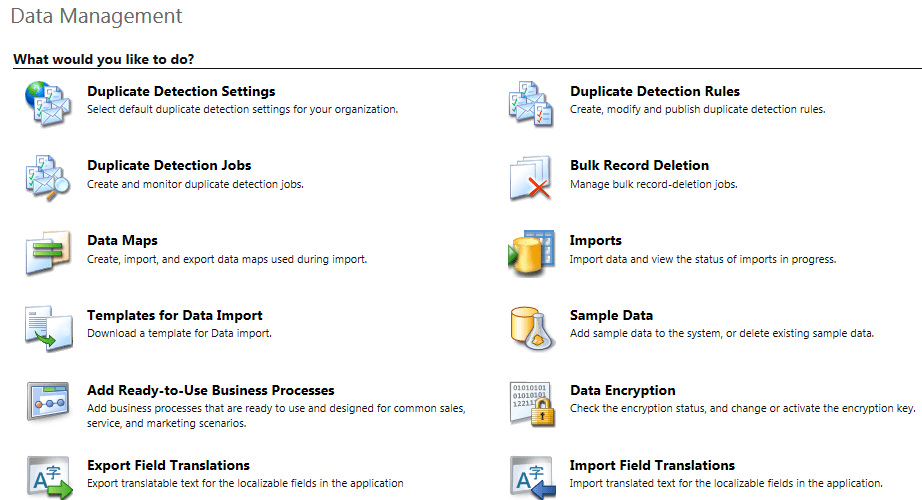
D365: Limitations of Duplicate Detection Rules


Points to keep in mind before we think of using them – Duplicate Detection Rules

Zohaib Uddin Khan's avatarDynamics 365 Funda by Zohaib Uddin Khan

Author: Zohaib Uddin Khan

Duplicate detection is one of the old and powerful feature of Dynamics family. But, I found it has some major limitations and inconsistency. I tried to use them in every implementation but reach to a point where I decided not to use them is my best bet. Anyhow, following are the ones which bother me heaps:-

  • Duplicate detection works with Dynamics 365 for tablets, but isn’t available for Dynamics 365 for phones.
  • Duplicates can’t be detected when a user converts a lead and it will create Account/Contact automatically.
  • Duplicates also aren’t detected when a user changes the status of a record, such as activating or reactivating it.
  • Maximum 5 Duplicate detection rules under Published state per Entity.

In case, if you found or know any other then feel free to comment and I will update the post. Cheers!

View original post

Completed 11 year of blogging with WordPress !


Achievement

dilbert2007458220426

Changing the target runtime version of Azure Functions


Azure Functions 2.x runtime is based on .NET Core 2 from .NET Framework 4.7 in 1.x. So, any application migrating from 1.x to 2.x needs to make sure that they are using and referring the compatible code and libraries.

We can also update our Azure Functions to target the appropriate runtime using the below steps à

Inside Azure Portal, select the Function App, click on Application Settings within Platform Features tab.

We can specify the version number for the APP SETTING NAME – FUNCTIONS_EXTENSION_VERSION

~ tilde à indicates that the latest version of that major version.

Get all the details here

https://docs.microsoft.com/en-us/azure/azure-functions/functions-versions

Hope it helps..

The type or namespace name Xrm could not be found (are you missing a using directive or an assembly reference?) error while using Azure Functions 2.x


Recently while working on Azure Functions (https://nishantrana.me/category/azure-functions/), we started getting the error that type or namespace Xrm could not be found.

We had added the project.json file with appropriate NuGet Package reference inside it

It was later we realized that project.json file have been replaced with function.proj in Azure Function 2.0.

More details here

https://blogs.msdn.microsoft.com/cjaliaga/2018/01/21/installing-nuget-packages-in-azure-functions-2-x-runtime-preview/

Hope it helps..

401 Not Authorized error while access project in VSTS


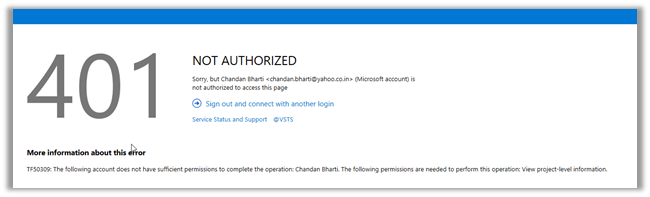
Recently one of our users was getting the below error while trying to access the VSTS Project.

401 NOT AUTHORIZED and the following account does not have sufficient permissions to complete the operation. The following permissions are needed to perform this operation. View project level information.

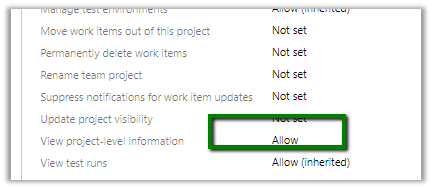
Here we can see the users being added to the project team and the team having all the appropriate rights.

Adding the user to other groups i.e. Build Administrators, Contributors, Project Administrators etc. also didn’t help.

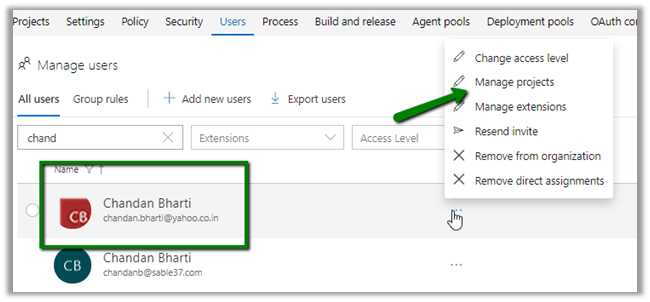
Also, inside Manager Users section.

https://[[subscription]].visualstudio.com/_admin/_users

We selected the user and clicked on Manage Projects to check his access.

It showed the user being part of Project Administrators – VSTS Groups.

Still user was getting the same 401 Unauthorized error.

https://developercommunity.visualstudio.com/content/problem/342094/401-unauthorized-error-for-a-user-added-to-project.html

https://developercommunity.visualstudio.com/content/problem/76468/cant-connect-to-tfs-401-not-authorized.html

Not sure what happens in the background and it takes time for the change to propagate. We have faced this issue many times with certain set of our users (one thing we have noticed that these users had their Gmail or Yahoo id associated to VSTS). For some users it has always worked properly (one using Outlook, Hotmail and Corporate account)

Hope it helps..

LookupRecordNotAvailable error while using Configuration Migration Tool in Dynamics 365 Customer Engagement


While trying to migrate the record using the Configuration Migration Tool, we were getting error like below in the log

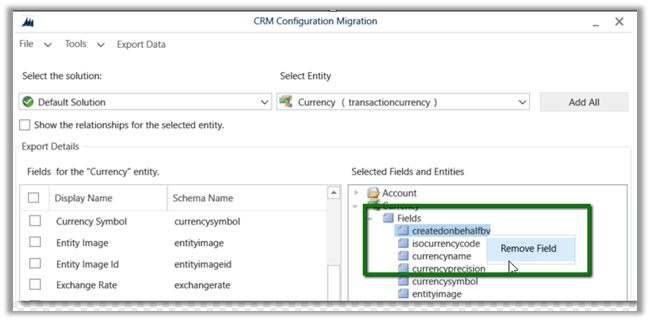
ImportEntity – Result: True – Entity: transactioncurrency – Adding transactioncurrency to the reprocess List as field createdonbehalfby with value 05d52058-eb35-41e8-8af7-dfb7120c4599 – LookupEntity systemuser and Record Id 2655712b-e13b-e711-80fb-5065f38b5691 (SYSTEM) – (action:Update) failed validation for reason code: LookupRecordNotAvailable

As we do not want to migrate the createdonbehalfby field, the easiest fix for this is to remove the field from the schema.

Ideally instead of adding the entire Entity, we should select only those fields whose value we want to migrate in the Schema file.

Hope it helps..

Nishant Rana's Weblog

Everything related to Microsoft .NET Technology

Skip to content ↓