Power Apps | Microsoft Dataverse


Rajeev Pentyala's avatarRajeev Pentyala – Technical Blog on Power Platform, Azure and AI

Microsoft Dataverse

Common Data Service (CDS), the sophisticated and secure backbone that powers Dynamics 365 and Power Platform, has been renamed to Microsoft Dataverse

Some terminology in Microsoft Dataverse has been updated. For example, entity is now ‘Table’ and field is now ‘Column’.

Microsoft Dataverse for Teams

Microsoft Dataverse for Teams (formerly known as Project Oakdale), a low code built-in data platform for Teams, is generally available now.

Microsoft Dataverse for Teams follows existing data governance rules established by the Power Platform and enables access control in the Teams Admin Center like any other Teams feature. Within the Teams Admin center, you can allow or block apps created by users at the individual level, group level, or org level.

Refer my article on Project Oakdale to know more.

Power BI Teams App

Licensed Microsoft Power BI users can enjoy the full capabilities of Power BI in Teams with the Power…

View original post 38 more words

Date Time Behavior and Format in Power Platform/Dynamics 365 CRM


Prashant Maurya's avatarPrashant Kumar Maurya

Date Time field in power apps has behaviors and formats which control how the data will be stored in CDS (Common Data Service) and how it will pe presented to different users from different time zone on retrieval. Here I will try to explain the same in a simple way with examples for each combination of behaviors and formats.

Behavior: User Local

  1. Format: Date Only
    • User’s provided date gets converted to UTC before it gets saved in CDS.
    • As there is no time part in user input system will take midnight as input time for conversion.
    • Stored data in CDS will have both date and time part.
    • System will convert UTC time to requesting user’s time zone while displaying data in UI.
  2. Format: Date and Time
    • User’s provided date and time gets converted to UTC before it gets saved in CDS.
    • Stored data in CDS will have both date and…

View original post 473 more words

Create Reports (Power BI embedded) using Dynamics 365 Customer Insights


Virendra Agrawal's avatarVirendra Agrawal's Blog

Recently, there was a new featured launched into Dynamics 365 Customer Insights to build reports within Customer Insights using the interactive custom report builder (Power BI embedded).

With this enhancement, we’ll be able to combine available metrics/measures and dimensions to create reports with the CI data , using the visualizations we want directly within Customer Insights. It will provide another way of generating the reports and visualise the Customer Insights data (without using the Power BI connector).

In this post, we’ll talk about how we can use the built-in report feature within Customer Insights.


View original post 245 more words

Process Optimization – Dynamics 365 CE / CRM / CDS SSIS Integration toolkit – KingswaySoft


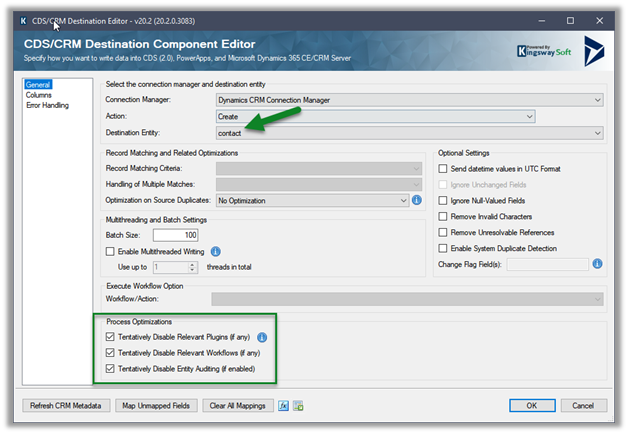
Process Optimizations is a new feature added in the CDS / CRM Destination Component of KingswaySoft’s SSIS Integration Toolkit as part of November 2020 Release.

Check other posts on SSIS and Dynamics 365

https://nishantrana.me/2020/10/16/ssis-kingswaysoft-and-dynamics-365/

These options if enabled, will turn off or disable plugin, workflow, entity auditing during pre-execution temporarily, during the writing process, and will revert the changes to the original state after successful execution.

  • Tentatively Disable Relevant Plugins (if any)
  • Tentatively Disable Relevant Workflows (if any)
  • Tentatively Disable Relevant Auditing (if any)

Let us take a simple example to see it in action.

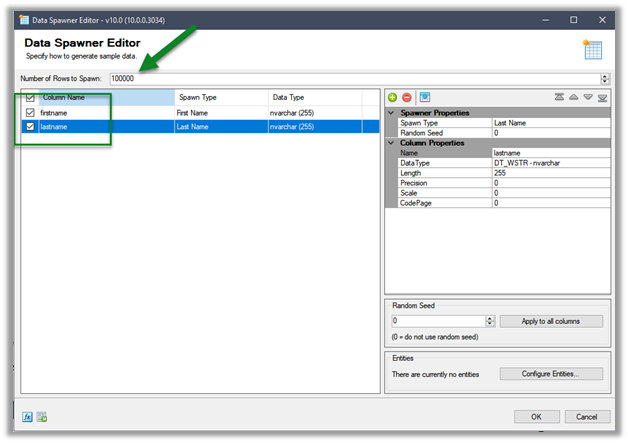
Here we have a simple data flow that creates contact records inside CDS using Data Spawner.

https://nishantrana.me/2020/05/26/using-data-spawner-component-ssis-to-generate-sample-data-in-dynamics-365/

Let us run the package and see the status of the plugin, workflow, and audit with regards to the contact entity.

As expected, we do not see any Audit records created for contact records creation.

We see an event where Audit is disabled and then enabled later for the contact entity, during the duration of package running and after its successful completion.

We can also see our workflow in status – Draft

In the case of Plugin, we didn’t see the step being disabled and it was still being triggered

As per the documentation –

Get the toolkit here

https://www.kingswaysoft.com/products/ssis-integration-toolkit-for-microsoft-dynamics-365

Hope it helps..

How to – Embed Canvas App in an Iframe inside Dynamics 365


Canvas App can be easily embedded in a web site using the Iframe.

Say e.g. we have the following Canvas App to be embedded inside Dashboard in Dynamics 365

Save the app and navigate to Details

We can copy the Web link or App ID.

The URL Format –

https://apps.powerapps.com/play/[appId]

The other parameter that can be used are

source, tenantid, screencolor and any additional parameters

e.g.

https://apps.powerapps.com/play/[appId]?source=iframe&screenColor=rgba(120,110,55,1)&param1=value&param2=value 2

  • Here we have embedded it inside an Iframe component within the Dashboard

Publish the change and navigate to the Dashboard, we can see our Canvas App.

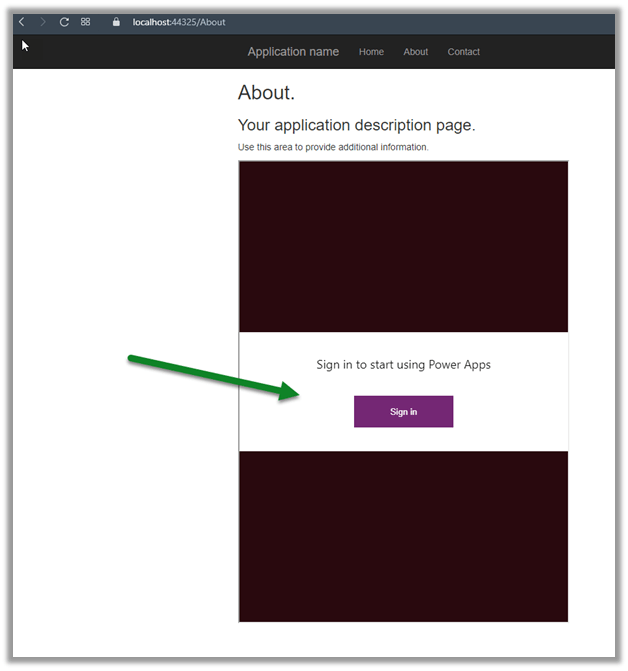
If the application is using Azure Active Directory-based authentication, the user will not be asked to sign-in again, else the user will be asked to Sign-in and will be able to access the app if it is shared with them.

Here we have embedded it inside an ASP.NET page, and we are asked to Sign-in.

After successful sign-in

Get all the details here –

https://docs.microsoft.com/en-us/powerapps/maker/canvas-apps/embed-apps-dev

Hope it help..

Advertisements

Fixed – System.FormatException: Input string was not in a correct format exception while registering Plugin in Dynamics 365


We might get the below error while trying to register a plugin.


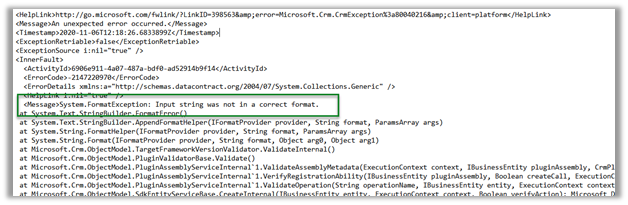

Cause

The plugin project was referring the .NET Framework 4.7.2


And the latest version of Microsoft.CrmSdk.CoreAssemblies – (Sept 29, 2020)
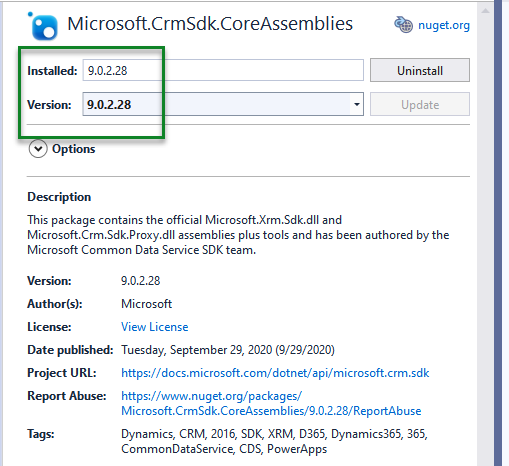
2020-11-10_19-33-39

Resolution –

Changing it to 4.6.2 fixed it.


Details-

Unhandled Exception: System.ServiceModel.FaultException

An unexpected error occurred.

Server stack trace:

at System.ServiceModel.Channels.ServiceChannel.HandleReply(ProxyOperationRuntime operation, ProxyRpc& rpc)

at System.ServiceModel.Channels.ServiceChannel.Call(String action, Boolean oneway, ProxyOperationRuntime operation, Object[] ins, Object[] outs, TimeSpan timeout)

at System.ServiceModel.Channels.ServiceChannelProxy.InvokeService(IMethodCallMessage methodCall, ProxyOperationRuntime operation)

at System.ServiceModel.Channels.ServiceChannelProxy.Invoke(IMessage message)

Exception rethrown at [0]:

at Microsoft.Xrm.Tooling.Connector.CrmServiceClient.Create(Entity entity)

at Xrm.Sdk.PluginRegistration.Forms.PluginRegistrationForm.btnRegister_Click(Object sender, EventArgs e)

Detail:

<OrganizationServiceFault xmlns=”http://schemas.microsoft.com/xrm/2011/Contracts&#8221; xmlns:i=”http://www.w3.org/2001/XMLSchema-instance”&gt;

<ActivityId>6906e911-4a07-487a-bdf0-ad52914b9f14</ActivityId>

<ErrorCode>-2147220970</ErrorCode>

<ErrorDetails xmlns:a=”http://schemas.datacontract.org/2004/07/System.Collections.Generic”&gt;

<KeyValuePairOfstringanyType>

<a:key>ApiExceptionSourceKey</a:key>

<a:value i:type=”b:string” xmlns:b=”http://www.w3.org/2001/XMLSchema”>Plugin/Microsoft.Crm.ObjectModel.PluginAssemblyService</a:value&gt;

</KeyValuePairOfstringanyType>

<KeyValuePairOfstringanyType>

<a:key>ApiOriginalExceptionKey</a:key>

<a:value i:type=”b:string” xmlns:b=”http://www.w3.org/2001/XMLSchema”>Microsoft.Crm.CrmException: An unexpected error occurred. —&gt; System.FormatException: Input string was not in a correct format.

at System.Text.StringBuilder.FormatError()

at System.Text.StringBuilder.AppendFormatHelper(IFormatProvider provider, String format, ParamsArray args)

at System.String.FormatHelper(IFormatProvider provider, String format, ParamsArray args)

at System.String.Format(IFormatProvider provider, String format, Object arg0, Object arg1)

at Microsoft.Crm.ObjectModel.TargetFrameworkVersionValidator.ValidateInternal()

at Microsoft.Crm.ObjectModel.PluginValidatorBase.Validate()

at Microsoft.Crm.ObjectModel.PluginAssemblyServiceInternal`1.ValidateAssemblyMetadata(ExecutionContext context, IBusinessEntity pluginAssembly, CrmPluginAssemblyMetadata assemblyMetadata)

at Microsoft.Crm.ObjectModel.PluginAssemblyServiceInternal`1.VerifyRegistrationAbility(IBusinessEntity pluginAssembly, Boolean createCall, ExecutionContext context, CrmPluginAssemblyMetadata assemblyMetadata)

at Microsoft.Crm.ObjectModel.PluginAssemblyServiceInternal`1.ValidateOperation(String operationName, IBusinessEntity entity, ExecutionContext context)

at Microsoft.Crm.ObjectModel.SdkEntityServiceBase.CreateInternal(IBusinessEntity entity, ExecutionContext context, Boolean verifyAction)

— End of inner exception stack trace —

at Microsoft.Crm.Extensibility.VersionedPluginProxyStepBase.Execute(PipelineExecutionContext context)

at Microsoft.Crm.Extensibility.PipelineInstrumentationHelper.Execute(Boolean instrumentationEnabled, String stopwatchName, ExecuteWithInstrumentation action, PipelineExecutionContext context)

at Microsoft.Crm.Extensibility.Pipeline.&lt;&gt;c__DisplayClass5_0.&lt;RunStep&gt;b__0()</a:value>

</KeyValuePairOfstringanyType>

<KeyValuePairOfstringanyType>

<a:key>ApiStepKey</a:key>

<a:value i:type=”b:guid” xmlns:b=”http://schemas.microsoft.com/2003/10/Serialization/”>3ecabb1b-ea3e-db11-86a7-000a3a5473e8</a:value&gt;

</KeyValuePairOfstringanyType>

<KeyValuePairOfstringanyType>

<a:key>ApiDepthKey</a:key>

<a:value i:type=”b:int” xmlns:b=”http://www.w3.org/2001/XMLSchema”>1</a:value&gt;

</KeyValuePairOfstringanyType>

<KeyValuePairOfstringanyType>

<a:key>ApiActivityIdKey</a:key>

<a:value i:type=”b:guid” xmlns:b=”http://schemas.microsoft.com/2003/10/Serialization/”>6906e911-4a07-487a-bdf0-ad52914b9f14</a:value&gt;

</KeyValuePairOfstringanyType>

<KeyValuePairOfstringanyType>

<a:key>ApiPluginSolutionNameKey</a:key>

<a:value i:type=”b:string” xmlns:b=”http://www.w3.org/2001/XMLSchema”>System</a:value&gt;

</KeyValuePairOfstringanyType>

<KeyValuePairOfstringanyType>

<a:key>ApiStepSolutionNameKey</a:key>

<a:value i:type=”b:string” xmlns:b=”http://www.w3.org/2001/XMLSchema”>System</a:value&gt;

</KeyValuePairOfstringanyType>

<KeyValuePairOfstringanyType>

<a:key>ApiExceptionCategory</a:key>

<a:value i:type=”b:string” xmlns:b=”http://www.w3.org/2001/XMLSchema”>SystemFailure</a:value&gt;

</KeyValuePairOfstringanyType>

<KeyValuePairOfstringanyType>

<a:key>ApiExceptionMesageName</a:key>

<a:value i:type=”b:string” xmlns:b=”http://www.w3.org/2001/XMLSchema”>UnExpected</a:value&gt;

</KeyValuePairOfstringanyType>

<KeyValuePairOfstringanyType>

<a:key>ApiExceptionHttpStatusCode</a:key>

<a:value i:type=”b:int” xmlns:b=”http://www.w3.org/2001/XMLSchema”>400</a:value&gt;

</KeyValuePairOfstringanyType>

</ErrorDetails>

Hope it helps..


Nishant Rana's Weblog

Everything related to Microsoft .NET Technology

Skip to content ↓