Object doesn’t support property or method selectNodes error in JavaScript in CRM 2011


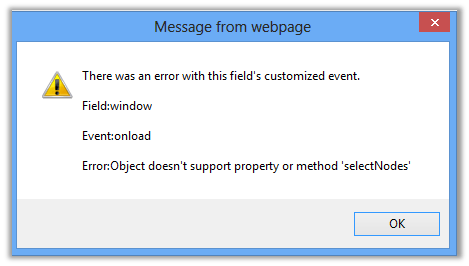
We got the below error in one of our CRM entity form’s onload JavaScript. The same was working fine in IE9.

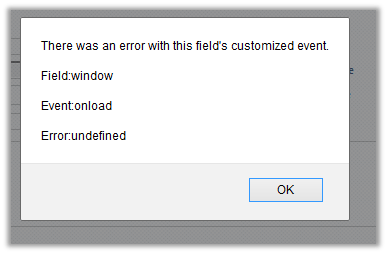
Similarly in Chrome and Firefox also we were getting the below error.

Finally we came to know it was because XPath is not supported in IE 10 and other browsers.

Get the more details here

http://www.w3schools.com/xpath/xpath_examples.asp

Hope it helps

New Microsoft Dynamics CRM 2011 SDK Version 5.0.14 released


The new version of SDK has been released. It can be downloaded here

http://www.microsoft.com/en-us/download/details.aspx?id=24004

List of all the significant changes made

http://msdn.microsoft.com/en-us/library/jj916625.aspx

Bye.

Entity Name specified in FetchXml does not match the entity name in the EntityExpression error in Filtered Lookup in CRM 2011.


Hi,

We had used addCustomView function to filter lookups in our email entity. However while changing the entity inside the Lookup dialog we were getting the above error.

We read in the forum that installing the Update Rollup 10 should fix the issue for the multi-entity lookup. We had Update Rollup 6 in our system and as suggested, installing UR 10 resolved the issue.

Check out the helpful link

http://social.microsoft.com/Forums/en/crmdevelopment/thread/9d3d60fb-106e-4e4c-b846-295cea4d800e

Hope it helps.


Cross-domain iframe requests are blocked in Office 365 SharePoint Online.


Hi,

I was currently working on some integration tasks between SharePoint 2013 online and CRM 2011 online. Here we wanted to use one of the search pages configured in SharePoint 2013 online inside an iframe of Case form in CRM 2011 online.

SharePoint 2013 online and CRM 2011 online were part of different Office 365 domain. After specifying the url for the iframe we got the following error

Found the following kb article

http://support.microsoft.com/kb/2795602

Then tried hosting the SharePoint 2010 online search page that is part of same domain in which CRM 2011 online is. That worked properly.

Hope it helps.

The ‘label’ attribute is not declared error while importing solution in CRM 2011


Hi,

We got this “The ‘label’ attribute is not declared” while importing one of our solutions in CRM 2011. It gave the following details for the error

ame” /><attribute name=”parentcustomerid” /><attribute name=”telephone1″ /><attribute name=”emailaddress1″ /><attribute name=”statecode” /><order attribute=”fullname” descending=”false” /><link-entity name=”postfollow” from=”regardingobjectid” to=”contactid” alias=”aa”><filter type=”and”><condition attribute=”ownerid” operator=”eq-userid” /></filter></link-entity><attribute name=”contactid” /></entity></fetch></fetchxml><LocalizedNames><LocalizedName description=”Contacts I Follow” languagecode=”1033″ /></LocalizedNames><Descriptions><Description description=”Contacts that you follow.” languagecode=”1033″ /></Descriptions></savedquery></savedqueries></SavedQueries><Visualizations><visualization><savedqueryvisualizationid>{889CE563-1263-E211-8BE5-984BE17C6693}</savedqueryvisualizationid><datadescription><datadefinition><fetchcollection><fetch mapping=”logical” aggregate=”true”><entity name=”contact”><attribute groupby=”true” alias=”_CRMAutoGen_groupby_column_Num_0″ name=”address1_city” label=”City” /><attribute alias=”_CRMAutoGen_aggregate_column_Num_0″ name=”fullname” aggregate=”countcolumn” /></entity></fetch></fetchcollection><categorycollection><category alias=”_CRMAutoGen_groupby_column_Num_0″><measurecollection><measure alias=”_CRMAutoGen_aggregate_column_Num_0″ /></measurecollection></category></categorycollection></datadefinition></datadescription><presentationdescription><Chart Palette=”None” PaletteCustomColors=”149,189,66; 197,56,52; 55,118,193; 117,82,160; 49,171,204; 255,136,35; 168,203,104; 209,98,96; 97,142,206; 142,116,178; 93,186,215; 255,155,83″><Series><Series ChartType=”Bar” IsValueShownAsLabel=”True” Color=”purple” BackGradientStyle=”TopBottom” BackSecondaryColor=”112, 142, 50″ Font=”{0}, 9.5px” LabelForeColor=”59, 59, 59″ CustomProperties=”PointWidth=0.75, MaxPixelPointWidth=40, DrawingStyle=Wedge”></Series></Series><ChartAreas><ChartArea BorderColor=”White” BorderDashStyle=”Solid”><AxisY LabelAutoFitMinFontSize=”8″ TitleForeColor=”59, 59, 59″ T

We saw one attribute tag with label attribute in it. Removing the label attribute and importing the solution back resolved the issue.

Hope it helps

“The Business Data Connectivity Metadata Store is currently unavailable” error in SharePoint Designer 2013 Preview


Hi,

I recently wrote a WCF service as a wrapper over CRM 2011 online and hosted it in Azure. The intent was to use this WCF service as BCS connection to integrate CRM 2011 online with SharePonit 2013 online. I tested the service with WCF Test Client and it was working fine.

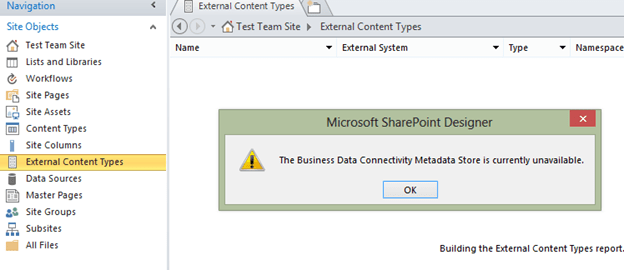
The next step was to create an External Content Type in SharePoint Designer 2013. On selecting the External Content Types link inside SharePoint designer I kept getting the below error.

Next I used SharePoint Designer 2010 to connect to the SharePoint 2013 online site. There it didn’t throw the Metadata Store is currently available error.
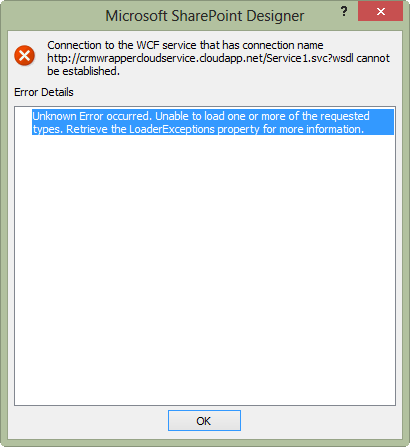
However I kept getting the following error while trying to create a new external content type.

The workaround was to connect to SharePoint 2010 online site through SharePoint Designer 2010 and then generating the BCS Model from therein using our Azure Hosted WCF Service.

Hope it helps.