Fixed – System.FormatException: Input string was not in a correct format exception while registering Plugin in Dynamics 365


We might get the below error while trying to register a plugin.


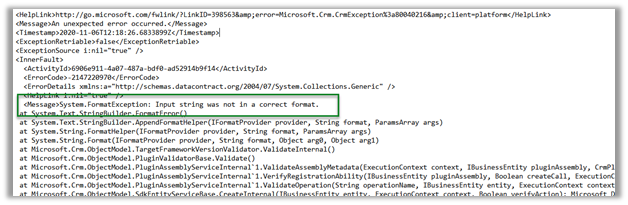

Cause

The plugin project was referring the .NET Framework 4.7.2


And the latest version of Microsoft.CrmSdk.CoreAssemblies – (Sept 29, 2020)
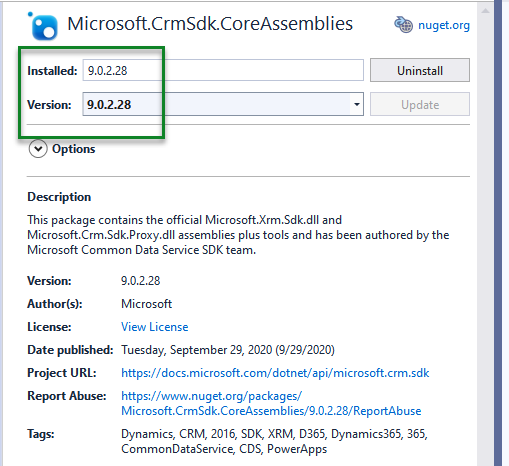
2020-11-10_19-33-39

Resolution –

Changing it to 4.6.2 fixed it.


Details-

Unhandled Exception: System.ServiceModel.FaultException

An unexpected error occurred.

Server stack trace:

at System.ServiceModel.Channels.ServiceChannel.HandleReply(ProxyOperationRuntime operation, ProxyRpc& rpc)

at System.ServiceModel.Channels.ServiceChannel.Call(String action, Boolean oneway, ProxyOperationRuntime operation, Object[] ins, Object[] outs, TimeSpan timeout)

at System.ServiceModel.Channels.ServiceChannelProxy.InvokeService(IMethodCallMessage methodCall, ProxyOperationRuntime operation)

at System.ServiceModel.Channels.ServiceChannelProxy.Invoke(IMessage message)

Exception rethrown at [0]:

at Microsoft.Xrm.Tooling.Connector.CrmServiceClient.Create(Entity entity)

at Xrm.Sdk.PluginRegistration.Forms.PluginRegistrationForm.btnRegister_Click(Object sender, EventArgs e)

Detail:

<OrganizationServiceFault xmlns=”http://schemas.microsoft.com/xrm/2011/Contracts&#8221; xmlns:i=”http://www.w3.org/2001/XMLSchema-instance”&gt;

<ActivityId>6906e911-4a07-487a-bdf0-ad52914b9f14</ActivityId>

<ErrorCode>-2147220970</ErrorCode>

<ErrorDetails xmlns:a=”http://schemas.datacontract.org/2004/07/System.Collections.Generic”&gt;

<KeyValuePairOfstringanyType>

<a:key>ApiExceptionSourceKey</a:key>

<a:value i:type=”b:string” xmlns:b=”http://www.w3.org/2001/XMLSchema”>Plugin/Microsoft.Crm.ObjectModel.PluginAssemblyService</a:value&gt;

</KeyValuePairOfstringanyType>

<KeyValuePairOfstringanyType>

<a:key>ApiOriginalExceptionKey</a:key>

<a:value i:type=”b:string” xmlns:b=”http://www.w3.org/2001/XMLSchema”>Microsoft.Crm.CrmException: An unexpected error occurred. —&gt; System.FormatException: Input string was not in a correct format.

at System.Text.StringBuilder.FormatError()

at System.Text.StringBuilder.AppendFormatHelper(IFormatProvider provider, String format, ParamsArray args)

at System.String.FormatHelper(IFormatProvider provider, String format, ParamsArray args)

at System.String.Format(IFormatProvider provider, String format, Object arg0, Object arg1)

at Microsoft.Crm.ObjectModel.TargetFrameworkVersionValidator.ValidateInternal()

at Microsoft.Crm.ObjectModel.PluginValidatorBase.Validate()

at Microsoft.Crm.ObjectModel.PluginAssemblyServiceInternal`1.ValidateAssemblyMetadata(ExecutionContext context, IBusinessEntity pluginAssembly, CrmPluginAssemblyMetadata assemblyMetadata)

at Microsoft.Crm.ObjectModel.PluginAssemblyServiceInternal`1.VerifyRegistrationAbility(IBusinessEntity pluginAssembly, Boolean createCall, ExecutionContext context, CrmPluginAssemblyMetadata assemblyMetadata)

at Microsoft.Crm.ObjectModel.PluginAssemblyServiceInternal`1.ValidateOperation(String operationName, IBusinessEntity entity, ExecutionContext context)

at Microsoft.Crm.ObjectModel.SdkEntityServiceBase.CreateInternal(IBusinessEntity entity, ExecutionContext context, Boolean verifyAction)

— End of inner exception stack trace —

at Microsoft.Crm.Extensibility.VersionedPluginProxyStepBase.Execute(PipelineExecutionContext context)

at Microsoft.Crm.Extensibility.PipelineInstrumentationHelper.Execute(Boolean instrumentationEnabled, String stopwatchName, ExecuteWithInstrumentation action, PipelineExecutionContext context)

at Microsoft.Crm.Extensibility.Pipeline.&lt;&gt;c__DisplayClass5_0.&lt;RunStep&gt;b__0()</a:value>

</KeyValuePairOfstringanyType>

<KeyValuePairOfstringanyType>

<a:key>ApiStepKey</a:key>

<a:value i:type=”b:guid” xmlns:b=”http://schemas.microsoft.com/2003/10/Serialization/”>3ecabb1b-ea3e-db11-86a7-000a3a5473e8</a:value&gt;

</KeyValuePairOfstringanyType>

<KeyValuePairOfstringanyType>

<a:key>ApiDepthKey</a:key>

<a:value i:type=”b:int” xmlns:b=”http://www.w3.org/2001/XMLSchema”>1</a:value&gt;

</KeyValuePairOfstringanyType>

<KeyValuePairOfstringanyType>

<a:key>ApiActivityIdKey</a:key>

<a:value i:type=”b:guid” xmlns:b=”http://schemas.microsoft.com/2003/10/Serialization/”>6906e911-4a07-487a-bdf0-ad52914b9f14</a:value&gt;

</KeyValuePairOfstringanyType>

<KeyValuePairOfstringanyType>

<a:key>ApiPluginSolutionNameKey</a:key>

<a:value i:type=”b:string” xmlns:b=”http://www.w3.org/2001/XMLSchema”>System</a:value&gt;

</KeyValuePairOfstringanyType>

<KeyValuePairOfstringanyType>

<a:key>ApiStepSolutionNameKey</a:key>

<a:value i:type=”b:string” xmlns:b=”http://www.w3.org/2001/XMLSchema”>System</a:value&gt;

</KeyValuePairOfstringanyType>

<KeyValuePairOfstringanyType>

<a:key>ApiExceptionCategory</a:key>

<a:value i:type=”b:string” xmlns:b=”http://www.w3.org/2001/XMLSchema”>SystemFailure</a:value&gt;

</KeyValuePairOfstringanyType>

<KeyValuePairOfstringanyType>

<a:key>ApiExceptionMesageName</a:key>

<a:value i:type=”b:string” xmlns:b=”http://www.w3.org/2001/XMLSchema”>UnExpected</a:value&gt;

</KeyValuePairOfstringanyType>

<KeyValuePairOfstringanyType>

<a:key>ApiExceptionHttpStatusCode</a:key>

<a:value i:type=”b:int” xmlns:b=”http://www.w3.org/2001/XMLSchema”>400</a:value&gt;

</KeyValuePairOfstringanyType>

</ErrorDetails>

Hope it helps..


Changes in CDS / CRM Destination Component – SSIS Integration Toolkit for Dynamics 365


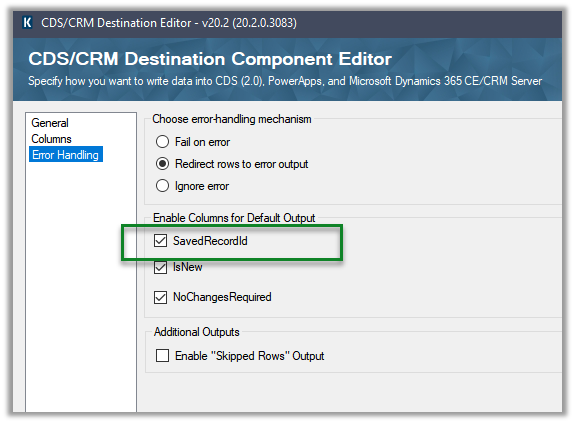
With version 20.2 November 2020 release, there have few updates added to the KingwaySoft’s CDS/CRM Destination Component, few are changes in the label and others are metadata changes, that one should be aware of before updating.

Check Post on SSIS and Dynamics 365

https://nishantrana.me/2020/10/16/ssis-kingswaysoft-and-dynamics-365/

  • Label changes.

Version 20.1 –

Version 20.2 –

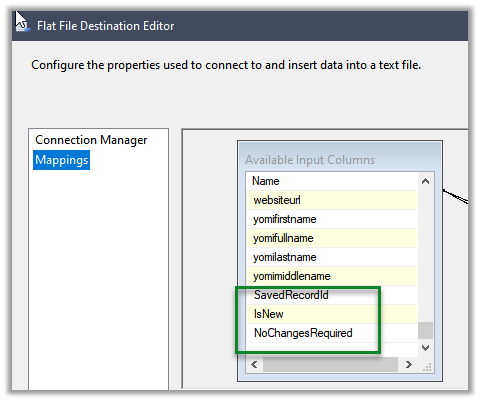
  • CrmRecordId renamed to SavedRecordId

Version 20.1 –

Version 20.2 –

  • CrmErrorMessage renamed to ErrorMessage

Version 20.1 –

Version 20.2 –

Thus, any package saved with the new version will not work with the older version, and it is recommended to take full back up of the package before updating to the new version.

Hope it helps..
CDS/CRM SDK – WS-Trust auth and OrganizationServiceProxy Deprecated, what does it mean?


cv's avatarColin Vermander

Announced late last week on docs.microsoft.com was the deprecation of the WS-Trust authentication type as well as OrganizationServiceProxy. Both are connected to the same thing of the WS-Trust authentication being moved away from for a long time now in other Microsoft SDKs and the CDS/CRM SDK is catching up as they modernize the authentication for the SDK. How does this effect you? Does it even effect you?

It really depends on how you have been using the SDK previously in writing your client applications. If you are using a username and password type connection string to connect to your CDS/CRM instance then you will be effected. If you strictly implement OrganizationServiceProxy and not the more generic interface IOrganizationService then you will also be effected.

If you have been using Server-to-Server (S2S) authentication which has been available now for quiet a while with a client Id and either a client…

View original post 453 more words

Sample code to connect to CDS / Dynamics 365 / CE using OAuth


Sample code for quick reference for connecting to CDS through a console application using OAuth

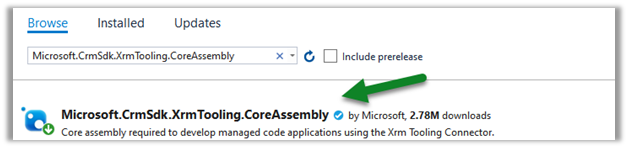
Add the NuGet package for Microsoft.CrmSdk.XrmTooling.CoreAssembly in the project.

Xrm.Tooling is the preferred way to connect to CDS, because of many benefits – we can define connection string, thread safety, support for X.509 certificate authentication, support for secure storage of sign-in credentials and reuse etc.

Note

Here we will be using the sample AppId and Redirect URI.

Sample Code- 


using Microsoft.Xrm.Sdk;
using Microsoft.Xrm.Tooling.Connector;
using System;

namespace SampleConsoleApp
{
class Program
{
static void Main(string[] args)
{
string ConnectionString = "AuthType = OAuth; " +
"Username = [username]@[domain].onmicrosoft.com;" +
"Password = [password]; " +
"Url = https://[orgname].crm.dynamics.com;" +
"AppId=51f81489-12ee-4a9e-aaae-a2591f45987d;" +
"RedirectUri=app://58145B91-0C36-4500-8554-080854F2AC97;" +
"LoginPrompt=Auto";

CrmServiceClient svc = new CrmServiceClient(ConnectionString);

if (svc.IsReady)
{
var myContact = new Entity("contact");
myContact.Attributes["lastname"] = "Test";
myContact.Attributes["firstname"] = "User1";
svc.Create(myContact);
}
}
}
}


For .NET Framework 4.5.2 – we need to explicitly specify Tls1.2 as the default protocol. 

ServicePointManager.SecurityProtocol = SecurityProtocolType.Tls12;

https://nishantrana.me/2018/01/

.NET Framework 4.6.2 uses TLS 1.2 as the default protocol.


More details on – Connection string parameters.

Sample Code – Dynamics 365 Web API / Organization Service

Hope it helps..
Advertisements

How to – Extract attachment from Notes in Dynamics 365 / CE / CDS – SSIS (KingswaySoft)


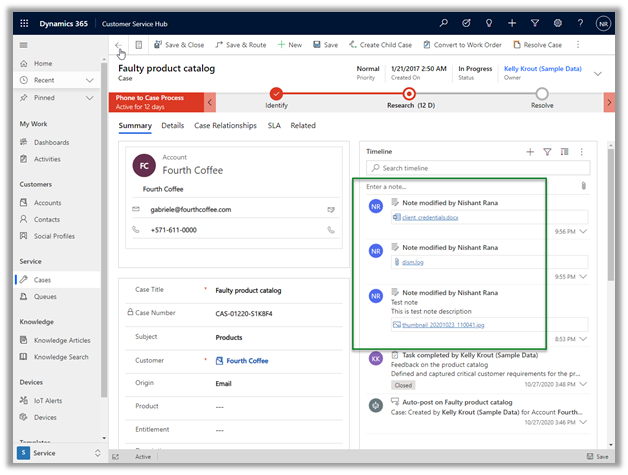
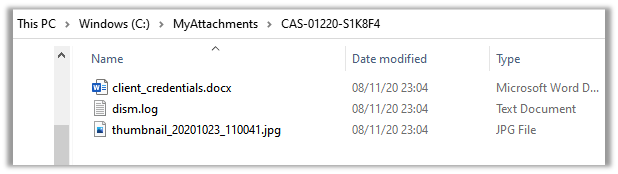
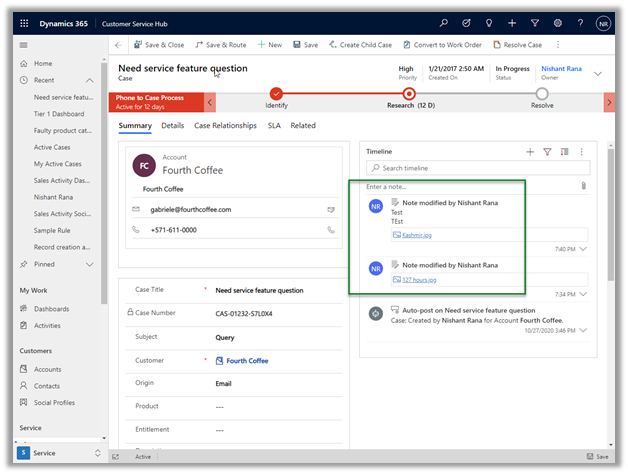
Recently we were exploring ways of extracting attachment from notes to a local drive for our case entity. We also wanted to organize it based on Case Number.

For this, we used KingswaySoft’s SSIS components.

Other posts on SSIS and Dynamics 365 –

https://nishantrana.me/2018/11/26/ssis-and-microsoft-dynamics-365/

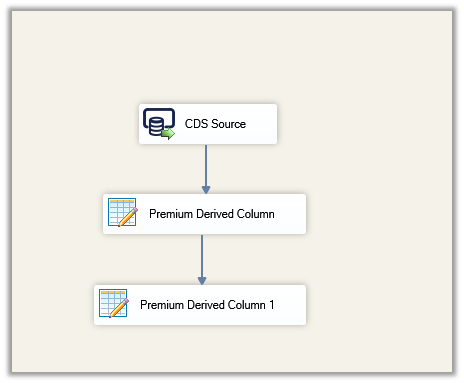
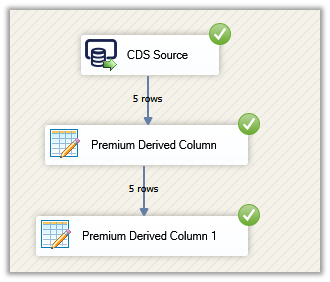
This is how our final package looked like

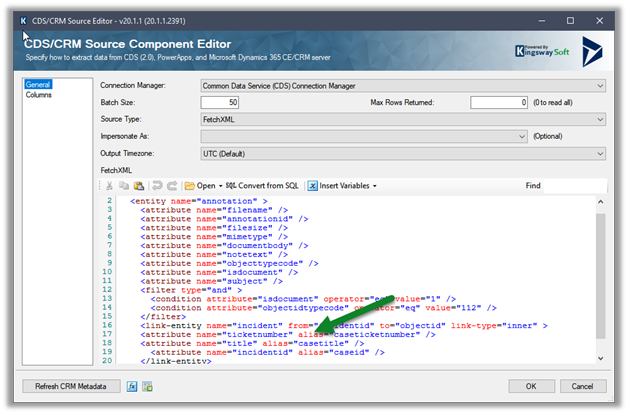
For CDS Source, we used Source Type as Fetch XML.

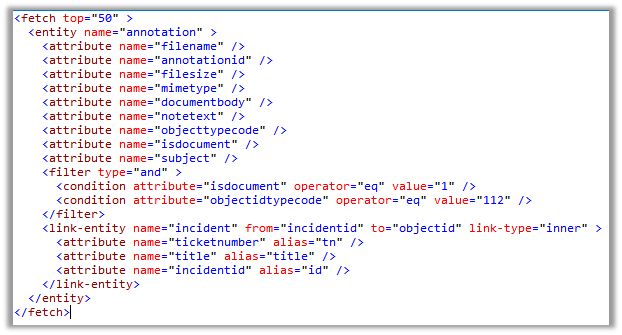
And the below Fetch XML to fetch notes details where objecttypecode is incident and isdocument property are true (i.e. has an attachment) and case as the linked entity to get the case ticket number.

Result View –

CDS / CRM Source Component

Make sure to use the alias for the attributes of the linked entity.

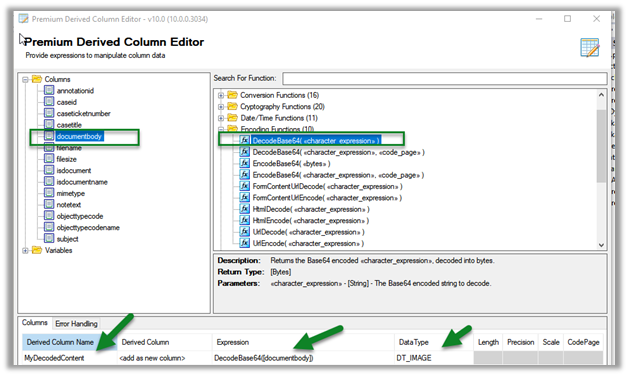
Next drag the Premium Derived Column, here we will use the DecodeBase64 encoding function to decode the file content stored in the documentbody field using as base-64 encoded string.

DT_Image output column will have the binary content of the attachment

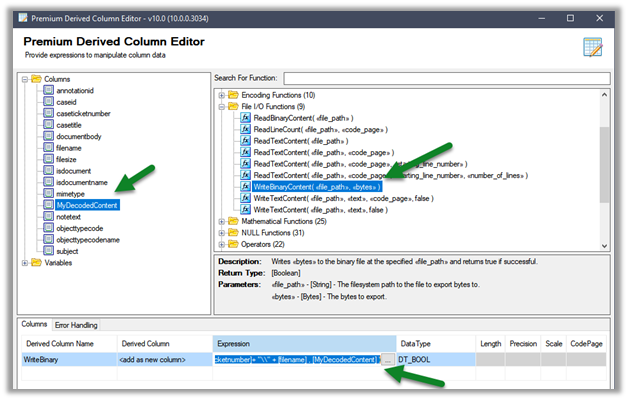
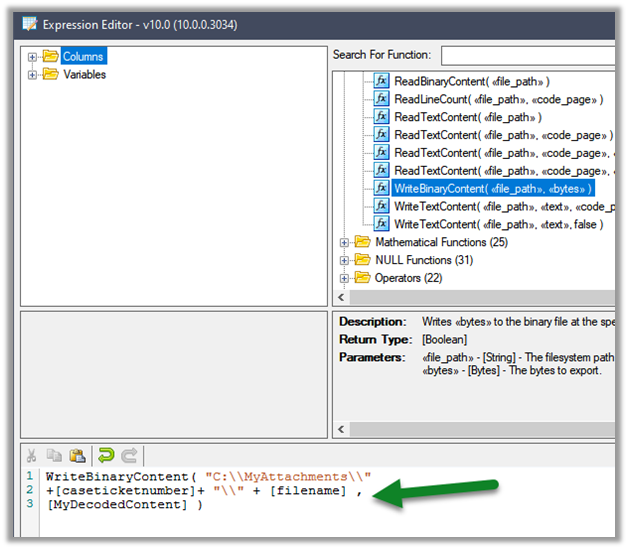
Next, we have added another Premium Derived Column, this time to write the binary content to the local drive, using the WriteBinaryContent function.

Click on the ellipsis to specify the expression.

Here we are creating a folder based on the case ticket number and storing the corresponding attachments inside it.

Let us run the package

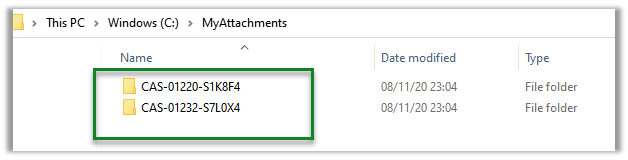
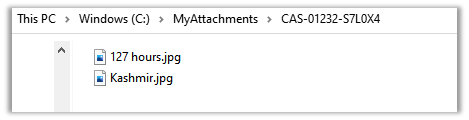
On successful execution, we can see the folders created with case ticket number and attachments added to it.

Get all the details here

http://www.kingswaysoft.com/blog/2017/03/21/Extracting-CRM-Attachments-with-Ease

Hope it helps..
Advertisements

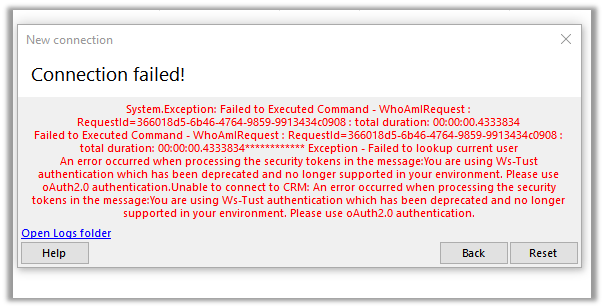
Fixed – An error occurred when processing the security tokens in the message:You are using Ws-Tust authentication which has been deprecated and no longer supported in your environment. Please use oAuth2.0 authentication in Dynamics 365 / CDS


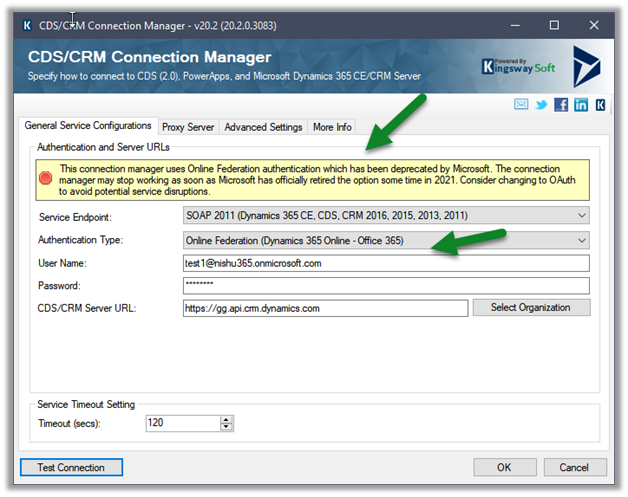
While trying to connect to Dynamics 365 instance through Online Federation authentication type (deprecated) using CDS/ CRM connection manager of KingswaySoft

For Console App – https://nishantrana.me/2020/11/09/sample-code-to-connect-to-cds-dynamics-365-ce-using-oauth/

you would get the below error –

KingswaySoft.IntegrationToolkit.DynamicsCrm.CrmServiceException: CRM service call returned an error: An error occurred when processing the security tokens in the message:You are using Ws-Tust authentication which has been deprecated and no longer supported in your environment. Please use oAuth2.0 authentication. (SSIS Integration Toolkit for Microsoft Dynamics 365, v20.2.0.3083 – devenv, v15.9.28307.905)System.ServiceModel.FaultException

: An error occurred when processing the security tokens in the message:You are using Ws-Tust authentication which has been deprecated and no longer supported in your environment. Please use oAuth2.0 authentication.

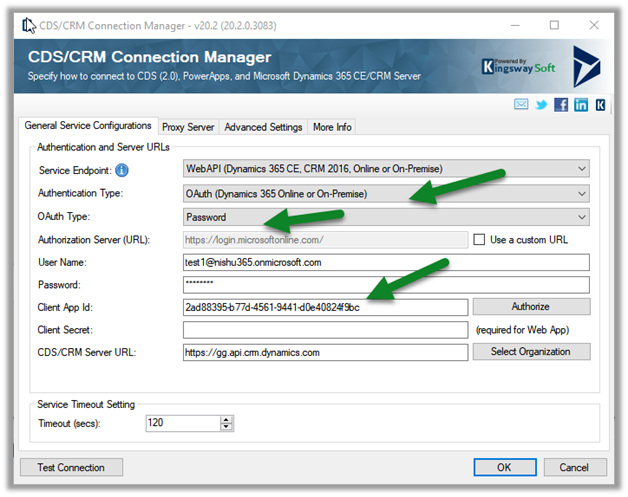
The solution is to use the OAuth connection type as shown below.

More on OAuth 2.0 – https://nishantrana.me/2019/08/30/oauth-2-0-with-dynamics-365-ce-web-api/

Here we have selected Password as OAuth type.

And specified username and password, and for Client App Id we have specified the default client app id.

2ad88395-b77d-4561-9441-d0e40824f9bc

https://nishantrana.me/2019/08/23/connect-to-dynamics-365-web-api-using-oauth-2-0-resource-owner-password-credential-ropc/

This connection succeeds this time.

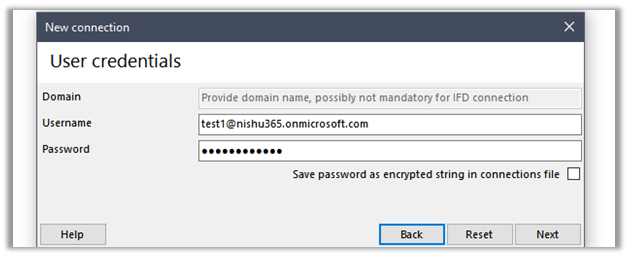
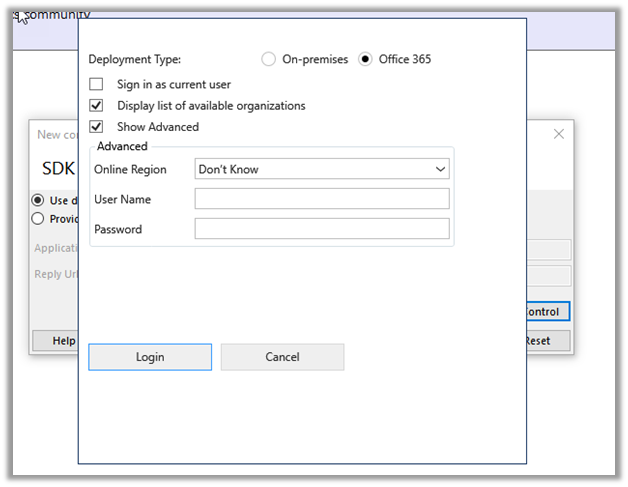
The same will be the experience with XrmToolBox while trying to create a new connection using the connection wizard

Microsoft.Xrm.Tooling.Connector.CrmServiceClient    Error    2    06/11/20 07:18:46 Unable to connect to CRM: An error occurred when processing the security tokens in the message:You are using Ws-Tust authentication which has been deprecated and no longer supported in your environment. Please use oAuth2.0 authentication.

Error    : An error occurred when processing the security tokens in the message:You are using Ws-Tust authentication which has been deprecated and no longer supported in your environment. Please use oAuth2.0 authentication.

Try the alternate connection method like SDK Login Control, Client ID secret, etc.

https://www.xrmtoolbox.com/documentation/for-users/connecting-to-an-organization/

Please refer to the below articles to get more details –

Use of Microsoft 365 authentication with the WS-Trust security protocol

Deprecation of Office365 authentication type and OrganizationServiceProxy class for connecting to Common Data Service

https://colinvermander.wordpress.com/2020/02/09/cds-crm-sdk-ws-trust-auth-and-organizationserviceproxy-deprecated-what-does-it-mean/

Hope it helps..
Advertisements