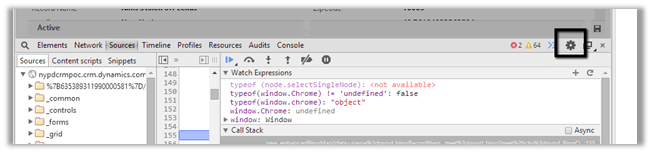
Following are the setting that we can use to disable caching in Chrome and IE.
Chrome:-

IE:-


Following are the setting that we can use to disable caching in Chrome and IE.
Chrome:-
IE:-

Recently was writing a jscript function to populate optionset value using SDK.MetaData.js helper class.
It was working fine in IE, however I was getting error in Chrome.

It turned out the following condition was always evaluating as true

And as selectSingleNode is not supported in Chrome we were getting error.
Added the following condition fixed the issue
if (typeof(window.chrome) != ‘undefined’) {
var xpe = new XPathEvaluator();
var xPathNode = xpe.evaluate(xpathExpr, node, _NSResolver, XPathResult.FIRST_ORDERED_NODE_TYPE, null);
return (xPathNode != null) ? xPathNode.singleNodeValue : null;
}
Hope it helps..

At times we need to convert the XML string to Literal. And it is not fun. While searching for online tool that could help, I found this XML Formatter tool
http://xmltoolbox.appspot.com/

Hope it helps.

Get guid of the record quickly in CRM 2013
Update :- Works for CRM 2013 as well.
Hi,
Normally to get the guid we need to click on “Copy a link” button and then get id from the url, so just thought of creating a custom button that only copies the guid.
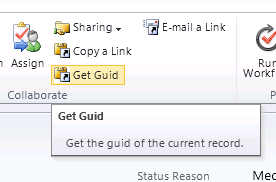
Clicking on Get Guid button will copy the id to the clipboard
RibbonDiffXml:-
Download the managed solution here ( Change the extension to zip from doc).
https://nishantrana.me/wp-content/uploads/2011/10/getguidapplicationribbon_1_0_0_0_managed.doc
Hope it helps.

Hi,
Was getting Generic SQL Error while using ConditionOperator.Contains in the ConditionExpression. The requirement was to get all the incident records based on the title attribute value.
condExp.AttributeName = “title”;
condExp.Operator = ConditionOperator.Contains;
condExp.Values.Add(“test”);
The correct way to perform this kind of search is by using Like operator with %.
condExp.AttributeName = “title”;
condExp.Operator = ConditionOperator.Contains;
condExp.Values.Add(“%test%”);
Hope it helps.

The Maintenance jobs for CRM 2013 is similar to the CRM 2011 jobs if they are not the same. I had to dig into the details of each of the jobs for my project. These are my findings and I hope it will be useful for everyone. Please remember to reschedule these maintenance jobs after the installation of CRM is completed.
Maintenance Job Name | Purpose | Default Frequency/ Recommendation |
Deletion Service | The deletion service maintenance operation now cleans up subscription tracking records for deleted metadata objects as they expire.
| By default, the job executes every… |
View original post 1,611 more words


 Nishant Rana's Weblog