Sample code to read XML Data from Web Resource in Plugin in CRM 2011/2013/2015


We recently had a requirement to read xml data stored in a particular web resource in plugin.

Sharing the sample code


public static Dictionary<string, string> GetMarketClusterAndMarketSegment(string webresourceName, string buildingTypeValue, IOrganizationService organizationService)
{
Dictionary<string, string> dictionaryMarket = new Dictionary<string, string>();

// tk_et_oppline_marketingfilterpicklists
// create request to retrieve Webresource
ColumnSet cols = new ColumnSet();
cols.AddColumn("content");
QueryByAttribute requestWebResource = new QueryByAttribute
{
EntityName = "webresource",
ColumnSet = cols
};
requestWebResource.Attributes.AddRange("name");
requestWebResource.Values.AddRange(webresourceName);

Entity webResourceEntity = null;
EntityCollection webResourceEntityCollection = organizationService.RetrieveMultiple(requestWebResource);

if (webResourceEntityCollection.Entities.Count > 0)
{
webResourceEntity = webResourceEntityCollection.Entities[0];
byte[] binary = Convert.FromBase64String(webResourceEntity.Attributes["content"].ToString());
string resourceContent = System.Text.Encoding.UTF8.GetString(binary);
string byteOrderMarkUtf8 = Encoding.UTF8.GetString(Encoding.UTF8.GetPreamble());
if (resourceContent.StartsWith(byteOrderMarkUtf8))
{
resourceContent = resourceContent.Remove(0, byteOrderMarkUtf8.Length);
}

XDocument xmlDocument = XDocument.Parse(resourceContent);

var marketSegment = from t in xmlDocument.Descendants("ParentField").ElementAt(1).Descendants("ShowOption")
where t.Attribute("value").Value.Equals(buildingTypeValue)
select new
{
marketSegmentValue = t.Parent.Attribute("value").Value,
marketSegmentLabel = t.Parent.Attribute("label").Value
};

foreach (var v in marketSegment)
{
dictionaryMarket.Add("marketsegment", v.marketSegmentValue);
var marketCluster = from t in xmlDocument.Descendants("ParentField").ElementAt(0).Descendants("ShowOption")
where t.Attribute("value").Value.Equals(v.marketSegmentValue)
select new
{
marketClusterValue = t.Parent.Attribute("value").Value,
marketClusterLabel = t.Parent.Attribute("label").Value
};

foreach (var m in marketCluster)
{
dictionaryMarket.Add("marketcluster", m.marketClusterValue);
}
}
}

return dictionaryMarket;
}
}

Hope it helps..

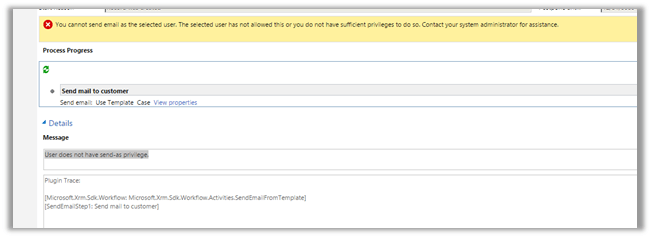
You cannot send email as the selected user. The selected user has not allowed this or you do not have sufficient privileges to do so. Contact your system administrator for assistance. Error in CRM 2013/2015


Was getting the below error in one of the custom workflow activity we were using for sending email.

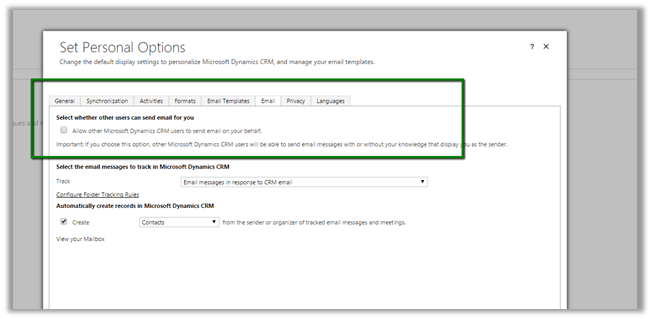
To fix the issue,

Login to CRM with the user selected as From.

Open Set Personal Options box

And check the check box “Allow other Microsoft Dynamics CRM users to send email on your behalf”

Hope it helps..

Dynamics CRM 2015 – Interact with the Business Process Flow controls in the form


adisys's avatarAdisys Technology Corner

With Microsoft Dynamics CRM 2015, the Xrm.Page.data.process namespace provides events, methods, and objects to interact with the business process flow data in a form.

This sample demonstrates how to switch to different stage using the new Xrm.Page.data.process methods.

Followings are the API used in the sample code:

getActiveProcess() – retrieve information about the active process

setActiveProcess()- Set different process as the active process.

getActiveStage()- retrieve information about the active stage

setActiveStage() – set a different stage as the active stage.

getActivePath() – get a collection of stages currently in the active path with methods to interact with the stages displayed in the business process flow control.

addOnStageChange(),removeOnStageChange() – add or remove event handlers for the business process flow control.

addOnStageSelected() – add a function as an event handler for the OnStageSelected event so that it will be called when a…

View original post 453 more words

CRM 2011 Parental Relationship Behaviour (the Reparent action) in Practise


James Wood's avatarWOODSWORKBLOG

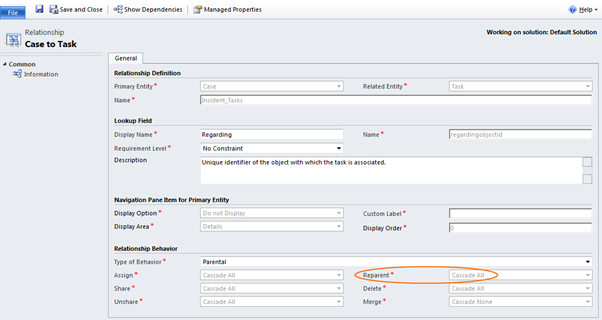
Parental relationships in Mscrm do a couple of things, in this post I’m going to focus on the reparent action.

(As a side note, reparent isn’t exclusively used in the parental behaviour, but is where it is most commonly used).

View original post 333 more words

FetchXML Formatter Tool


Arun Potti's avatarArun Potti's Power Platform blog

It is a Light weight windows application and this tool will be helpful when you are extensively working with FetchXML in Javascript / C# code to get desired result.

Functionality:

It will take FetchXML from Advance Find as an input and convert that into desired format, which can be used into Javascript / C# for further coding.

Pros:

  1. No Need to spend time for FetchXML formatting
  2. It is easy to use.
  3. Works for both Javascript and C# code

Example:

Let us take a simple example of the below FetchXML,

 <fetch version="1.0" output-format="xml-platform" mapping="logical" distinct="false">
  <entity name="contact">
    <attribute name="fullname" />
    <attribute name="telephone1" />
    <attribute name="emailaddress1" />
    <attribute name="contactid" />
    <order attribute="fullname" descending="false" />
    <filter type="and">
      <condition attribute="ownerid" operator="eq-userid" />
      <condition attribute="statecode" operator="eq" value="0" />
    </filter>
  </entity>
</fetch>

Provide this as an input to FetchXML formatter Tool, 1. Check Javascript radio…

View original post 140 more words

SSRS Extension Installation does not display SSRS Instances – CRM 2011


Rajeev Pentyala's avatarRajeev Pentyala – Technical Blog on Power Platform, Azure and AI

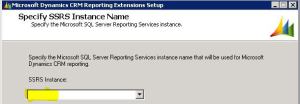
The other day to configure CRM environment, we were installing “Microsoft Dynamics CRM 2011 Reporting Extension” and to our surprise

“SSRS Instance” dropdown was blank and we could not proceed further

Reporting Extensions Setup Reporting Extensions Setup

Reason

  • We had 2 machines one with CRM application server and another with both “SQL server” & “SSRS Reporting services”
  • The reason in our case was, we were trying to install “Microsoft Dynamics CRM 2011 Reporting Extension” on the CRM application server machine

Fix

  • You must run CRM Reporting Extensions Setup on a computer that has Microsoft SQL Server 2008 Reporting Services or Microsoft SQL Server 2008 R2 Reporting Services installed

Here is the MSDN’s  CRM 2011 Reporting Extensions Installation Guide

🙂

View original post