Hi,
Got the below error while trying to install the Report Authoring Extension for CRM 2015.

To fix the issue, open the log file, check for the registry path and delete it

Hope it helps !

Hi,
Got the below error while trying to install the Report Authoring Extension for CRM 2015.
To fix the issue, open the log file, check for the registry path and delete it
Hope it helps !

Hi,
We were getting the Duplicate Column Heading Existing while trying to download template for data import for Opportunity Entity.
Through Customizations we changed the Display Name of the fields that were duplicate and it fixed the issue for us.
Solution:
https://community.dynamics.com/crm/f/117/t/169282
I had the same issue. In Settings> Customizations, display the Entities that causes the error. Sort the fields by display name and scroll through the list until you find two identical display names. Rename one, save and publish your changes. You should now be able to download the Import template.
Do check out this awesome article
http://missdynamicscrm.blogspot.in/2014/09/understanding-import-template-crm-2011-2013-fields.html
Hope it helps ..

Sharing sample code to check if a user belongs to a team or not
public static bool IsTeamMember(Guid teamID, Guid userID, IOrganizationService service)
{
QueryExpression query = new QueryExpression("team");
query.ColumnSet = new ColumnSet(true);
query.Criteria.AddCondition(new ConditionExpression("teamid", ConditionOperator.Equal, teamID));
LinkEntity link = query.AddLink("teammembership", "teamid", "teamid");
link.LinkCriteria.AddCondition(new ConditionExpression("systemuserid", ConditionOperator.Equal, userID));
var results = service.RetrieveMultiple(query);

if (results.Entities.Count > 0)
{
return true;
}
else
{
return false;
}
}
Hope it helps.

We recently had a requirement to read xml data stored in a particular web resource in plugin.
Sharing the sample code
public static Dictionary<string, string> GetMarketClusterAndMarketSegment(string webresourceName, string buildingTypeValue, IOrganizationService organizationService)
{
Dictionary<string, string> dictionaryMarket = new Dictionary<string, string>();

// tk_et_oppline_marketingfilterpicklists
// create request to retrieve Webresource
ColumnSet cols = new ColumnSet();
cols.AddColumn("content");
QueryByAttribute requestWebResource = new QueryByAttribute
{
EntityName = "webresource",
ColumnSet = cols
};
requestWebResource.Attributes.AddRange("name");
requestWebResource.Values.AddRange(webresourceName);

Entity webResourceEntity = null;
EntityCollection webResourceEntityCollection = organizationService.RetrieveMultiple(requestWebResource);

if (webResourceEntityCollection.Entities.Count > 0)
{
webResourceEntity = webResourceEntityCollection.Entities[0];
byte[] binary = Convert.FromBase64String(webResourceEntity.Attributes["content"].ToString());
string resourceContent = System.Text.Encoding.UTF8.GetString(binary);
string byteOrderMarkUtf8 = Encoding.UTF8.GetString(Encoding.UTF8.GetPreamble());
if (resourceContent.StartsWith(byteOrderMarkUtf8))
{
resourceContent = resourceContent.Remove(0, byteOrderMarkUtf8.Length);
}

XDocument xmlDocument = XDocument.Parse(resourceContent);

var marketSegment = from t in xmlDocument.Descendants("ParentField").ElementAt(1).Descendants("ShowOption")
where t.Attribute("value").Value.Equals(buildingTypeValue)
select new
{
marketSegmentValue = t.Parent.Attribute("value").Value,
marketSegmentLabel = t.Parent.Attribute("label").Value
};

foreach (var v in marketSegment)
{
dictionaryMarket.Add("marketsegment", v.marketSegmentValue);
var marketCluster = from t in xmlDocument.Descendants("ParentField").ElementAt(0).Descendants("ShowOption")
where t.Attribute("value").Value.Equals(v.marketSegmentValue)
select new
{
marketClusterValue = t.Parent.Attribute("value").Value,
marketClusterLabel = t.Parent.Attribute("label").Value
};

foreach (var m in marketCluster)
{
dictionaryMarket.Add("marketcluster", m.marketClusterValue);
}
}
}

return dictionaryMarket;
}
}
Hope it helps..

Was getting the below error in one of the custom workflow activity we were using for sending email.
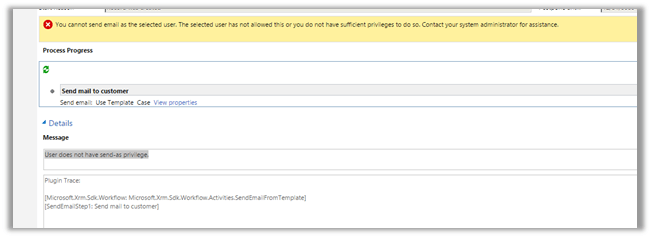 To fix the issue,
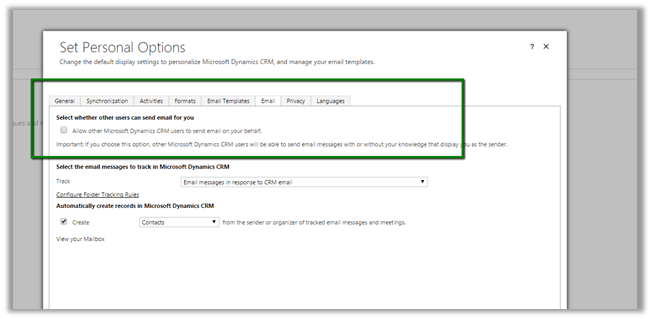
Login to CRM with the user selected as From.
Open Set Personal Options box
And check the check box “Allow other Microsoft Dynamics CRM users to send email on your behalf”
Hope it helps..

With Microsoft Dynamics CRM 2015, the Xrm.Page.data.process namespace provides events, methods, and objects to interact with the business process flow data in a form.
This sample demonstrates how to switch to different stage using the new Xrm.Page.data.process methods.
Followings are the API used in the sample code:
getActiveProcess() – retrieve information about the active process
setActiveProcess()- Set different process as the active process.
getActiveStage()- retrieve information about the active stage
setActiveStage() – set a different stage as the active stage.
getActivePath() – get a collection of stages currently in the active path with methods to interact with the stages displayed in the business process flow control.
addOnStageChange(),removeOnStageChange() – add or remove event handlers for the business process flow control.
addOnStageSelected() – add a function as an event handler for the OnStageSelected event so that it will be called when a…
View original post 453 more words


 Nishant Rana's Weblog