Using RetrievePrincipalAccessRequest in CRM


Hi,

Recently had a requirement to show\hide a ribbon button based on the condition i.e. if a user has Write access to that record show it else hide it.

Here either the user can have Write access to the record through the one of the security roles assigned to him or through the team which has that rights.

In this case we can use RetrievePrincipalAccessRequest which returns as response all the right user had on that particular record either through his own security roles or teams he is part of.

For e.g. we give following rights on a particular record to a team (which the user is part of)
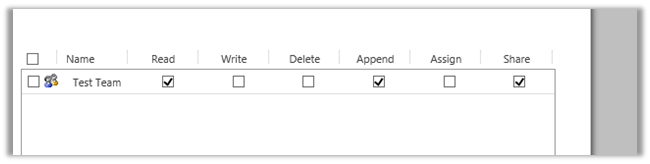
If we check the rights user has on the record using RetrievePrincipalAccessRequest we get the following response (combination of all the rights either through sharing or his own security roles)

[


RetrievePrincipalAccessRequest request = new RetrievePrincipalAccessRequest();

// system user or team
request.Principal = new EntityReference("systemuser", new Guid("EBEECB5F-2D60-E511-80F8-3863BB357FC0"));

// record for which we want to check the access
request.Target = new EntityReference("is_productionsite", new Guid("15734DF9-31DD-E511-810E-3863BB353ED0"));

RetrievePrincipalAccessResponse resp = (RetrievePrincipalAccessResponse)orgService.Execute(request);


Hope it helps.

Only Secure Content is displayed notification while using Bing Map API version 7.0 in CRM Online.


Hi,

We recently developed a web resource using Bing Map API to show address as push pin for Custom Entities.

However, we were getting the following notification

The reason being we were using Http version of the API and CRM is on HTTPS. We changed it to use HTTPS version and it fixed the issue.

Else we would have to do the following settings in the browsers

http://du.screenstepslive.com/s/docs/m/7107/l/219447-allow-mixed-content-in-browsers

Helpful post

http://blog.devdave.com/2011/01/removing-mixed-content-warning-when.html

Hope it helps..

CRM 2013 – Leveraging Actions to get around JavaScript cross-domain challenges


salimadamon's avatarSalim Adamon - Dynamics 365 Blog

Last year, I wrote about the challenge of cross-domain calls from JavaScript with CRM 2011. The issue was related to fact that from a security perspective, you could not have JavaScript functions executing on a CRM form event or when a ribbon button is clicked calling web services outside of the CRM domain. I proposed a few workarounds here but the bottom line is that in all cases, there was some sort of a negative impact in each solution. With CRM 2013, actions processes are a great way to get around the browsers’ cross domain restriction.

In this article, I am providing an example of how actions can be used to make a request to a web service outside of the CRM domain from a record’s form event.

Scenario

When users call an incident management center, the agents need to capture the temperature at the time of the incident in…

View original post 425 more words

How to – Get Total Count of records in CRM. (more than 5000)


For version 9.0 please check the below post

RetrieveTotalRecordCountRequest

https://dreamingincrm.com/2019/07/22/getting-entity-record-counts/

https://docs.microsoft.com/en-us/dotnet/api/microsoft.crm.sdk.messages.retrievetotalrecordcountrequest?view=dynamics-general-ce-9

Just sharing a sample code to get the total number of records (e.g. account here)

<br />
 IOrganizationService orgService = GetOrganizationService();</p>
<p> int totalCount = 0;</p>
<p> QueryExpression query = new QueryExpression("account");<br />
 query.ColumnSet = new ColumnSet();<br />
 query.Distinct = true;<br />
 query.ColumnSet.AddColumn("accountid");<br />
 query.PageInfo = new PagingInfo();<br />
 query.PageInfo.Count = 5000;<br />
 query.PageInfo.PageNumber = 1;<br />
 query.PageInfo.ReturnTotalRecordCount = true;</p>
<p> EntityCollection entityCollection = orgService.RetrieveMultiple(query);<br />
 totalCount = entityCollection.Entities.Count;</p>
<p> while (entityCollection.MoreRecords)<br />
 {<br />
 query.PageInfo.PageNumber += 1;<br />
 query.PageInfo.PagingCookie = entityCollection.PagingCookie;<br />
 entityCollection = orgService.RetrieveMultiple(query);<br />
 totalCount = totalCount + entityCollection.Entities.Count;<br />
 } </p>
<p> MessageBox.Show(totalCount.ToString());<br />


Hope it helps

Advertisements

Impersonate a user using the Microsoft Dynamics Web API in Dynamics CRM 2016


A must read post on CRM 2016 ..

Debajit's avatarDebajit's Dynamic CRM Blog

I have been exploring the Dynamics CRM Web API features and frankly speaking it never ceases to amaze me. So today I am going to explain how you can impersonate a user to create a record from the client side. Wondering how can we impersonate from the client side. After all, till this time, plugins were the privileged objects to do something in impersonation. Well, then Web API has come to shatter many establishments in the CRM society.

I have two users in my CRM system. System Administrator and my account.

image

I am going to login with the System Administrator account and then create an account on behalf of my account (Debajit Dutta).

Below is the code to do the same.

Let me explain the code a bit here. Here I am creating a account named “Sample Account – Impersonation Test”. However I am creating the record under impersonation. The…

View original post 206 more words

Business Process Error while trying to open records in CRM 2015


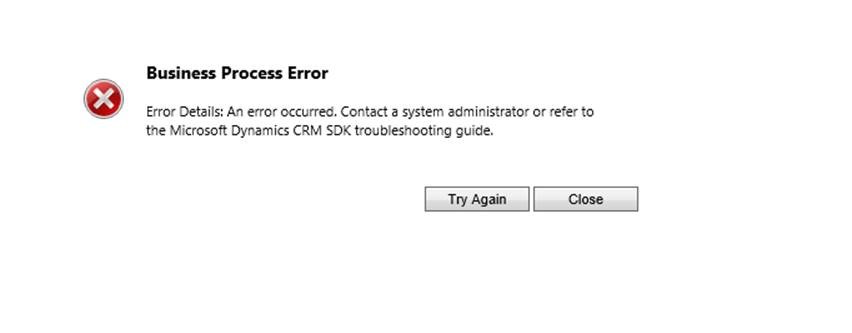
Hi we were getting the below error while trying to open any record in CRM 2015

G

Turned out that by mistake one wrong extra step had got registered on RetrieveMultiple

ActivityFeeds.Plugins: ActivityFeeds.Plugins.ActivityClose]

[c824b80a-d392-e511-8114-3863bb356f90: ActivityFeeds.Plugins.ActivityClose: RetrieveMultiple of any Entity]

Removing this step fixed the issue.

Hope it helps.