Fixed – Grid can not be used in this (‘quirks’) model in jqGrid


We got the above error in an HTML Web Resource which was using jqGrid. The page was working fine in IE 10 browser only in IE 8 we got that error.

The solution was to use the following meta tag inside the HEAD tag of the html page.


<meta
http-equiv=”X-UA-Compatible”
content=”IE=edge”
/>

More details on this meta tag

http://stackoverflow.com/questions/6771258/whats-the-difference-if-meta-http-equiv-x-ua-compatible-content-ie-edge-e

Hope it helps.

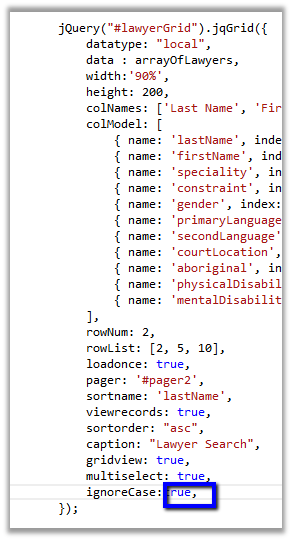
Fixed – Expected identifier, string or number error in HTML Web Resource in IE.


We recently developed an html web resource which was using jqGrid. The web resource was working properly on machines having IE 10 browser, but got the above error in case of IE 8.

As it turned out extra “,” i.e. trailing comma was the reason for the error.

Removing it fixed the issue. IE 10 was more forgiving.

Hope it helps.

Sample Code: OData Synchronous Call in CRM 2011


Just sharing the sample code to make synchronous OData call in CRM 2011.


var oDataRequestUrl = http://server/orgname/xrmservices/2011/OrganizationData.svc/ContactSet?$select=FullName

var result = syncODataCall(oDataRequestUrl);

// function to make synchronous oData call
 function syncODataCall(odataSelect) {
 var request = new XMLHttpRequest();
 request.open("GET", odataSelect, false);
 request.setRequestHeader("Accept", "application/json");
 request.setRequestHeader("Content-Type", "application/json; charset=utf-8");
 request.send();
 var objJQuery = jQuery.parseJSON(request.responseText);
 return objJQuery.d
 }

Check for following methods to parse the result returned

  • ProcessReturnedEntities(data.d.results)
  • ProcessReturnedEntity(data.d)

http://crmscape.blogspot.in/2011/03/crm-2011-odata-json-and-crm-forms.html

Hope it helps !

Retrieve OptionSet Label using SDK.Metadata.RertrieveAttribute method in JavaScript (CRM 2011)


Hi,

Recently we were working on an HTML Web Resource which was using oData to fetch information regarding a particular entity which had multiple optionset fields in it.

As we know using oData we can get the value of the optionset field but not the label. While searching for the best possible way to get the label in Jscript came to know about the sdk.metadata.js sample code in SDK (sdk\samplecode\js\soapforjscript\soapforjscript\scripts)

It has RetrieveAttribute method in it which can be used to get the attribute metadata

We had an optionset attribute named Language in it, this is how we fetched all the label and the value for that field


var languageArray = [];

// this.RetrieveAttribute = function (EntityLogicalName, AttributeLogicalName, MetadataId, RetrieveAsIfPublished, successCallBack, errorCallBack, passThroughObject
 SDK.Metadata.RetrieveAttribute("new_lawyer", "new_primary_language", null, true, function (result) {

for (var i = 0; i < result.OptionSet.Options.length; i++) {
 languageArray[result.OptionSet.Options[i].Value] = result.OptionSet.Options[i].Label.LocalizedLabels[0].Label;
 }
 },
 function (error) {
 alert("error");
 }
 );

Hope it helps !

Cleared MB2-703: Microsoft Dynamics CRM 2013 Customization and Configuration Exam.


Finally took and cleared my first CRM 2013 exam i.e. Customization and Configuration today.

It had total 48 questions in it with passing score of 700.

As expected the main focus area were

  • Access Teams
  • Business Process Flows
  • Business Rules
  • Quick Create forms.
  • New Controls

So anyone planning to take this exam should focus around these new features added in CRM 2013.

Bye.

CRM 2011 StringMap Table


John Winford's avatarTechnical Reflections

Fields in a CRM entity record are often based on a pick list. Should you need to query the SQL database directly to extract information these will come out not as the text based descriptive values, but a code such as 0, 1, or 2. To retrieve the associated descriptive information, a join to the StringMapBase table is required. A rough SQL query might be something like so:


This works fine for most items, but some such as statecode are used in multiple entities. A join to the MetaDataSchema.Entity table to get the ObjectTypeCode will filter down the records. If you do not the following will result:


Say you wanted to retrieve the values for statecode for the Opportunity entity, you would write query such as this:


The reason for the date filter is that CRM maintains a history of changes to the entities. If a customisation solution has been…

View original post 47 more words