

Recently we wrote a flow that will run daily once and will pick all the tasks due in the last 24 hours i.e. schedule end date less than equal to utcNow() and greater than equal to addDays(UTCNow(),-1)

Interestingly we observed one of the task records not picked.
The scheduled end date on the task record was – 2024-07-22T20:00:00Z
And for the flow the filter condition was –
scheduledend le 2024-07-23T20:00:35.5173871Z and scheduledend ge 2024-07-22T20:00:35.5173943Z
If we look at the date for the greater than equal condition, we can see that the seconds part is 35, the exact time when the List rows step would have run, and in case of that particular task record is 00, so it was not picked.
Then we applied the below formatDateTime function, excluding the time part.
(scheduledend le ‘@{formatDateTime(utcNow(),’yyyy-MM-dd’)}’ and scheduledend ge ‘@{formatDateTime(addDays(utcNow(),-1),’yyyy-MM-dd’)}’ and _regardingobjectid_value ne null and statecode eq 0)
Again we saw few tasks not picked,
The records that were not picked had scheduledenddate as
- 2024-07-25 18:00:00.000
- 2024-07-25 19:00:00.000
And as per new condition
scheduledend = ‘2024-07-24’ which essentially was
scheduledend = ‘2024-07-24 00:00:00.0000’
Eventually we updated the flow’s Filter Rows condition to include only the hour and minutes, ignoring the seconds/milliseconds because of which we got the issue in the first place.
(scheduledend le ‘@{formatDateTime(utcNow(),’yyyy-MM-dd HH:mm’)}’ and scheduledend ge ‘@{formatDateTime(addDays(utcNow(),-1),’yyyy-MM-dd HH:mm’)}’ and _regardingobjectid_value ne null and statecode eq 0)
One more example for more clarity –
Below we are creating a contact record and setting values for 3 date time fields, UTC1, UTC2, UTC3.
- UTC1 = utcNow()
- UTC2 = formatDateTime(utcNow(),’yyyy-MM-dd’)
- UTC3 = formatDateTime(utcNow(),’yyyy-MM-dd HH:mm’)
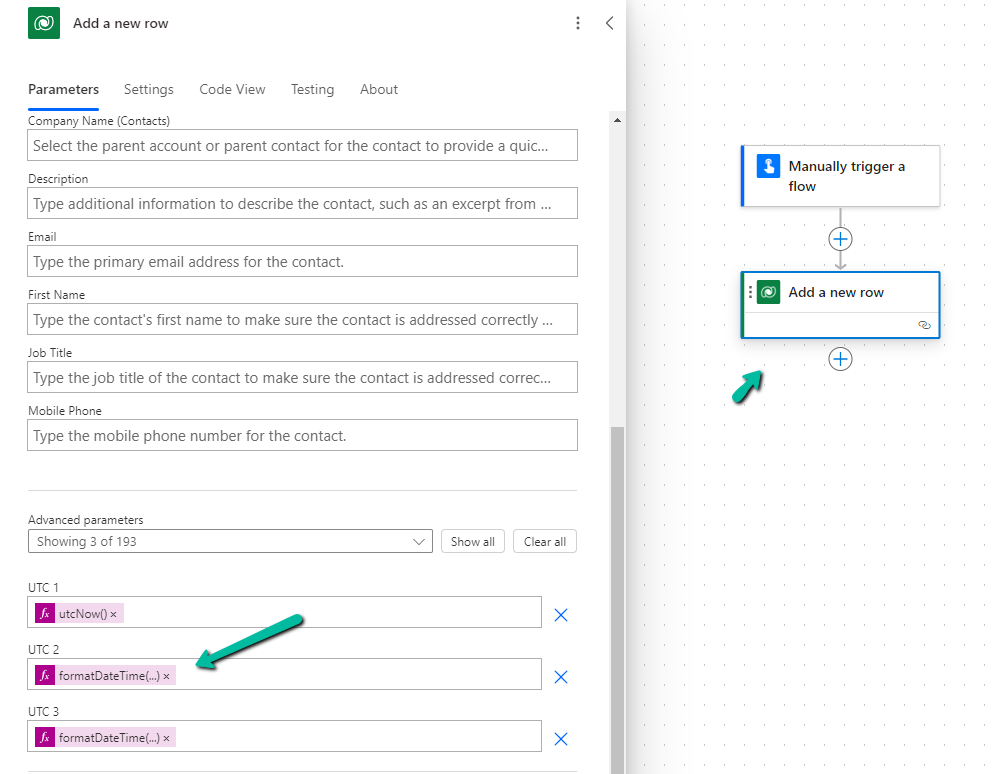
The values for those fields inside CRM’s form –

The corresponding values within the Dataverse/ CRM’s database (UTC) –

Hope it helps..











 Nishant Rana's Weblog