New features in CRM 2011 as part of Update Rollup 5


Dialog Enhancements

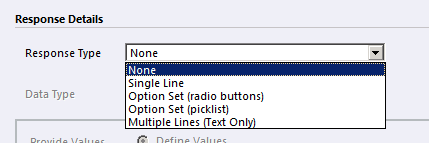
Earlier

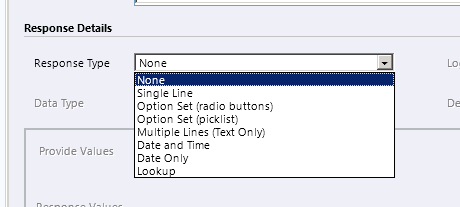
Now

Added Support for Date and Lookup fields.

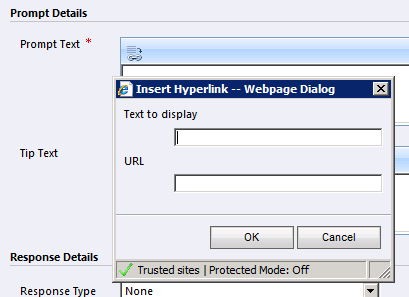
Earlier

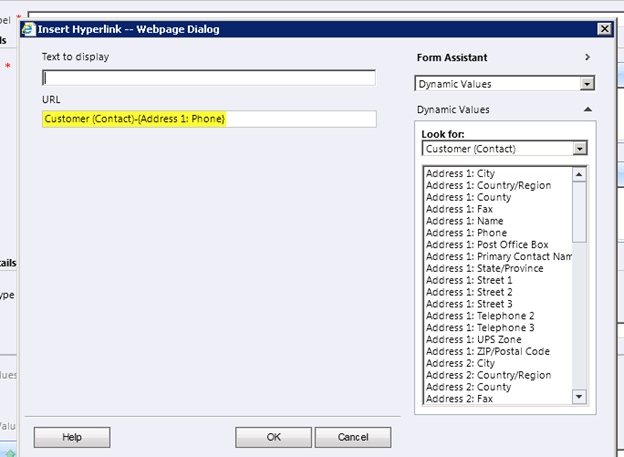
Now

Support for contextual URL.

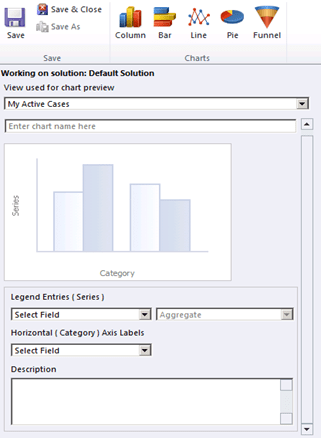
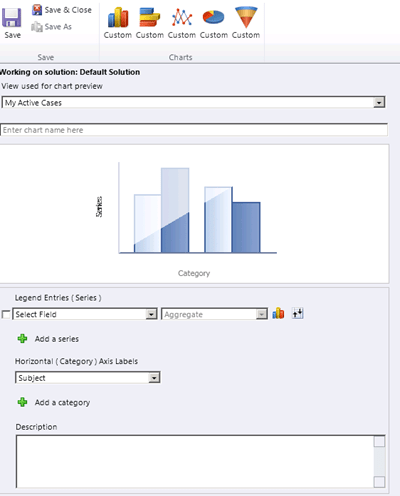
Charts

Earlier

Now

Adding Series and Category.

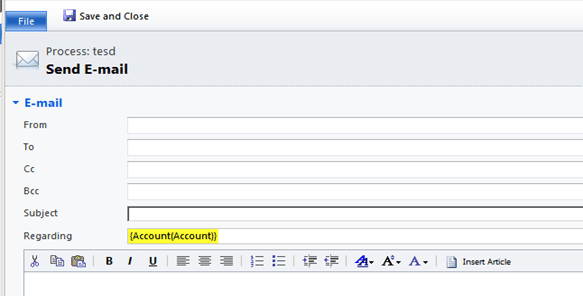
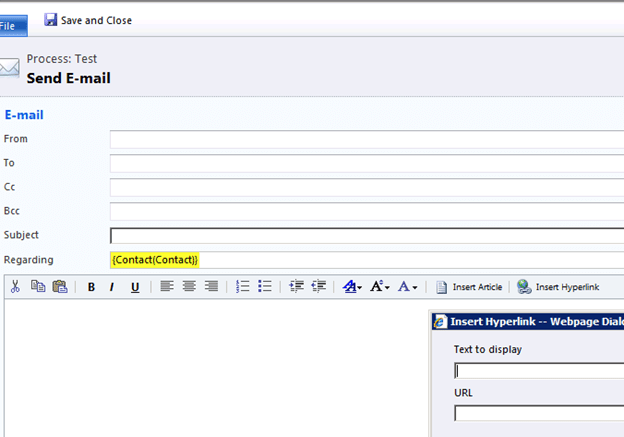
Send email activity

Earlier

Now

Option for Inserting Hyperlink

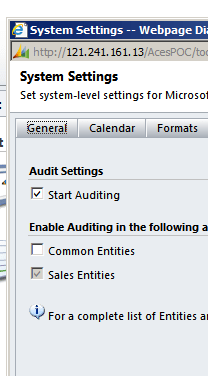
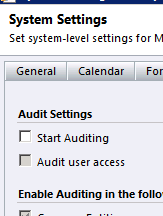
Auditing

Earlier

Now

Audit User Access

http://msdn.microsoft.com/en-us/library/hh547392.aspx

Improvements in Duplicate Detections

Get the complete detail here

http://blogs.msdn.com/b/crminthefield/archive/2011/10/26/podcast-and-overview-microsoft-dynamics-crm-2011-update-rollup-5.aspx

Hope this helps.

Activity Feeds in CRM 2011 – New features.


Hi,

Let us see what all features are there in the Activity Feeds.

  • Download Activity Feeds solution from the market place.
  • Import the managed solution MicrosoftCRMActivityFeeds.zip.

We can see a new link added above Dashboard in “My Work” area

The other place it appears is the Sales area.

Let us go to Settings:-

There we see two new entries: – Activity Feeds Configuration and Activity Feeds Rules.

Let us create a new Activity Feeds Configuration (Post Configurations) record.

For Entity Name, we need to enter the schema name of our entity and we can also select the check box that enables walls for those entity records.

After saving the record the two new rules “New lead created” and “A lead has been qualified” automatically gets added to the record.

A small alert in the record also informs us to publish the related entity, so let us publish the lead entity.

No opening our lead record shows a new Record Wall link in the information section.

Clicking on Follow adds the user as the follower

Now let us qualify the lead record, which is one of the activity feed rule that got auto created.

Going back to “What’s New” link shows us that information in our wall.

Now let us open the same lead record, activate it and submit a post or “Share an insight

This information would also appear in our “What’s New” wall.

We can also add comments in our lead record.

Now suppose I open another lead record and start following it. And now I change something in that record, and then check my wall.

Here I won’t see any update in my wall. This is because of the rule that was defined in the “Post Configuration”

Only when the rule is qualified the update would be available.

Can we define a new rule over there?

It seems that we can only activate or deactivate rule, we can’t add a new one.

Now let us check if we can define Post Configuration for a custom entity or not?

I created a new post configuration record for my custom map entity.

After publishing the entity and opening one of its records I can see the Record Wall link for it.

Now let us check what kind of updates can I receive for my custom entity, as there are no out of the box rules created for it while creating post configuration record for it.

Say I deactivate a map record and then check my wall. I don’t see any update over there which is expected as no rules are defined.

Suppose I write something on Record’s Wall and post it.

It should be available on my wall.

As expected it is.

Similar to records we can also follow system user entity. The post configuration record for the System User automatically got created.

Now let us check the other option Activity Feeds Rules in our system settings.

It contains the feed rules which automatically got created when we defined the Post Configuration rule on lead entity. And again we can only activate and deactivate rules from here; we can’t create a new one.

The What’s new page also shows

auto posts :- the post based on rule.

user posts :- the post on record’s wall.

Clicking on “2 leads” link opens up a view showing the leads records I follow

The edit button gives up an option to upload the profile picture

To summarize,

  • Acitvity Feeds can be enabled for both system entities and custom entities.
  • For certain system entities, Activity Feed Rules will get auto created. We can’t add our own rules, only activate or deactivate them.
  • We can follow records and users. We will receive both auto posts and user posts in our wall (“What’s New” area)
  • We can comment on posts on our wall and delete them.
  • We can set a profile picture.

The best Ribbon Editor Tool for CRM 2011.


Hi,

Just a few days back came to know from my friend that a new ribbon editor tool was has been released.

http://erikpool.blogspot.com/2011/10/new-crm-2011-ribbon-editing-tool.html

So thought of giving it a try.

After using it for few days I can easily say that this is exactly the tool many of us would have been waiting for ribbon editing.

There are other posts as well in the Erik Pool’s blog for understanding how exactly ribbon can be customized. Do have a look at them.

http://erikpool.blogspot.com/2011/10/understanding-crm-ribbon-xml-part-3.html

Bye.

Plugin to check the InputParameters value of the Context in CRM 2011.


Hi,

Wrote a simple plugin to check the value of InputParameters being passed on update of lead record.

  public void Execute(IServiceProvider serviceProvider)
        {
            IPluginExecutionContext context = (IPluginExecutionContext)serviceProvider.GetService(typeof(IPluginExecutionContext));
            Entity myEntity = (Entity)context.InputParameters["Target"];
            // Get the attribute collection
            AttributeCollection myAttColl = myEntity.Attributes;
            // Write in a log file
            TextWriter log = TextWriter.Synchronized(File.AppendText(@"C:\InputParameterLog.txt"));

            log.WriteLine("Log generated at  " + DateTime.Now);
            log.WriteLine();

            foreach (KeyValuePair<string, object> myKV in myAttColl)
            {
                log.WriteLine("Key - " + myKV.Key);

                if (myKV.Value == null)
                {
                    log.WriteLine("Value - null");
                }
                else if (myKV.Value.GetType()== typeof(EntityReference))
                {
                    EntityReference eRef = myKV.Value as EntityReference;
                    log.WriteLine("Id - " + eRef.Id.ToString());
                    log.WriteLine("Logical Name - " + eRef.LogicalName);
                    log.WriteLine("Name - " + eRef.Name);
                }

                else if (myKV.Value.GetType() == typeof(OptionSetValue))
                {
                    OptionSetValue oSetValue = myKV.Value as OptionSetValue;
                    log.WriteLine("OptionSetValue - " + oSetValue.Value);
                }

                else
                {
                    log.WriteLine("Value - " + myKV.Value.ToString());
                }

                log.WriteLine();
            }
            log.WriteLine();
            log.Close();

        }

Haven’t tested it though, might be useful while debugging.

Bye.


Unable to Change Domain Logon Name error in CRM 2011.


Hi,

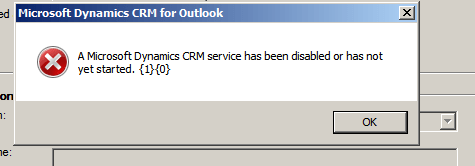
Recently got the below error while updating a record. It was surprising as we were just saving the record to which we had full access.

The good thing was that the log file had the correct message\information about the error

The error was because of access denied error while trying to write something to a text file inside plugin code.

Unhandled Exception: System.ServiceModel.FaultException`1[[Microsoft.Xrm.Sdk.OrganizationServiceFault, Microsoft.Xrm.Sdk, Version=5.0.0.0, Culture=neutral, PublicKeyToken=31bf3856ad364e35]]: Access is denied.Detail:

<OrganizationServiceFault xmlns:i=”http://www.w3.org/2001/XMLSchema-instance&#8221; xmlns=”http://schemas.microsoft.com/xrm/2011/Contracts”&gt; <ErrorCode>-2147187707</ErrorCode>

<ErrorDetails xmlns:d2p1=”http://schemas.datacontract.org/2004/07/System.Collections.Generic&#8221; />

<Message>Access is denied.</Message>

<Timestamp>2011-11-02T14:13:28.7922199Z</Timestamp>

<InnerFault i:nil=”true” />

<TraceText>

[testPlugin: testPlugin.Class1]

[7e507fe4-3605-e111-9e2c-00155d2a49c7: testPlugin.Class1: Update of lead]

</TraceText>

</OrganizationServiceFault>

Few days back also one friend of mine was getting the same issue, however it was while importing the solution. Not sure how it was fixed for them. It might be some custom code throwing exception.

Bye.

Accessing Xrm.Page or CrmForm through JavaScript from an html page showing CRM form in an IFrame


Suppose we have an html page having an iframe that shows a crm record. If we want to access the attributes on the form or call the save function from our html page, we can do it in the following manner.

var  crmForm =document.getElementById("myIframe").contentWindow.document.getElementById("contentIFrame").document.frames[0].document.forms['crmForm'];
var XrmPage =document.getElementById("myIframe").contentWindow.document.getElementById("contentIFrame").document.frames[0].Xrm.Page;

Hope it helps.