Changing the target runtime version of Azure Functions


Azure Functions 2.x runtime is based on .NET Core 2 from .NET Framework 4.7 in 1.x. So, any application migrating from 1.x to 2.x needs to make sure that they are using and referring the compatible code and libraries.

We can also update our Azure Functions to target the appropriate runtime using the below steps à

Inside Azure Portal, select the Function App, click on Application Settings within Platform Features tab.

We can specify the version number for the APP SETTING NAME – FUNCTIONS_EXTENSION_VERSION

~ tilde à indicates that the latest version of that major version.

Get all the details here

https://docs.microsoft.com/en-us/azure/azure-functions/functions-versions

Hope it helps..

The type or namespace name Xrm could not be found (are you missing a using directive or an assembly reference?) error while using Azure Functions 2.x


Recently while working on Azure Functions (https://nishantrana.me/category/azure-functions/), we started getting the error that type or namespace Xrm could not be found.

We had added the project.json file with appropriate NuGet Package reference inside it

It was later we realized that project.json file have been replaced with function.proj in Azure Function 2.0.

More details here

https://blogs.msdn.microsoft.com/cjaliaga/2018/01/21/installing-nuget-packages-in-azure-functions-2-x-runtime-preview/

Hope it helps..

401 Not Authorized error while access project in VSTS


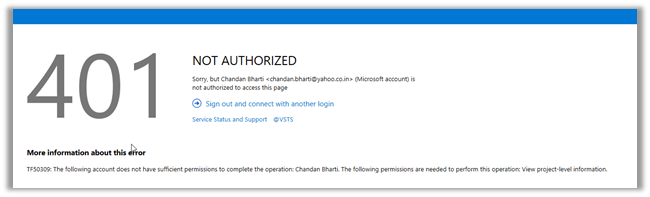
Recently one of our users was getting the below error while trying to access the VSTS Project.

401 NOT AUTHORIZED and the following account does not have sufficient permissions to complete the operation. The following permissions are needed to perform this operation. View project level information.

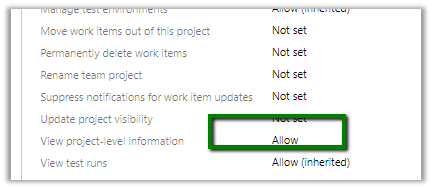
Here we can see the users being added to the project team and the team having all the appropriate rights.

Adding the user to other groups i.e. Build Administrators, Contributors, Project Administrators etc. also didn’t help.

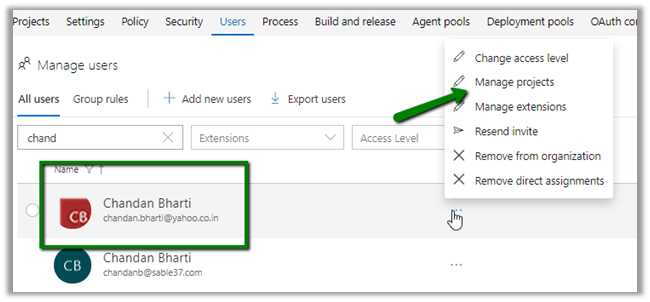
Also, inside Manager Users section.

https://[[subscription]].visualstudio.com/_admin/_users

We selected the user and clicked on Manage Projects to check his access.

It showed the user being part of Project Administrators – VSTS Groups.

Still user was getting the same 401 Unauthorized error.

https://developercommunity.visualstudio.com/content/problem/342094/401-unauthorized-error-for-a-user-added-to-project.html

https://developercommunity.visualstudio.com/content/problem/76468/cant-connect-to-tfs-401-not-authorized.html

Not sure what happens in the background and it takes time for the change to propagate. We have faced this issue many times with certain set of our users (one thing we have noticed that these users had their Gmail or Yahoo id associated to VSTS). For some users it has always worked properly (one using Outlook, Hotmail and Corporate account)

Hope it helps..

LookupRecordNotAvailable error while using Configuration Migration Tool in Dynamics 365 Customer Engagement


While trying to migrate the record using the Configuration Migration Tool, we were getting error like below in the log

ImportEntity – Result: True – Entity: transactioncurrency – Adding transactioncurrency to the reprocess List as field createdonbehalfby with value 05d52058-eb35-41e8-8af7-dfb7120c4599 – LookupEntity systemuser and Record Id 2655712b-e13b-e711-80fb-5065f38b5691 (SYSTEM) – (action:Update) failed validation for reason code: LookupRecordNotAvailable

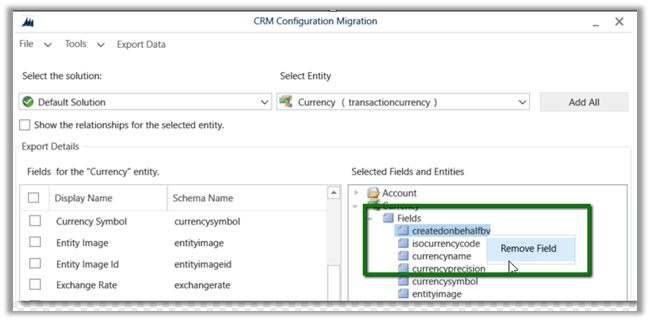
As we do not want to migrate the createdonbehalfby field, the easiest fix for this is to remove the field from the schema.

Ideally instead of adding the entire Entity, we should select only those fields whose value we want to migrate in the Schema file.

Hope it helps..

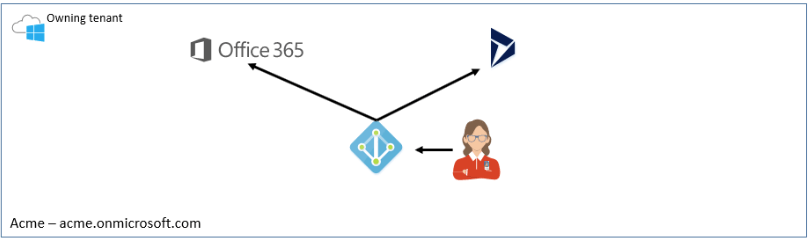
Dynamics 365 and Office 365 in different tenants – How to consolidate !!


very insightful !!

Beth B - MCT, MCSE , MCSA, MSCP's avatarBethB-D365.com

tenantWe have run into many scenarios where a company has Office 365 and then orders Dynamic 365 from a CSP (Cloud Service Provider) and their systems end up different tenants.  As Microsoft moves to the model where there can be more than one partner of record and various flavors of Dynamics 365 (Finance and Operations, Business Central, Customer Engagement, etc..),  I can see this problem getting more prevalent over time.

When your Office 365 and Dynamics 365 are in different tenants it becomes quite the challenge and inconvenience.   A few major issues are as follows

  1. Server-Side Sync – only supports single tenant.
  2. Single sign-on – need to log into two systems.
  3. Two systems to manage
    1. Users
    2. Licensing
    3. Notifications
    4. Double the security concerns
    5. Double the competencies efforts
    6. etc… 

You say, heck this is easy, let’s just move our Dynamics 365 to the other tenant.  If it were on Premise it would…

View original post 2,241 more words

Dynamics 365 Saturday – Dynamics 365 Top 20 Tips & Tricks


Awesome tips and tricks. A must read 🙂