How to – Create a custom API of type function in Dynamics 365 / Microsoft Dataverse


Continuing our previous posts,

Create Custom API Message
https://nishantrana.me/2021/01/13/use-custom-api-to-create-custom-messages-in-dynamics-365/

Allowed Custom Processing Step Type Property –

https://nishantrana.me/2021/01/20/allowed-custom-processing-step-type-allowedcustomprocessingsteptype-property-of-custom-api-in-dynamics-365-microsoft-dataverse/

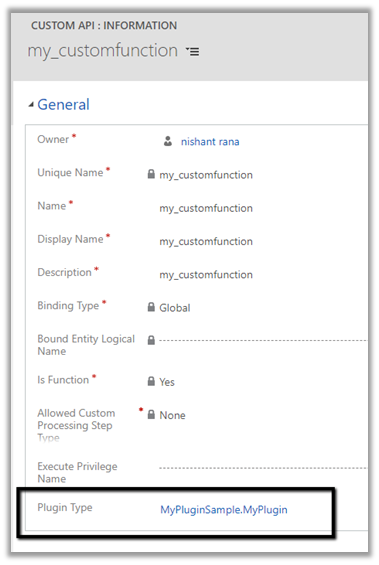
Here we will create a custom API of type function by setting Is Function property as true.

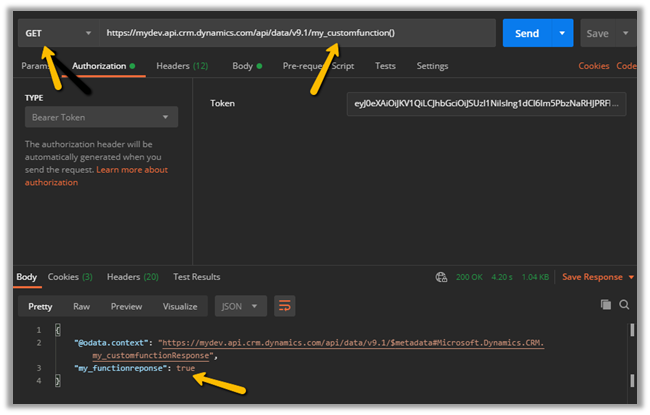
  • The function requires HTTP GET method.
  • The function must include at least one Custom API Response Property defined.
  • The function cannot use Entity or Entity Collection Request Parameter, i.e. Binding Type can only be Global in case of Function.

Let us define a Custom API Response Property and associate it with the custom function defined.

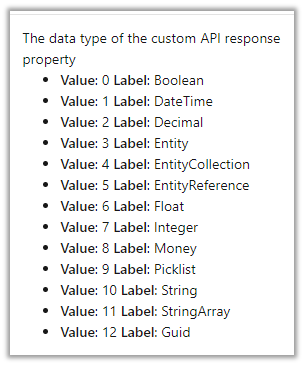
Here we have defined a custom API response property of type Boolean.

The other data type supported are

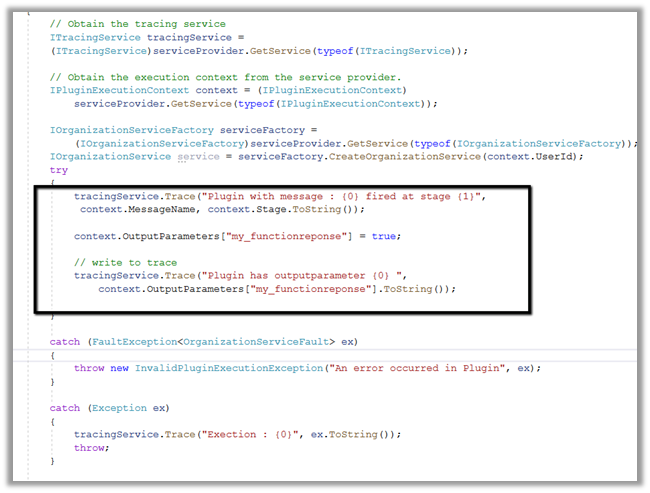
Below is the plug-in that we will associate with the Custom API message, here we are setting the value of the response parameter.

Associated the plugin to the custom API message

Let us trigger our function using the Postman.

Invoking Custom APIs

https://docs.microsoft.com/en-us/powerapps/developer/data-platform/custom-api#invoking-custom-apis

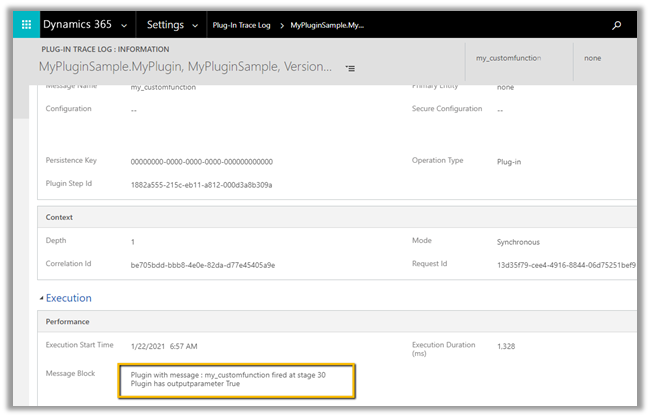
Plugin trace log –

More information on Custom API

Hope it helps..
Advertisements

Custom API Request Parameter entity in Dynamics 365 / Microsoft Dataverse


Continuing our previous posts on Custom API

Here we will look at the CustomAPIRequestParameter entity.

  • This entity can be used to define input parameters to the Custom API.
  • It is not a mandatory entity for Custom API i.e. we can define a custom API without any input/request or output/response parameter.
  • In the case of multiple parameters, ordering is not important as they are identified using the name.
  • One parameter can be associated with only one Custom API.
  • We can have multiple parameters with the same Unique Name as long as they are associated with different Custom API.

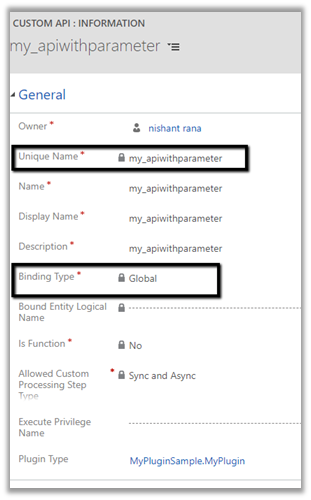
Say e.g. below is our Custom API

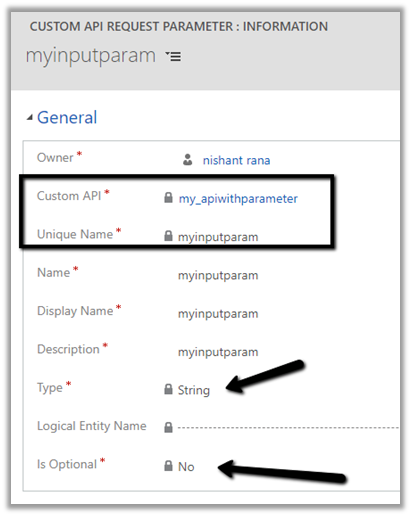
And this is our Custom API Request Parameter associated with the above API of type String

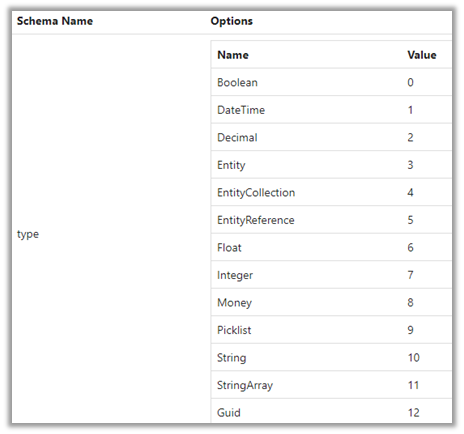
The different data type for the request parameter

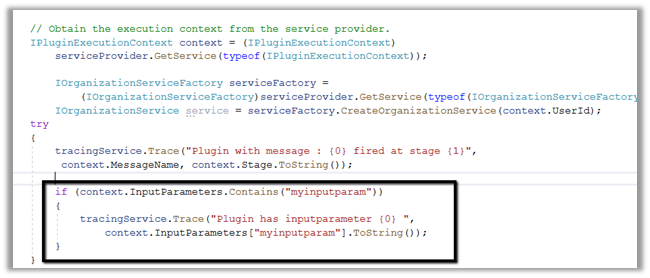
Below is our plugin registered for the custom message.

We are checking for the input parameter and writing it in the trace log.

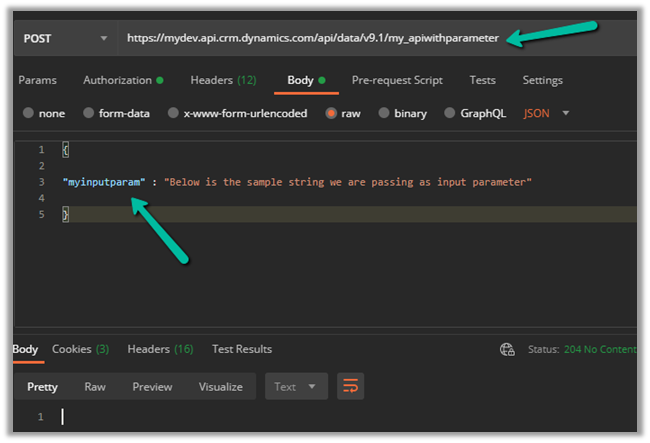
Let us call our custom API

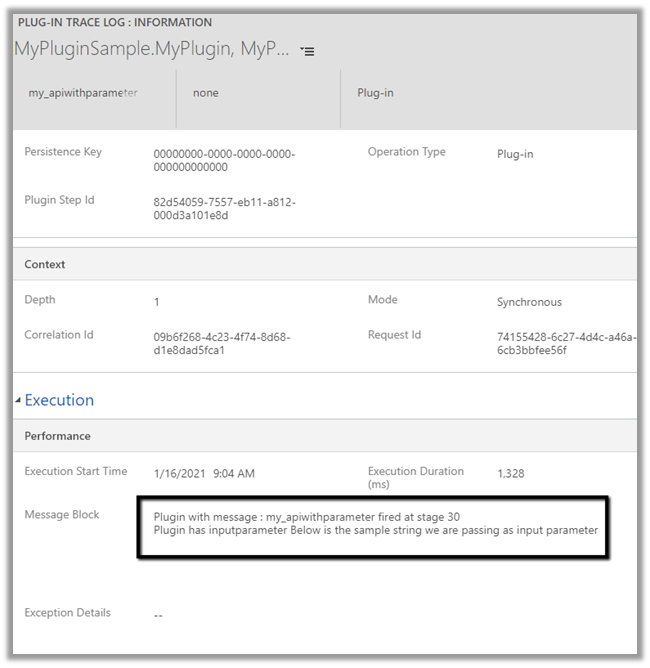
And let us check the plugin trace logs.

We can see the message being called successfully.

Get more details –

Create and use Custom APIs

Hope it helps..

Dynamics Portals – Using SSL Certificates and Custom Domains – Part 1: Generate Certificate Request


Step by Step – Generating CSR – Certificate Signing Request

Mario Trueba Cantero's avatarMS Tech & Coffee

Hello team,

This week I have been working with Certificates a LOT, and let me tell you, it’s a world on its own, I always had a lot of respect for the people that work on that field, now my respect is even greater!

As we are approaching our go-live date in my current project one of the things that we had left was to request an SSL Certificate for the Dynamics 365 Portal that we created.

If you don’t know what an SSL Certificate is or why do you need it, have a look at this website, I found it very useful:

What are SSL Certificates and who needs them

Your Dynamics Portal already has a certificate which makes it https:// however the one that is using is the wildcard one for all Azure Websites. If like myself, you have a different domain that you want to use, you…

View original post 569 more words

Export key attribute uniquename for component CustomAPI must start with a valid customization prefix exception while creating Custom Action in Dynamics 365


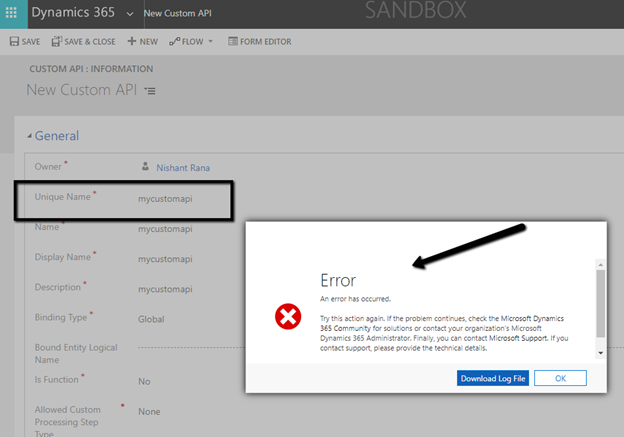
We might get below error while creating a custom action from the maker portal without specifying the prefix.

Unhandled exception:

Exception type: System.ServiceModel.FaultException`1[Microsoft.Xrm.Sdk.OrganizationServiceFault]

Message: Export key attribute uniquename for component CustomAPI must start with a valid customization prefix

As the message suggests, we need to add prefix to the Unique Name of the custom API.

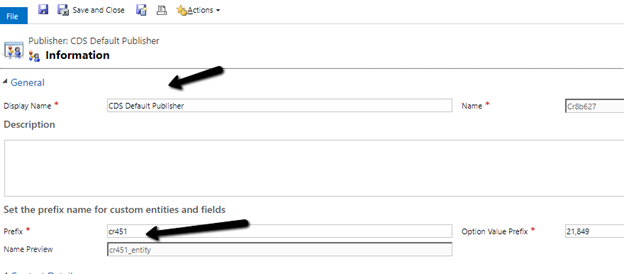
Check the prefix of the solution publisher and specify the same.

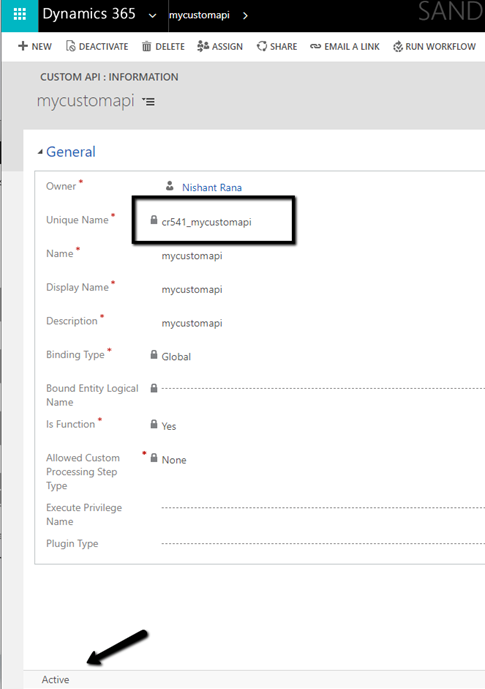
Adding the prefix allows us to save and create the Custom action record.

Microsoft docs suggest that is should match the prefix specified for the solution publisher

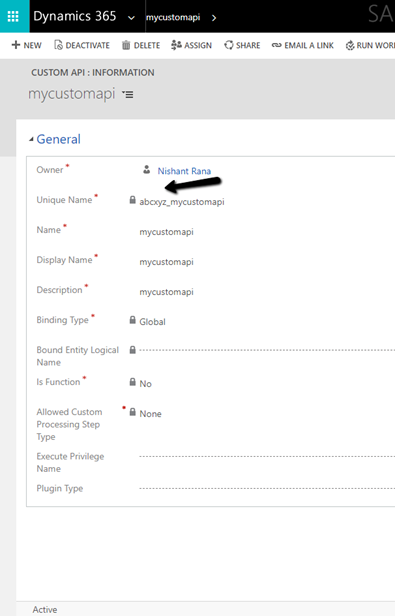
but it seems we can specify any prefix there and it allows us to save the record.

More on Custom API –

Create Custom API Message –
https://nishantrana.me/2021/01/13/use-custom-api-to-create-custom-messages-in-dynamics-365/

Execute Privilege Name Property –

https://nishantrana.me/2021/01/14/execute-privilege-name-executeprivilegename-property-of-custom-api-in-dynamics-365-microsoft-dataverse/

Allowed Custom Processing Step Type Property –

https://nishantrana.me/2021/01/20/allowed-custom-processing-step-type-allowedcustomprocessingsteptype-property-of-custom-api-in-dynamics-365-microsoft-dataverse/

Hope it helps..

How to – Force Sync Users from Azure AD to Dynamics CRM


At times after assigning the appropriate license to the User / adding them to Azure AD Security Group associated with the environment, the users do not appear within CRM, or it takes long time for them to appear.

We can use the PowerShell cmdlet shared in the blog.

The same thing can be achieved using Force Sync User Action within Power Platform for Admins Connector (Preview)

https://docs.microsoft.com/en-us/connectors/powerplatformforadmins/#force-sync-user

We can make use of the template which uses the above action

https://us.flow.microsoft.com/en-us/galleries/public/templates/6e4162ca7afc48479e3ad1caadc6c1e6/force-sync-azure-active-directory-group-members-to-specified-cds-instance/

lastly from Admin Portal, we can also try removing Security Group from the environment, and adding it back, or adding removing the license from the user, which triggers the sync.

If nothing helps the last resort is to raise the Microsoft Support Ticket.

soundharya subhash's avatarPower Platform Learning

When an new Environment is created, it takes more than an hour or some times a day to sync users from Azure AD to CRM.

Through Power Shell cmdlets, we can sync user immediately.

Install Module Microsoft.PowerApps.Administration.PowerShell

Install-Module -Name Microsoft.PowerApps.Administration.PowerShell

Connect to Power Apps using any of these

  • User Name and Password

Add-PowerAppsAccount -Endpoint "prod" -Username "" -Password ""

  • Tenant Id, Client Id and Client Secret

Add-PowerAppsAccount -Endpoint "prod" -TenantID "" -ClientSecret "" `
-ApplicationId ""

  • Tenant Id, Client ID and Certificate Thumbprint 

Add-PowerAppsAccount -Endpoint "prod" -TenantID "" -CertificateThumbprint "" `
-ApplicationId ""

Get-AdminPowerAppEnvironment cmdlet gives list of environments available in Tenant, note down the environment name (guid) to which you want to sync the Users

Go to Azure Portal : https://portal.azure.com -> Azure AD -> Users -> note down the Object Id of the user you want to sync

Run the cmdlet in Power Shell

Add-AdminPowerAppsSyncUser -EnvironmentName <Guid> -PrincipalObjectId…

View original post 30 more words

Dynamics CRM On Premise Maintenance Jobs!


rickysaffordpressword's avatarRicky Safford Development Repository

Please remember to reschedule these maintenance jobs after the installation of CRM is completed.

Maintenance Job NamePurposeDefault Frequency/ Recommendation
Deletion ServiceThe deletion service maintenance operation now cleans up subscription tracking records for deleted metadata objects as they expire.

If Outlook does not sync for 90 days, the job will remove the subscription with CRM.

Cleanup POA records. Un-sharing of record(s) do not remove the records in the POA table, it will stay there for 90 days and it will clean up by the deletion job.

Cleanup failed/stuck workflows for the record(s) synchronize with Outlook.

By default, the job executes every 24 hours, reschedule the job to run at non-peak hours. E.g. 11:00PM at night
Indexing ManagementValidates that system-managed indexes exist for all entities and recreates any missing indexes.

This is more for CRM Online and only impacts us during configuration of the solution. It automatically creates…

View original post 1,568 more words