Preserving ‘modifiedon’ During Data Migration in Dynamics 365 / Dataverse


We were working on a data migration requirement where we needed to preserve system fields like created on and modified on.

For Created On, things are straightforward. We can use the overriddencreatedon field, something we had already explored earlier here:

https://nishantrana.me/2018/10/16/using-overriddencreatedon-or-record-created-on-field-to-update-created-on-field-in-dynamics-365/

In this post, we focus on preserving the modifiedon value.

We started with a simple approach. We registered plugins on Pre-Create and Pre-Update and set the modifiedon field directly on the Target entity. This worked well for normal create and update scenarios.

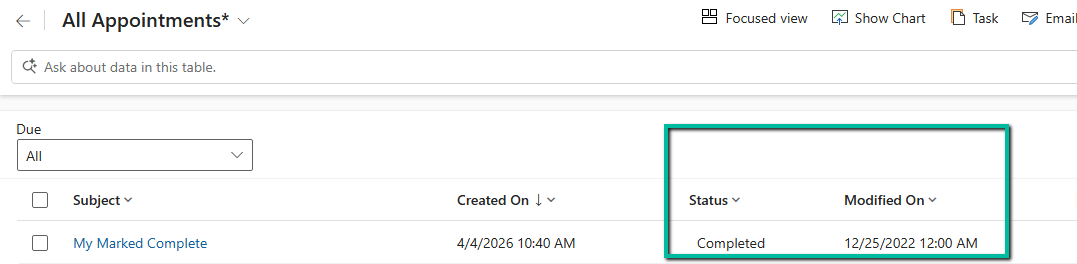
Everything was working fine… until we started migrating appointment records in the completed state. On checking the plugin execution, we observed the following sequence:

Create -> Update

The pre-update plugin although firing was not updating the value of the modified on field. This was because we have Set State message firing after Update which overriding the modifiedon set in the pre create / update plugin.

So we thought of implementing a plugin on the SetState / SetStateDynamicEntity message which will trigger when they are marked as completed instead of Update. However, in the SetStateDynamicEntity message, we do not receive a Target entity. Instead, we get an EntityMoniker (EntityReference) along with State and Status values. Because of this, we cannot directly set modifiedon in a Pre-Operation plugin for SetStateDynamicEntity.

To handle this scenario, we implemented a small workaround. We created an additional dummy field (for example, new_triggerupdate). Then we registered a plugin on Post Operation of SetStateDynamicEntity and performed a simple update on this dummy field. This update triggered the Update message again, which in turn executed our pre-update plugin where we were setting the modifiedon value.

So the final execution flow became:

Create -> Update -> SetStateDynamicEntity -> Update
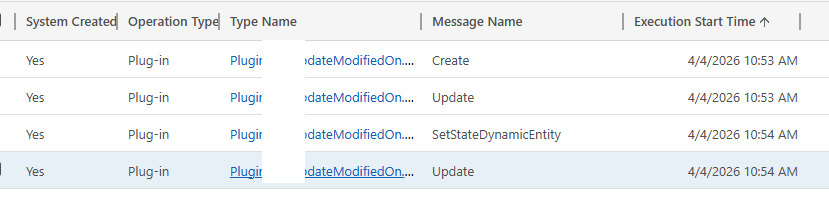
And in this final Update, the modifiedon value was set correctly.

After the migration was completed, we disabled or removed these plugins to avoid impacting normal system behavior.

This approach helped us handle all scenarios including create, update, and activities being marked as completed during migration.
The plugin code –

 public void Execute(IServiceProvider serviceProvider)
        {
            IPluginExecutionContext context = (IPluginExecutionContext)serviceProvider.GetService(typeof(IPluginExecutionContext));
            ITracingService tracingService = (ITracingService)serviceProvider.GetService(typeof(ITracingService));
            IOrganizationServiceFactory factory = (IOrganizationServiceFactory)serviceProvider.GetService(typeof(IOrganizationServiceFactory));
            IOrganizationService service = factory.CreateOrganizationService(context.UserId);

            string message = context.MessageName;
            tracingService.Trace($"Message: {message}");         
            DateTime forcedDate = new DateTime(2022, 12, 25);

            // =========================
            // CREATE & UPDATE (Pre-Op)
            // =========================
            if (message == "Create" || message == "Update")
            {
                if (context.InputParameters.Contains("Target") && context.InputParameters["Target"] is Entity target)
                {
                    tracingService.Trace("Handling Create/Update");

                    // Direct override works ONLY in Pre-Operation
                    target["modifiedon"] = forcedDate;

                    tracingService.Trace("Modifiedon overridden in PreOperation.");
                }
            } 

            // =========================
            // SETSTATE (Post-Op)
            // =========================
            if (message == "SetState" || message == "SetStateDynamicEntity")
            {
                tracingService.Trace("Handling SetState");

                if (context.InputParameters.Contains("EntityMoniker"))
                {
                    EntityReference entityRef = (EntityReference)context.InputParameters["EntityMoniker"];

                    Entity updateEntity = new Entity(entityRef.LogicalName, entityRef.Id);

                    updateEntity["new_touchfield"] = forcedDate.ToLongDateString();

                    service.Update(updateEntity);

                    tracingService.Trace("Modifiedon updated via service.Update in SetState.");
                }
            }
        }

Hope it helps..

Advertisements

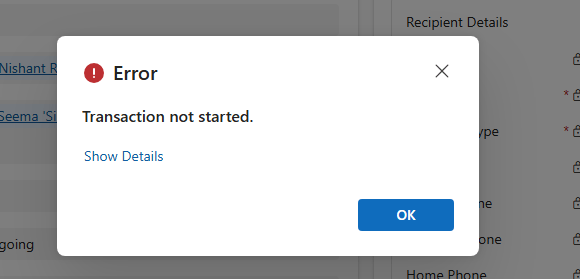
“Transaction not started. There is no active transaction” error (Dynamics 365 / Dataverse)


We recently ran into an interesting and slightly frustrating issue while trying to mark an activity (Appointment/Phone Call/ Task) as Completed in Dynamics 365.

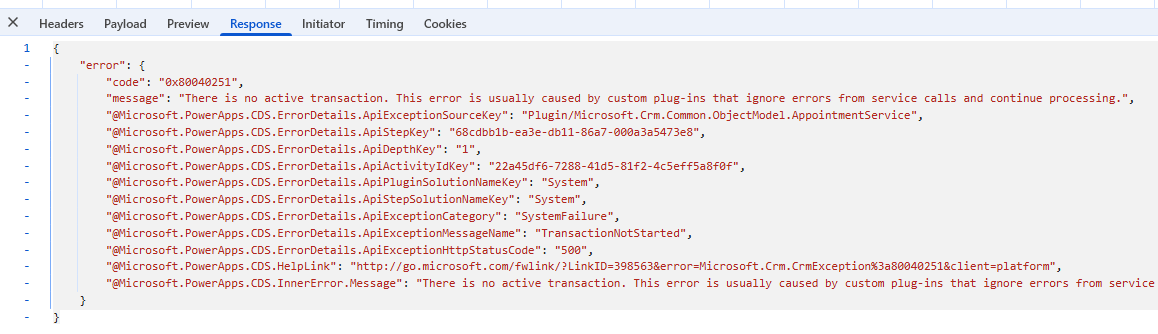
Whenever we tried to mark the activity as completed, we were getting the following error. We were only getting the exception when the activity was owned by a Team instead of a User.

Error Code: 0x80040251 Message: “There is no active transaction. This error is usually caused by custom plug-ins that ignore errors from service calls and continue processing.”

At this point, we were quite confident that this was related to some custom logic interfering with the transaction pipeline. The error message itself clearly hinted towards plug-ins swallowing exceptions and continuing execution.

So, we started with the usual debugging checklist:

Checked all synchronous plug-ins on Activity, Appointment, and related entities. Disabled custom plug-ins one by one. Looked into ownership/team-related logic. Assigned System Admin role to the Team, etc.

Surprisingly, even after disabling all plug-ins, the issue was still occurring. That was our first big clue that something else was at play.

After wasting good enough time, we shifted our attention towards workflows and custom workflow activities. And that’s where things got interesting.

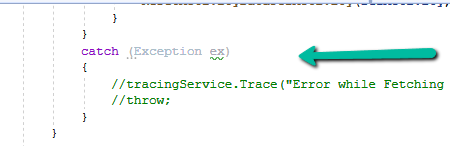
We found a custom workflow activity that had a try-catch block implemented like this:

The exception was being caught… but not thrown again. Essentially, the workflow activity was swallowing the exception silently and allowing execution to continue.

This behavior breaks the transaction pipeline. Dynamics expects failures to bubble up properly so that the transaction can be rolled back. When exceptions are consumed like this, the platform ends up in an inconsistent state, which is why we see errors like ‘There is no active transaction’.

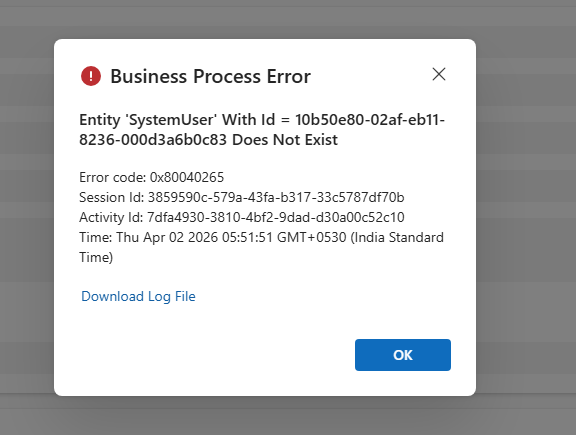
We started first by updating the code to rethrow the exception, that’s where we realized the actual error – which was a SystemUser record does not exist. Basically in our code we were assigning Team Guid’s to a lookup of type System User causing this issue.

After getting to know the exact issue, we updated our logic accordingly to fix the issue.

Key takeaway from this experience:

We should never suppress exceptions in plug-ins or custom workflow activities without proper handling. If something fails in the pipeline, it is better to let it fail cleanly rather than leaving the system in a broken transactional state.

Hope it helps..

Advertisements

Why We Switched Our Plugin from PreOperation to PreValidation – Dataverse / Dynamics 365


We had a business requirement to block the closing of a Quote as Lost under certain conditions. Instead of leaving the quote in an Active state, we wanted the system to explicitly move it back to Draft and show a clear error message to the user explaining why the close action was not allowed.

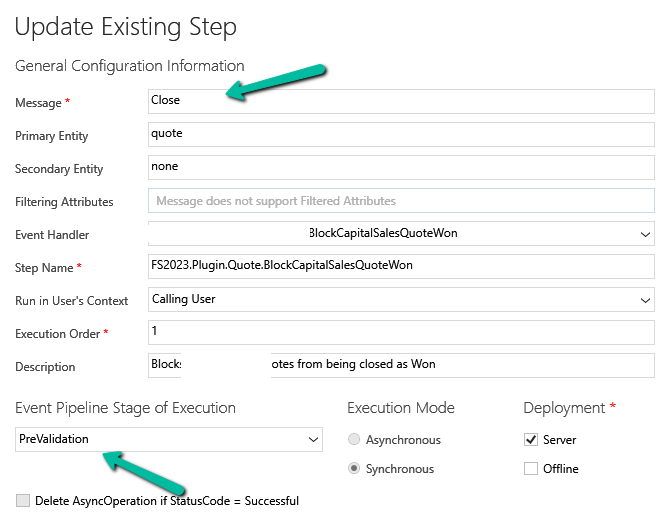
We initially registered our plugin on the Close message in the PreOperation stage. The logic was simple: detect the Lost status, set the quote back to Draft, and throw an exception to cancel the close operation.

The plugin executed exactly as expected. However, the result was not what we intended. Although the quote closure was blocked, the quote never moved to Draft. This happened because PreOperation runs inside the same transaction as the Close message. When we threw an InvalidPluginExecutionException, Dataverse rolled back everything in that transaction, including our SetStateRequest.

To fix this, we moved the same plugin logic to the PreValidation stage, and the behavior immediately changed. PreValidation runs outside the main transaction, before Dataverse starts processing the Close request. This allowed us to:

  • Update the quote state to Draft
  • Throw an exception to cancel the Close
  • Keep the quote in Draft without rollback

Sample Code for reference –

using Microsoft.Xrm.Sdk;
using Microsoft.Xrm.Sdk.Messages;

public class BlockQuoteCloseAndRevertToDraft : IPlugin
{
    public void Execute(IServiceProvider serviceProvider)
    {
        var context =
            (IPluginExecutionContext)serviceProvider.GetService(typeof(IPluginExecutionContext));

        if (!context.InputParameters.Contains("QuoteClose") ||
            !context.InputParameters.Contains("Status"))
            return;

        var status = (OptionSetValue)context.InputParameters["Status"];

        // Custom Lost status value
        const int LostStatusValue = 100000001;

        if (status.Value != LostStatusValue)
            return;

       // other business logic / check, return if not valid else continue and throw exception 

        var quoteClose = (Entity)context.InputParameters["QuoteClose"];
        var quoteRef = quoteClose.GetAttributeValue<EntityReference>("quoteid");

        if (quoteRef == null)
            return;

        var serviceFactory =
            (IOrganizationServiceFactory)serviceProvider.GetService(typeof(IOrganizationServiceFactory));
        var service = serviceFactory.CreateOrganizationService(context.UserId);

        service.Execute(new SetStateRequest
        {
            EntityMoniker = new EntityReference("quote", quoteRef.Id),
            State = new OptionSetValue(0),   // Draft
            Status = new OptionSetValue(1)   // Draft status
        });

        throw new InvalidPluginExecutionException(
            "This quote cannot be closed at this stage and has been reverted to Draft."
        );
    }
}

Hope it helps..
Advertisements

Using Parent Context in Dynamics 365 Plugins — Detecting System-Triggered Operations (Dataverse / Dynamics 365)


In this post, we’ll look at how we used the ParentContext property in Dynamics 365 plugins to determine if a plugin execution was triggered by another plugin and perform logic conditionally. This came up in two real-world cases — one where we needed to prevent duplicate Sales Leads created automatically through Event Management, and another where we wanted to match the correct Campaign when a Lead was updated through a Marketing Form submission.

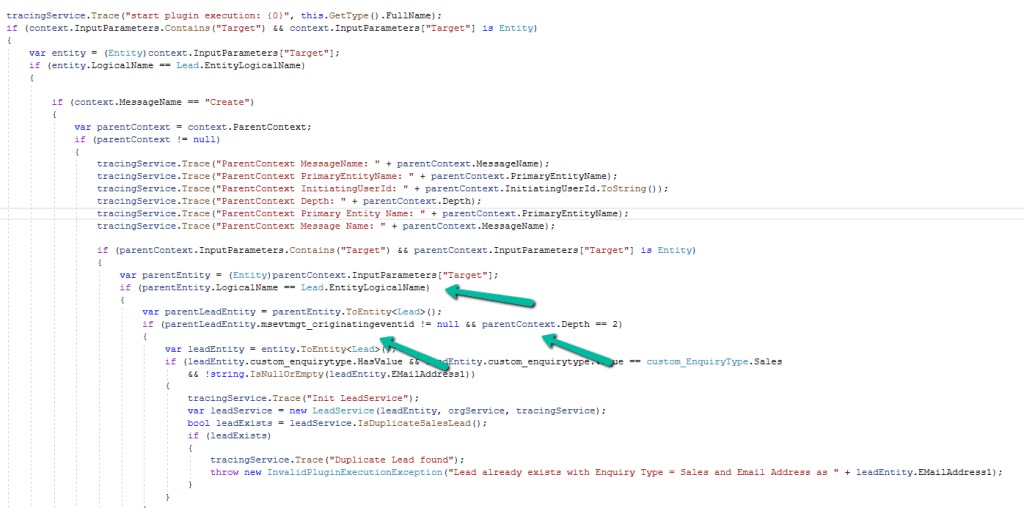
In the first scenario, we had a plugin registered on the Pre-Create of Lead. We wanted to block duplicate Sales Leads only when they were created via CRM’s Event Plugin, not during manual Lead creation. To achieve this, we checked if the plugin execution had a ParentContext. When present, it meant the Lead creation was triggered by another process, not a user. We confirmed it was the system’s Event Plugin by checking the msevtmgt_originatingeventid field (this field will be auto-populated for a lead created by event) and depth. If the Lead was of Enquiry Type “Sales” and had an email address, we checked for duplicates and stopped the creation if one existed. This ensured duplicates were blocked only for system-triggered Leads.

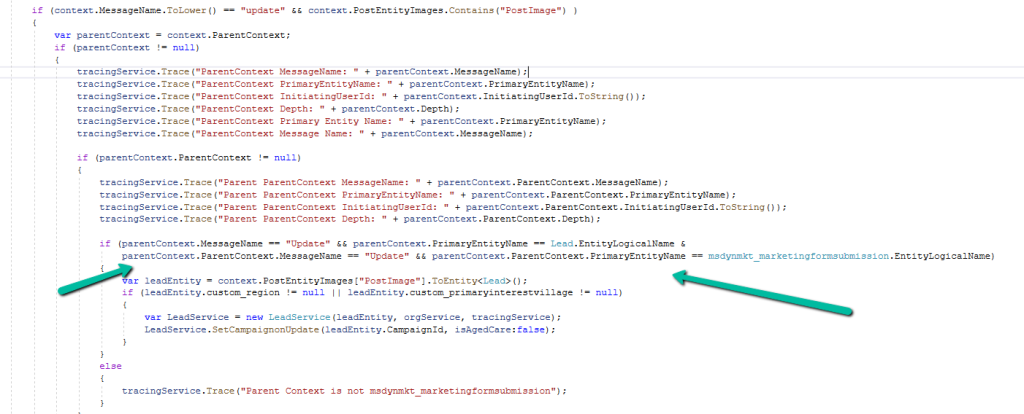
The second case involved the plugin, registered on the Update of Lead. Here, we needed to identify if a Lead update was triggered by a Marketing Form submission (from the msdynmkt_marketingformsubmission table) and only then run our Campaign mapping logic. We used ParentContext to walk up the plugin chain and confirm the origin. Once verified, we called our logic to assign the correct Campaign based on the Region or Village. This made sure the Campaign logic only ran for Leads updated by Marketing automation, not for regular user edits.

In both cases, using ParentContext gave us precise control over when the plugin logic should run. It allowed us to differentiate between user actions and system-triggered updates, avoiding redundant execution and maintaining a cleaner automation flow.

Hope it helps..

Advertisements

Fixed – “Action cannot be performed. This quote is not owned by Dynamics 365 Sales” in Dataverse / Dynamics 365


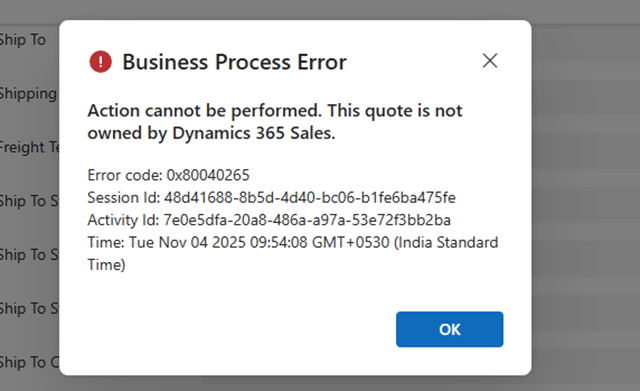
Recently, while working with Quotes in Dynamics 365 Sales integrated with Supply Chain Management (SCM) through Dual-write, we encountered an interesting error while trying to activate an existing quote.

When attempting to activate Quote, the system threw the following error message:

Checking the Plugin Trace Log, we found the following details:

Entered Microsoft.Dynamics.SCMExtended.Plugins.QuotePreUpdate.Execute(), Correlation Id: 97636eb7-a10c-4503-918f-6dd7b8c1a671, Initiating User: 2953f4a9-ffca-ea11-a812-000d3a6aa8ae

QuoteService: PreUpdate.

Validate calling user $2953f4a9-ffca-ea11-a812-000d3a6aa8ae.

Calling user not DataIntegrator

Feature: Dynamics. AX.Application.SalesQuotationD365SalesFeature; Enabled: True

QuoteService: update from CE.

Validate calling user $2953f4a9-ffca-ea11-a812-000d3a6aa8ae.

Calling user not Dual-write.

SCM plugin exception: Action cannot be performed. This quote is not owned by Dynamics 365 Sales., at Microsoft.Dynamics.SCMExtended.Plugins.Services.QuoteService.ValidateIntegrationOwnerOnStateCodeChange(LocalPluginContext localContext, Guid quoteId)

Interestingly, this issue occurred only for old quote records — the ones created before Dual-write was enabled.

All newly created quotes after enabling Dual-write worked perfectly fine and could be activated without any error.

When comparing both sets of records, we noticed one key difference:

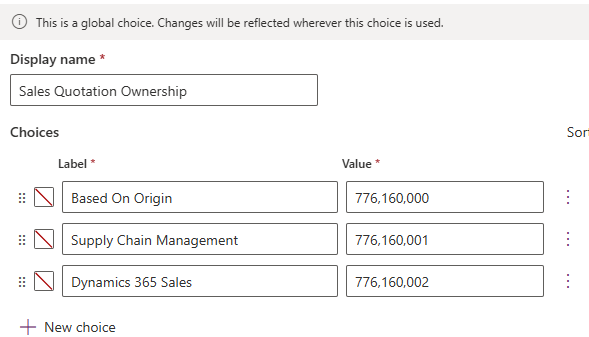
The msdyn_quotationownership (Ownership) field was blank for old quotes, while it was populated for the new ones.

This field plays an important role once Dual-write is enabled. The Microsoft.Dynamics.SCMExtended.Plugins.QuotePreUpdate plugin checks the Ownership field during operations like quote activation to validate the integration source.

If this field is empty, the plugin assumes the quote doesn’t belong to Dynamics 365 Sales and blocks the action, resulting in the error we saw.

Here we simply needed to set the missing ownership field.

A screenshot of a computer

AI-generated content may be incorrect.

To resolve the issue, we bulk updated all old quotes to set the missing Ownership (msdyn_quotationownership) field to Dynamics 365 Sales.

Once updated, the system immediately allowed us to activate quotes successfully — no more errors.

Hope it helps..

Advertisements

Handling Unexpected Lookup Auto-Population in Quick Create Forms (Dynamics 365)


Recently, we had a requirement to track the Current and Previous contracts for a Contact in our Dataverse environment. To achieve this, we created two separate N:1 relationships between the Contact and Contract tables

  • custom_currentcontractid → Contact’s Current Contract
  • custom_previouscontractid → Contact’s Previous Contract

So far, so good.

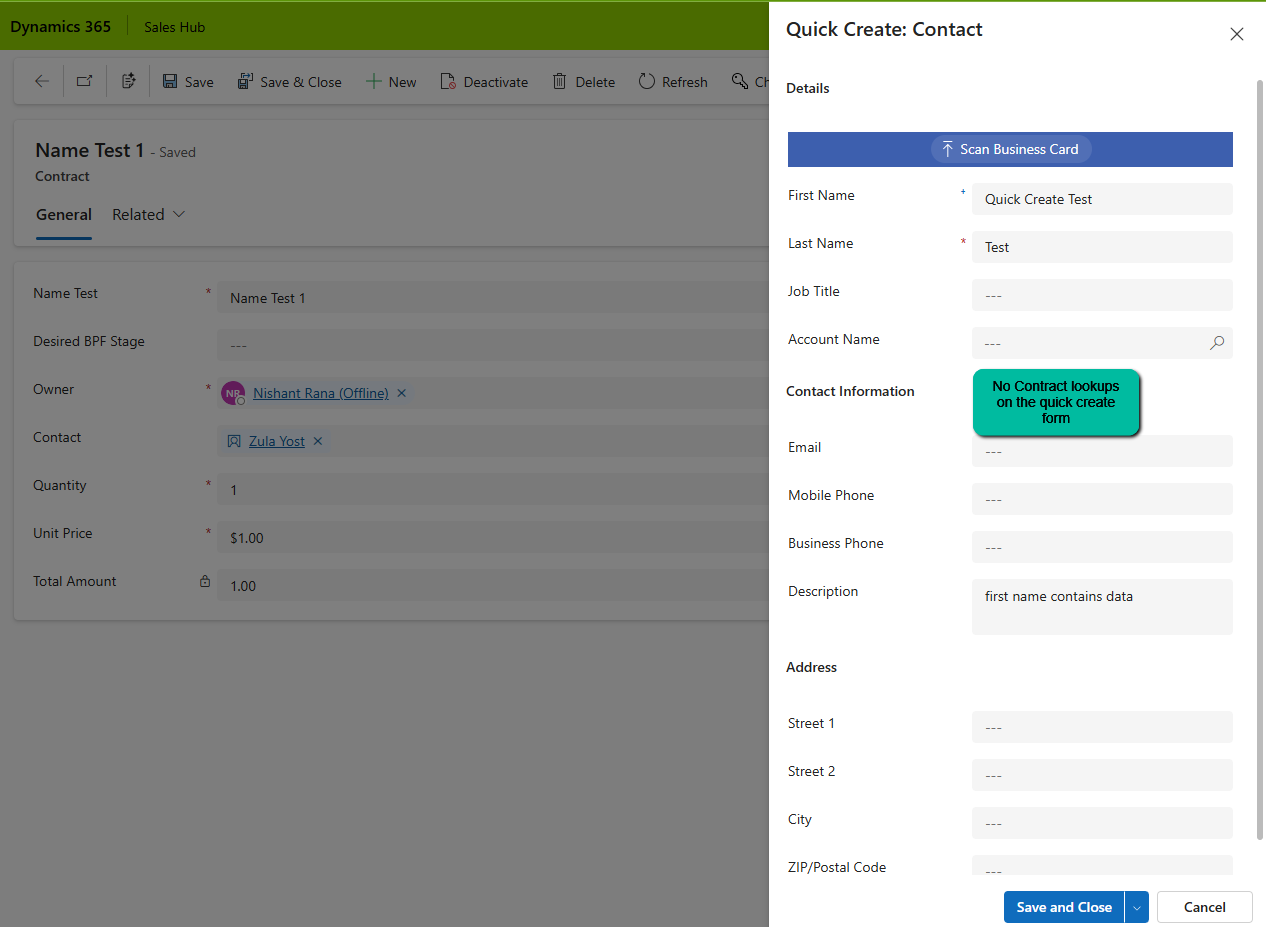
Soon after, we noticed a strange issue: “When creating a Contact from a Contract record (via the Quick Create form), both Current Contract and Previous Contract fields were being automatically populated — with the same Contract record”. This was unexpected, especially since neither field was present on the Quick Create form!

A screenshot of a computer

AI-generated content may be incorrect.

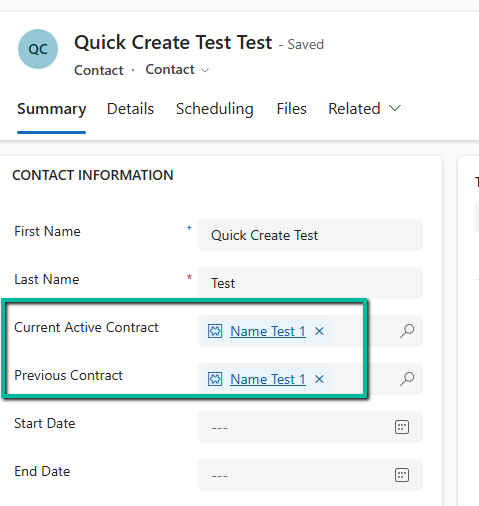
After saving and closing, when we open the record, we can see both the lookup auto-populated with the contract record in context.

A screenshot of a test

AI-generated content may be incorrect.

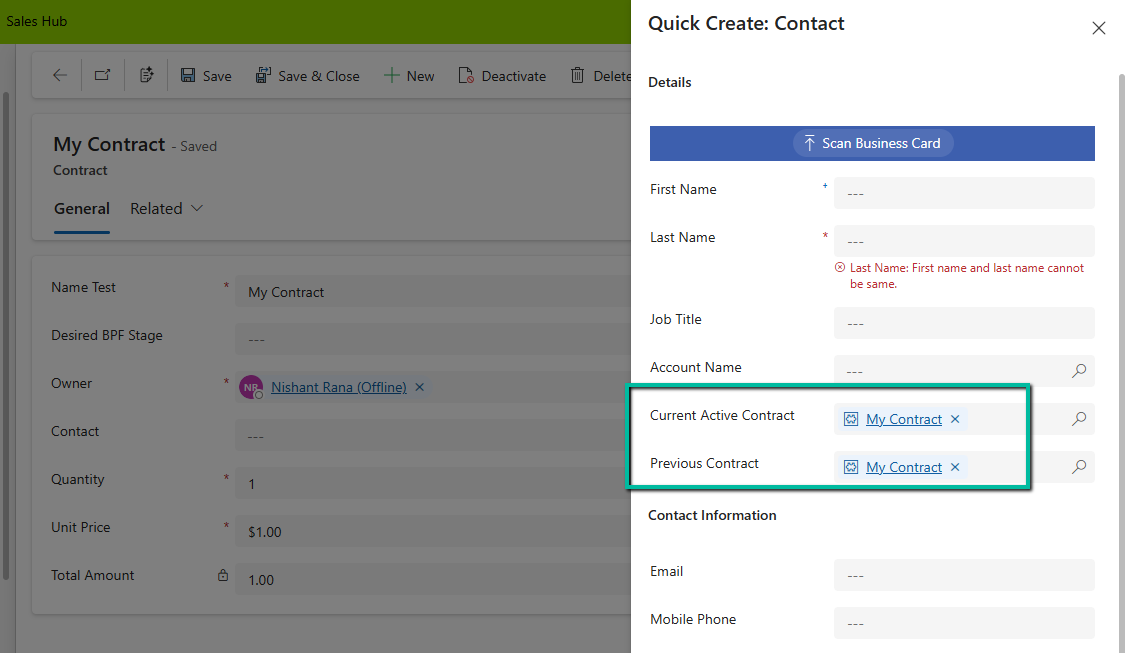
On adding these lookups in the Quick Create form, we can see that Dataverse is auto-populating it with the contract in context.

A screenshot of a contact page

AI-generated content may be incorrect.

When we open a Quick Create form from a record (in our case, from a Contract), Dataverse passes the entity reference context to the Quick Create form. And here’s the catch, If the target entity (Contact) has multiple lookups to the source entity (Contract), Dataverse tries to populate them all.

This behavior is based on relationship metadata, not on what’s visible on the form. So even though we didn’t include the Current Active Contract or Previous Contract on the Quick Create form, Dataverse filled both with the same value.

If we have the fields on the quick create form we can make use of JavaScript on the onload to clear the values.

function clearBothContractLookups(executionContext) {
    var formContext = executionContext.getFormContext();
    
    // Check if in Quick Create mode (formType = 1)
    if (formContext.ui.getFormType() === 1) { 
        var parentRecord = formContext.data.entity.getEntityReference();
        
        // If opened from a Contact, clear BOTH lookups
        if (parentRecord && parentRecord.entityType === "contact") {
            // Clear Current Contract
            if (formContext.getAttribute("new_currentcontract")) {
                formContext.getAttribute("new_currentcontract").setValue(null);
            }
            
            // Clear Previous Contract
            if (formContext.getAttribute("new_previouscontract")) {
                formContext.getAttribute("new_previouscontract").setValue(null);
            }
        }
    }
}

However, like in our case as we did not have these fields on the quick create form, and we didn’t want to have these populated during the creation of the Contract, as these fields were supposed to be populated later, we wrote a Pre-Create Plugin on Pre Operation for it.

public class ClearBothContractLookups : IPlugin
{
    public void Execute(IServiceProvider serviceProvider)
    {
        IPluginExecutionContext context = (IPluginExecutionContext)serviceProvider.GetService(typeof(IPluginExecutionContext));
        
        if (context.InputParameters.Contains("Target") && context.InputParameters["Target"] is Entity)
        {
            Entity contact = (Entity)context.InputParameters["Target"];
            
               // Clear BOTH fields if they exist
                if (contact.Contains("new_currentcontract"))
                    contact["new_currentcontract"] = null;
                
                if (contact.Contains("new_previouscontract"))
                    contact["new_previouscontract"] = null;

              // or remove them from the input parameters 
                  contact.Attributes.Remove("new_currentcontract");
                  contact.Attributes.Remove("new_previouscontract");

            }
        }
    }
}

Hope it helps..
Advertisements