
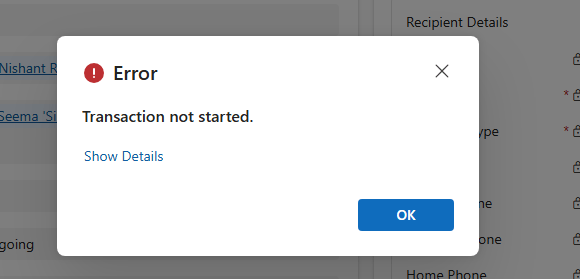
We recently ran into an interesting and slightly frustrating issue while trying to mark an activity (Appointment/Phone Call/ Task) as Completed in Dynamics 365.
Whenever we tried to mark the activity as completed, we were getting the following error. We were only getting the exception when the activity was owned by a Team instead of a User.
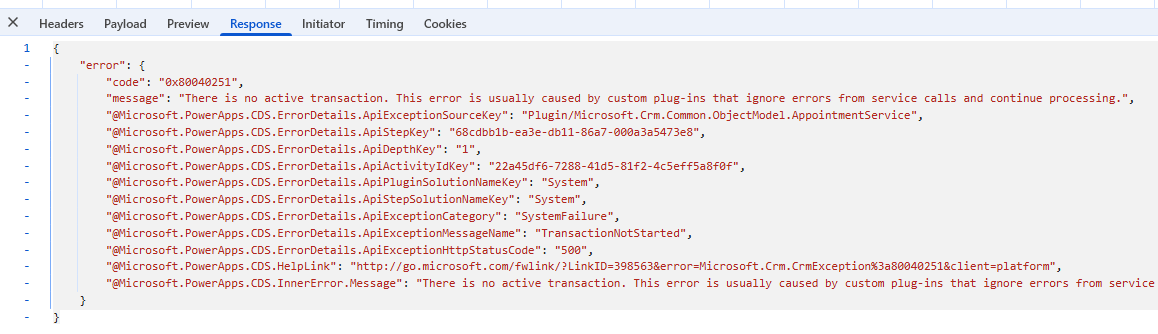
Error Code: 0x80040251 Message: “There is no active transaction. This error is usually caused by custom plug-ins that ignore errors from service calls and continue processing.”
At this point, we were quite confident that this was related to some custom logic interfering with the transaction pipeline. The error message itself clearly hinted towards plug-ins swallowing exceptions and continuing execution.
So, we started with the usual debugging checklist:
Checked all synchronous plug-ins on Activity, Appointment, and related entities. Disabled custom plug-ins one by one. Looked into ownership/team-related logic. Assigned System Admin role to the Team, etc.
Surprisingly, even after disabling all plug-ins, the issue was still occurring. That was our first big clue that something else was at play.
After wasting good enough time, we shifted our attention towards workflows and custom workflow activities. And that’s where things got interesting.
We found a custom workflow activity that had a try-catch block implemented like this:
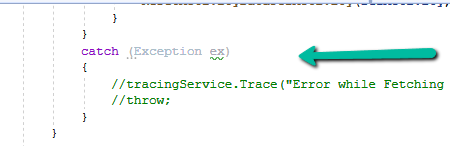
The exception was being caught… but not thrown again. Essentially, the workflow activity was swallowing the exception silently and allowing execution to continue.
This behavior breaks the transaction pipeline. Dynamics expects failures to bubble up properly so that the transaction can be rolled back. When exceptions are consumed like this, the platform ends up in an inconsistent state, which is why we see errors like ‘There is no active transaction’.
We started first by updating the code to rethrow the exception, that’s where we realized the actual error – which was a SystemUser record does not exist. Basically in our code we were assigning Team Guid’s to a lookup of type System User causing this issue.
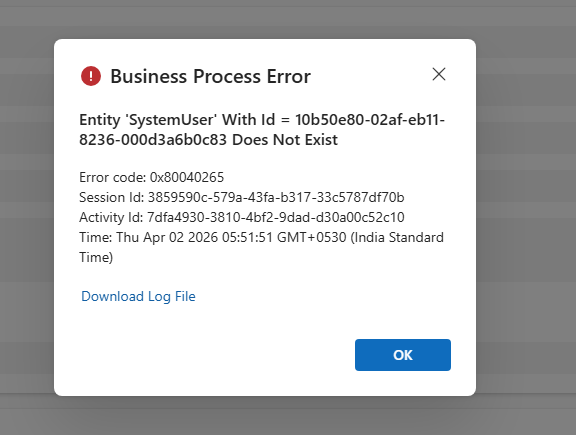
After getting to know the exact issue, we updated our logic accordingly to fix the issue.
Key takeaway from this experience:
We should never suppress exceptions in plug-ins or custom workflow activities without proper handling. If something fails in the pipeline, it is better to let it fail cleanly rather than leaving the system in a broken transactional state.
Hope it helps..
Discover more from Nishant Rana's Weblog
Subscribe to get the latest posts sent to your email.
Share It -


 Nishant Rana's Weblog
One thought on ““Transaction not started. There is no active transaction” error (Dynamics 365 / Dataverse)”