

When working with forms in Dynamics 365 / Power Apps model-driven apps, we often customize field labels based on context, using the setLabel method. At times, we would also like to change the tool tip to go with the changed label of the field. The tooltip is defined as a Description of the field.
Below is the Topic (subject) field of the lead.
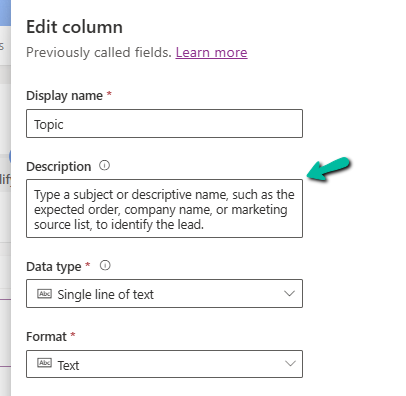
However, we cannot set the tool tip (description) of the field dynamically in the form using the Client API. So, what do we do when the meaning of a field changes depending on another value on the form? That’s where addNotification comes in as a handy workaround.
Let us take a simple example to see how we can use it. On the Lead form, the Topic(subject) field means different things depending on the Lead Source. So here we will be changing the label of the Topic (subject) field, along with setting a different notification message.
For e.g., if Lead Source – Advertisement, we are changing the label to Campaign Name. We can also notice the bulb icon next to the field.
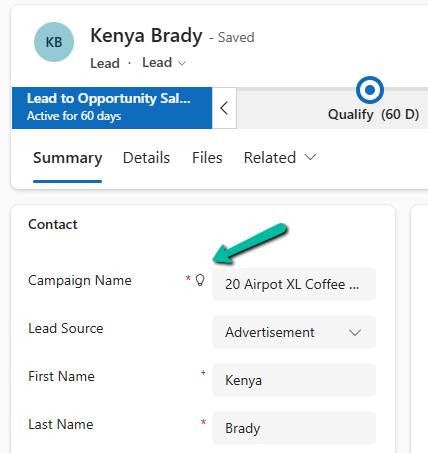
Clicking on it, we can see our message –

Similarly, on changing the Lead Source to Web, we are changing the label to Landing Page, and clicking on the icon, we can see a different message.
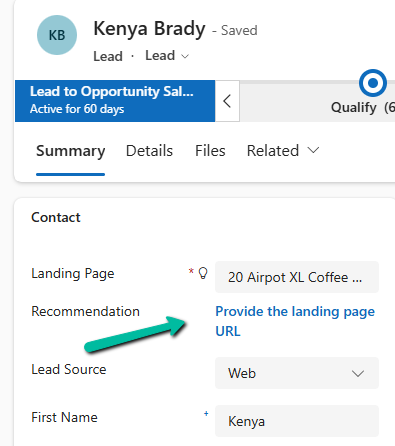
Sample Code –
function updateSubjectField(executionContext) {

    var formContext = executionContext.getFormContext();
    var leadSourceAttr = formContext.getAttribute("leadsourcecode");
    var subjectControl = formContext.getControl("subject");

    subjectControl.clearNotification("subjectTooltip");

    var leadSource = leadSourceAttr ? leadSourceAttr.getValue() : null;

    if (leadSource === 1) {
        // 1 = Advertisement
        subjectControl.setLabel("Campaign Name");
        subjectControl.addNotification({
            messages: ["Enter the name of the ad campaign"],
            notificationLevel: "RECOMMENDATION",
            uniqueId: "subjectTooltip"
        });
    }
    else if (leadSource === 2) {
        // 2 = Referral
        subjectControl.setLabel("Referrer Notes");
        subjectControl.addNotification({
            messages: ["Mention details about the referrer"],
            notificationLevel: "RECOMMENDATION",
            uniqueId: "subjectTooltip"
        });
    }
    else if (leadSource === 8) {
        // 3 = Web
        subjectControl.setLabel("Landing Page");
        subjectControl.addNotification({
            messages: ["Provide the landing page URL"],
            notificationLevel: "RECOMMENDATION",
            uniqueId: "subjectTooltip"
        });
    }
    else {
        // Default
        subjectControl.setLabel("Subject");
    }
}
While addNotification isn’t a perfect replacement for a native tooltip, it’s a practical workaround when we need dynamic, context-aware user guidance.
Hope it helps..
Discover more from Nishant Rana's Weblog
Subscribe to get the latest posts sent to your email.
Share It -


 Nishant Rana's Weblog