

Recently while trying to import one of the solutions we got the below error
Missing dependencies. You’ll need to import the following items to this environment.
It was referring to one of the Managed Solutions – DynamicsMKT_PushNotification, managed by Microsoft, for Microsoft Dynamics 365 Marketing.

We realized that the source environment had a higher version installed than the destination environment.
Source – 1.1.25335.61 and destination environment – 1.1.22667.44

Initially, we thought the error is because the Dev had full marketing app configured i.e. both Solution and Services app configured and the destination had only Dynamics 365 Marketing Solution Only app.
The marketing apps –
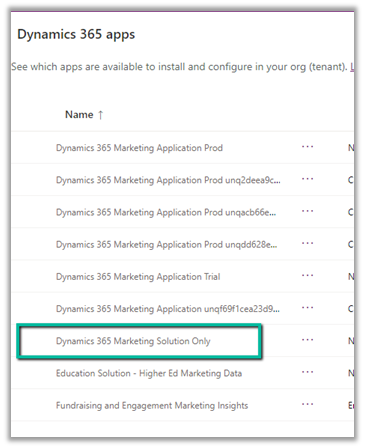
After raising the Microsoft Support, we got guidance/advice from the Microsoft Support / Product team that the Dynamics 365 Marketing Solution Only app was not installed in the destination environment and it was a copy of some other environment that had marketing installed. They suggested installing the Dynamics 365 Marketing Solution Only app in the destination environment. After installing the app, we could see the version of the DynamicsMKT_PushNotification solution increased and were able to install our custom solution successfully.
Hope it helps..
Discover more from Nishant Rana's Weblog
Subscribe to get the latest posts sent to your email.
Share It -


 Nishant Rana's Weblog
One thought on “Missing dependencies – You’ll need to import the following items to this environment error while importing the solution – Dynamics 365 / Dataverse”