

Recently while designing the marketing form, we realized the Hide field option missing for our dropdown fields.

There are 2 ways to solve this –
In the HTML designer mode for the Marketing form –
- Add the attribute hidden=”hidden” for the field
The field will be hidden but the Hide field toggle won’t be available in the designer.
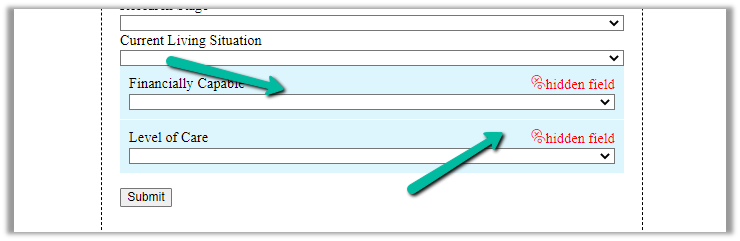
- Change the data-editorblocktype from “Field-dropdown” to “Field-checkbox“.
This adds the Hide field toggle option in the designer.

The result –
The helpful thread – https://community.dynamics.com/365/marketing/f/dynamics-365-for-marketing-forum/391470/how-do-i-populate-lead-source-from-a-hidden-field-on-marketing-form
Hope it helps..
Advertisements
Discover more from Nishant Rana's Weblog
Subscribe to get the latest posts sent to your email.
Share It -


 Nishant Rana's Weblog
One thought on “Fixed – Hide field option missing for dropdown (OptionSet) field in Marketing Form – Dynamics 365 Marketing”