

The new search provider options in Customer Service Hub allow agents to search for files, documents, or articles outside the current organization.
The option can be found at Service Management > Knowledge Base Management > Search Providers
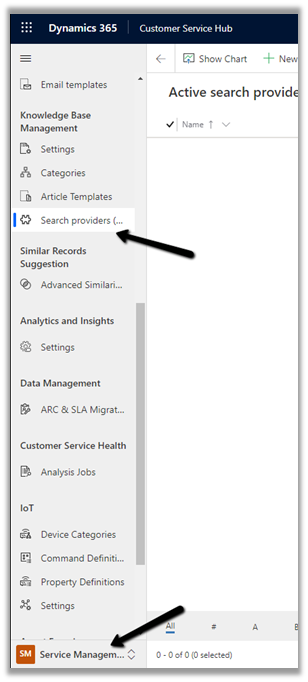
The 3 different search type supported currently are

- Cross organization search – allows specifying a different organization within the same tenant.


On performing the search within the Case record we can see the results being populated from the Organization configured in the search provider


- SharePoint
Enter the SharePoint URL to be searched.
Below is our SharePoint site, to which users have the appropriate rights.

Specify the SharePoint URL
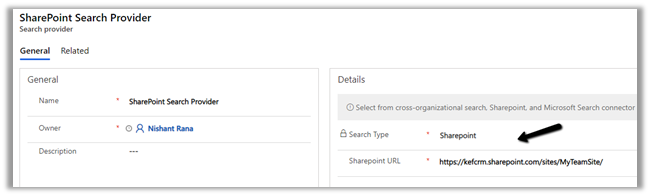
The result –

SharePoint Search Provide only supports filter by Modified date.

- Microsoft Search Connector
This is for the organizations using Microsoft Search for external data.
https://docs.microsoft.com/en-us/microsoftsearch/connectors-overview
Get all the details here
Blog posts on 2021 Release Wave 1 – Dynamics 365
Hope it helps..
Discover more from Nishant Rana's Weblog
Subscribe to get the latest posts sent to your email.
Share It -


 Nishant Rana's Weblog
One thought on “Search Providers (Preview) in Dynamics 365 Customer Service Hub”