
Hi,
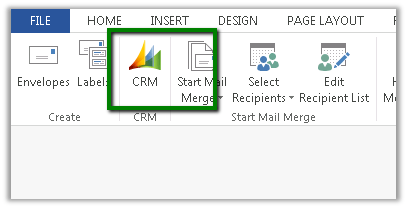
The way we got it working was to download the following template
CRMTemplate.dotm
From the following location
http://server:port/_static/Tools/MailMerge/CRMTemplate.dotm
And place it at the following location
C:\Users\[username]\AppData\Roaming\Microsoft\Templates
Followed by restarting Word.
The helpful post
http://www.experts-exchange.com/Software/Microsoft_Applications/Microsoft_Dynamics/Q_27749742.html
Discover more from Nishant Rana's Weblog
Subscribe to get the latest posts sent to your email.
Share It -


 Nishant Rana's Weblog
So the I’ve downloaded the template and I can see the CRM button on the ribbon but pressing the button yields no action. Is there some additional configuration?
LikeLike
I typically skimp on the legs and feet, but that’s my choice,
just as the helmet must be for all.
LikeLike
In fact when someone doesn’t know after that its up to other viewers that they will assist,
so here it takes place.
my site Mickie website website
LikeLike
I’ll immediately take hold of your rss feed as I can’t find your
e-mail subscription hyperlink or e-newsletter service.
Do you have any? Kindly permit me recognize so that I could subscribe.
Thanks.
LikeLike
Everything published made a bunch of sense. However, what about this?
what if you composed a catchier post title? I ain’t saying your information isn’t
good., however suppose you added something that grabbed a person’s attention? I mean Fixed –
CRM Mail Merge button missing in Word 2013. | Nishant Rana’s Weblog is kinda plain. You could peek at Yahoo’s front page
and see how they create post headlines to grab people
to open the links. You might try adding a video or a related pic or
two to get readers excited about everything’ve
got to say. In my opinion, it would make your blog a little
bit more interesting.
LikeLike
I have been exploring for a little for any high-quality
articles or blog posts on this kind of space . Exploring in Yahoo I ultimately stumbled upon this web site.
Reading this information So i’m happy to convey that I’ve an incredibly excellent uncanny feeling I discovered exactly what I needed.
I such a lot unquestionably will make sure to don?t overlook
this site and give it a glance on a constant basis.
LikeLike