Using CDS/CRM Connection Manager of KingswaySoft’s SSIS Dynamics 365 Integration toolkit in Script Component (SSIS)


Recently for one of our requirements we had to use the CDS/CRM Connection of KingswaySoft’s SSIS Integration Toolkit for Dynamics 365

Below are the steps to be followed –

Drag the Script Transformation component, specify any input columns and inputs / outputs as required.

In the Connection Managers add the connection to Dynamics 365
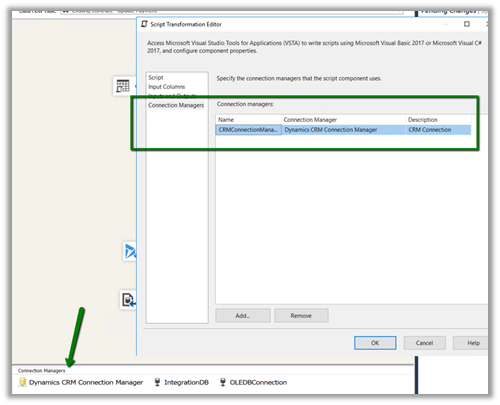
Click on Edit Script to open the Visual Studio.

Add references to below 3 assemblies. We need to search for the 2 KingswaySoft assemblies in the machine and then add them.

The sample code –


public override void Input0_ProcessInputRow(Input0Buffer Row)
{
var connMgr = this.Connections.CRMConnectionManager;
var connectionString = (string)connMgr.AcquireConnection(null);
var conn = new CrmConnection(connectionString);

var orgService = (IOrganizationService)conn.GetCrmService();

RetrieveRequest retRequest = new RetrieveRequest();
retRequest.ColumnSet = new ColumnSet();
retRequest.ColumnSet.AddColumn("statuscode");
retRequest.Target = new EntityReference("dxc_contract", "dxc_contractnumberinternal", Row.dxccontractnumberinternal);
var response = (RetrieveResponse)orgService.Execute(retRequest);

if (response.Entity != null)
{
// status is closed
if (((OptionSetValue)response.Entity.Attributes["statuscode"]).Value == 282210002)
{
Row.IsApprovedContract = "N";
}
else
{
Row.IsApprovedContract = "Y";
}
}
}

Get all the details here

http://www.kingswaysoft.com/blog/2013/06/24/Writing-Script-Component-or-Script-Task-using-CRM-Connection-Manager

Hope it helps..

Scribe Insight Limitation – XML Source doesn’t support repeating sibling nodes


Recently we were evaluating Scribe Insight as our Integration tool for one of our clients. The requirement was to read an xml and create records in Dynamics 365 CE.

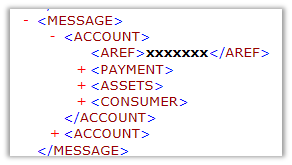
The basic structure was something like below, with Account as the parent tag and Payment, Assets, Consumer as repeating child nodes of Account i.e. 1 – n.

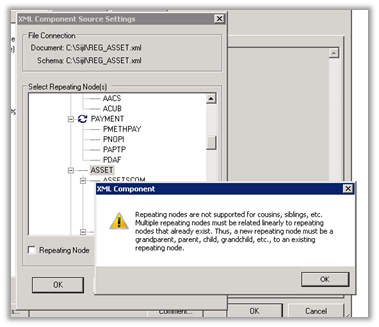
However, to our surprise when we started defining the same structure in the XML Component within Scribe Workbench we got the below error message à

—————————

XML Component

—————————

Repeating nodes are not supported for cousins, siblings, etc. Multiple repeating nodes must be related linearly to repeating nodes that already exist. Thus, a new repeating node must be a grandparent, parent, child, grandchild, etc., to an existing repeating node.

—————————

OK

—————————

Interestingly enough the same limitation doesn’t exist in Scribe Online. Had posted something similar few days’ back on that

https://nishantrana.me/2019/01/14/scribe-online-working-with-hierarchical-data-in-dynamics-365-ce/

As we wanted to go with something that works in On Premise setup we went ahead with SSIS Productivity Pack of KingswaySoft https://www.kingswaysoft.com/products/ssis-productivity-pack which had XML components that works perfectly well with this kind of schema or structure.

Hope it helps..

Thanks KingswaySoft


Thanks KingswaySoft for coming up with one of the best tools for Data Integration and especially the SSIS Integration Toolkit for Microsoft Dynamics 365..

https://www.kingswaysoft.com/partners/MVPsMVP_SSIS

System.AggregateException: One or more errors occurred. (SSIS Integration Toolkit for Microsoft Dynamics 365) error in KingswaySoft’s SSIS Integration Toolkit


Occasionally we might get the below error in our SSIS Package.

[Dynamics CRM Destination [2]] Error: An error occurred with the following error message: “System.AggregateException: One or more errors occurred. (SSIS Integration Toolkit for Microsoft Dynamics 365, v10.2.0.6982 – DtsDebugHost, v14.0.3002.113)KingswaySoft.IntegrationToolkit.DynamicsCRM.CrmServiceException

: CRM service call returned an error: CRM service call returned an error: The request channel timed out while waiting for a reply after 00:01:59.6189794. Increase the timeout value passed to the call to Request or increase the SendTimeout value on the Binding. The time allotted to this operation may have been a portion of a longer timeout. (Error Type / Reason: Timeout)KingswaySoft.IntegrationToolkit.DynamicsCRM.CrmServiceException

(Status Reason: Timeout): The operation has timed out”.

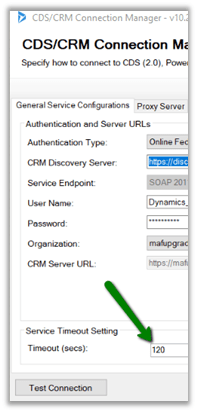
The way we can fix is either increase the time out in the CDS/CRM Connection Manager as suggested.

However the better solution is to keep the batch size low around 100 or so in the CDS/CRM Destination Component. We have observed that decreasing the batch size helps here in case of this error.

Hope it helps..

CrmRecordId and IsNew Output in CRM/CDS Destination Component


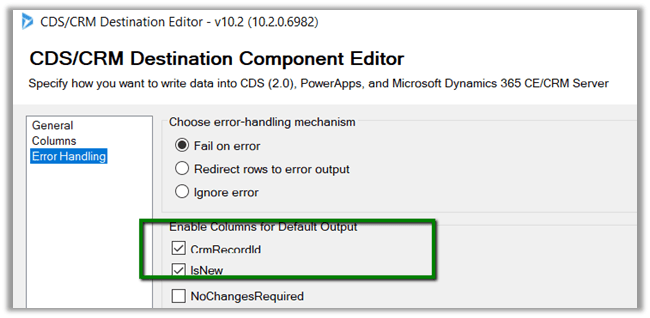
In CRM/CDS Destination Component of SSIS Integration toolkit we can found 2 output column as part of error handling

In case of Create

  • CrmRecordId will have the GUID of the newly created record, which could be used for any further processing
  • IsNew will list whether this is a new record or not.

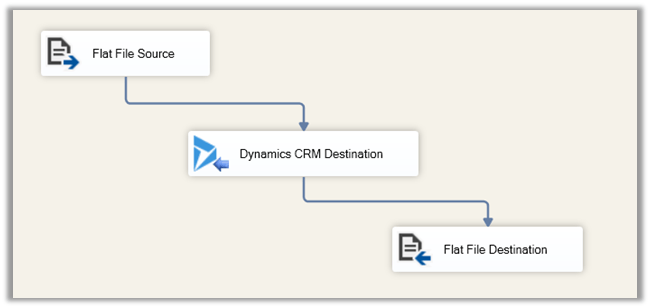
Our package: –

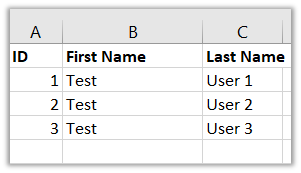
Suppose we have the following record in our source (here ID is the alternate key column used for Upsert)

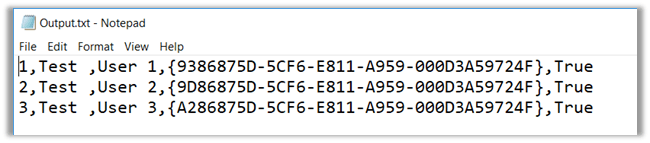
If all the records are new and are created we will get the following output.

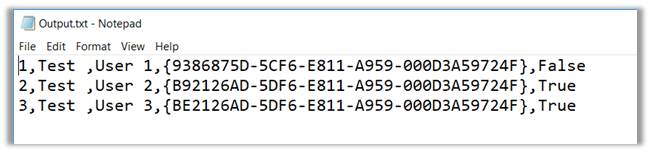
Now if we delete the Test User 2 and Test User 3 record and run the package again, which should now create 2 records and update one record i.e. Test User 1 during Upsert.

The output would be as below

It will return the GUID of the record irrespective of Update or Create and IsNew will specify whether the record is newly created or updated.

Hope it helps..

Fixed – The following job steps cannot be reached with the current job step flow logic in SSIS


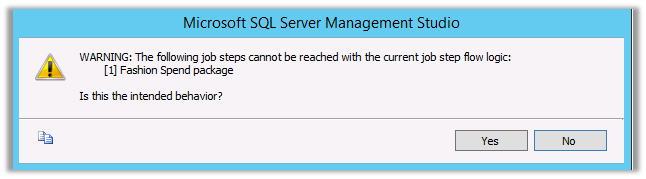
Recently while scheduling our SSIS Packages in SQL Server Agent Jobs we got the below error

WARNING: The following job steps cannot be reached with the current job step flow logic:

[1] Fashion Spend package

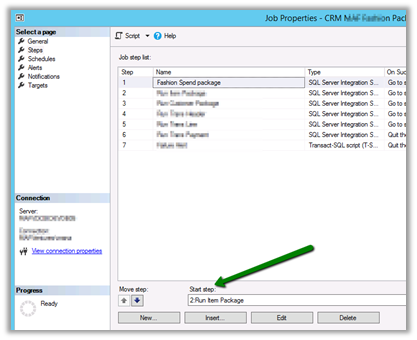
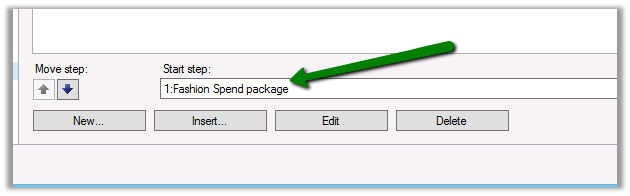
We just need to make sure that we have set correct package in the Start Step properties in Job Properties Dialog Box

To: –

Hope it helps..

Advertisements