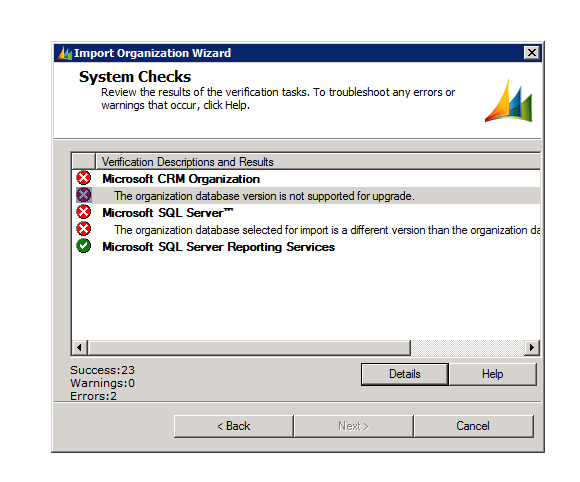
The organization database version is not supported for upgrade – error while importing organization in CRM 2011


After restoring the database to the server, I got the following error while importing the organization using the Deployment Manager

The build version of the database that I was importing was different than the build version of the database of the organization that I already had there.

http://support.microsoft.com/kb/946594 ( to find the build version of the database)

The one we were importing had higher build version.

Than we installed the update for Microsoft Dynamics CRM 2011 Release Candidate

http://support.microsoft.com/kb/2461082

Restarted the server and was able to import the organization successfully.

Hope it helps.

Get value for OptionSet in CRM 2011


To get the value for OptionSet we can use the following function

private
string GetOptionsSetTextOnValue(IOrganizationService service, string entityName, string attributeName, int selectedValue)
{

RetrieveAttributeRequest retrieveAttributeRequest = new
RetrieveAttributeRequest
{

EntityLogicalName = entityName,

LogicalName = attributeName,

RetrieveAsIfPublished = true

};
// Execute the request.

RetrieveAttributeResponse retrieveAttributeResponse =(RetrieveAttributeResponse)
service.Execute(retrieveAttributeRequest);
// Access the retrieved attribute.

Microsoft.Xrm.Sdk.Metadata.PicklistAttributeMetadata retrievedPicklistAttributeMetadata =(Microsoft.Xrm.Sdk.Metadata.PicklistAttributeMetadata)

retrieveAttributeResponse.AttributeMetadata;// Get the current options list for the retrieved attribute.
OptionMetadata[] optionList =
retrievedPicklistAttributeMetadata.OptionSet.Options.ToArray();
string selectedOptionLabel = string.Empty;

foreach (OptionMetadata oMD in optionList)
{
if (oMD.Value == selectedValue)
{selectedOptionLabel = oMD.Label.UserLocalizedLabel.Label;

}

}
return selectedOptionLabel;

}

http://www.codeproject.com/Tips/553178/Get-the-OptionsetValue-and-OptionsetText-for-Dynam


Hope it helps !

Using OrganizationServiceClient in CRM 2011


 Add Service Reference to the Organization WCF service in the application.

URL àhttp://servername:port/OrganizationName/xrmServices/2011/organization.svc 

Use the following code to perform various functions using OrganizationServiceClient 


Entity myContact = new Entity();

myContact.LogicalName = “contact”; 

AttributeCollection myAttColl = new AttributeCollection();

myAttColl.Add(new KeyValuePair<string, object>(“lastname”, “Rana”));

myContact.Attributes = myAttColl;
ClientCredentials credentials = new ClientCredentials();

Uri organizationUri = new Uri(http://servername:port/organizationname/xrmServices/2011/organization.svc&#8221;);

try
{
OrganizationServiceClient orgClient = new OrganizationServiceClient();
 

orgClient.ClientCredentials.Windows.ClientCredential = new System.Net.NetworkCredential(“username”, “password”, “domain”); 

orgClient.Create(myContact);

}
catch (Exception ex)
{

throw ex;

} 

Hope it helps.

CRM Shortcut in CRM 2011 Dialogs


Hi I was just wondering how we can use CRM Shortcut radio button option that appears in Insert Hyperlink dialog box of Dialogs in CRM 2011.

After searching for it, I found the following post which says that we should ignore that button as it won’t be there in the final release.

http://social.microsoft.com/Forums/en/crm2011beta/thread/d012ae9e-4bc5-4bdb-ae6f-c58da16882dc

Hope it helps !

Adding Left Navigation Item to a form in CRM 2011


Hi,

Export solution containing the entity we need to modify.

Find the <form> tag for the form we want to modify within <FormXml> tag

Then use the following sample xml to add the left navigation item.

<Navigation>
<NavBar>
<NavBarItem Id=”navItemID1″ PassParams=”1” Area=”Info” Icon=”testIcon” Url=”http://www.bing.com“>
<Titles>
<Title LCID=”1033” Text=”Custom Nav Item”/>
</Titles>
</NavBarItem>
</NavBar>
</Navigation>

Bye.

Dynamic Values in Workflow in CRM 4


We were facing an issue today; the issue was something like this

We were sending mail in one of our workflow, in the to field of the workflow we had set multiple users name as dynamic values. But we found that mail was being sent to only one user, i.e. the first user only.

Than we found out that if we add multiple values in Look For dialog box and click on ok to add all those together, only the first field having value would be picked by workflow.

For e.g. if I add (created by), (manager of the user field) in the look for dialog box and click on ok to add them together, the workflow would only pick the value for first field i.e. (created by) field for which value exists. It would ignore the manager of the user field. 

However if we add them separately i.e. first add (created by) field and then look for (manager of the user field) and add that field than we could have values for both the field. 

Bye…