Hi,
Found this article that lists the minimum version of products compatible with Microsoft Dynamics CRM 4.0 and 2011.
Do check it out
http://support.microsoft.com/kb/2669061
Bye.

Hi,
Found this article that lists the minimum version of products compatible with Microsoft Dynamics CRM 4.0 and 2011.
Do check it out
http://support.microsoft.com/kb/2669061
Bye.

Hi,
While developing a SSRS report, initially we set the Action property of the text box with the following value that will open the CRM’s Account record
=Parameters!CRM_URL.Value & “?ID={“&Fields!accountid.Value.ToString()&”}&OTC=1″

It was working fine however when we were using the same report inside the Dashboard, the report was not showing up properly as it was inside the IFrame.
So we had to use window.open for the Action’s Expression to open the report properly in a new window from inside Dashboard’s iframe.
=“javascript:void(window.open(‘”+ Parameters!CRM_URL.Value + “?ID={“ + Fields!accountid.Value.ToString() +“}&OTC=1′ ,’_blank’))”
Hope it helps.

Hi,
One of my colleagues was getting the above error while trying to register the plugin using plugin registration tool. This was because the plugin was copied from a network location and hence blocked. Right clicking the plugin assembly, selecting properties and then selecting unblock in the Security section of the General tab resolved the issue.
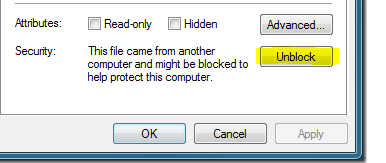
Hope it helps.

Hi,
We were showing a custom SSRS report inside an iframe in one of our CRM 2011 Dashboards. We wanted to hide the Tool Bar from the report.
To achieve that we need to pass the &rc:Toolbar=false parameter to our report’s URL, which we set for the IFrame.
This hides the tool bar.

Now in one of our other SSRS reports, we were doing filtering based on a report parameter. So we wanted to show only the Parameter toolbar to appear and hide the other toolbar that shows Export, Zoom, Print etc. option.
To do so we first figured out the CSS class being used for it,

this turned out to be ToolBarButtonsCell
Now what we did next was to create a simple CSS file with the following content to hide the tool bar
.ToolBarButtonsCell{display: none;}
And placed that file at the following location of the server
C:\Program Files\Microsoft SQL Server\MSRS10.MSSQLSERVER\Reporting Services\ReportServer\Styles
Now next we had to use the rc:stylesheet parameter for our report’s URL and pass the name of the above CSS file just created ( for e.g. hideToolBar.css)
So our new URL was like this
http://localhost/ReportServer/Pages/ReportViewer.aspx?%2fCIBPhaseIIAnD_MSCRM%2fBEA&rs:Command=Render&rc:stylesheet=hideToolBar

After applying the new style sheet parameter to the report’s URL

Check out the following link
http://msdn.microsoft.com/en-us/library/ms152835.aspx (URL Access Parameter Reference)
Hope it helps.

Hi,
Found these two wonderful articles that explains Team Ownership and Reparent feature in depth
Do check them out !
http://andrewbschultz.com/2011/06/17/the-architecture-of-team-security-in-crm-2011/
http://andrewbschultz.com/2011/10/10/isolated-dynamics-crm-security-feature-reparent/
Bye.

Hi,
Check out these two useful links
Release News for Microsoft Dynamics CRM: Q4 2012 Update & CRM on Windows 8.
http://niiranen.eu/crm/2012/07/dynamics-crm-roadmap-for-fall-2012-release-and-beyond/
Bye.

 Nishant Rana's Weblog