Fixed – The Product key is not compatible with installed version of Microsoft Dynamics CRM. Or the upgrade cannot be installed by the Windows Installer service because the program to be upgraded may be missing, or the upgrade may update a different version of the program.


Hi,

We had installed CRM 2011 Server in Network Load Balance. The installation was successful in both the nodes (CRM Server). However later because of some reason we had to do the installation again. We uninstalled CRM from node 1 and did a fresh re installation there, which succeeded.

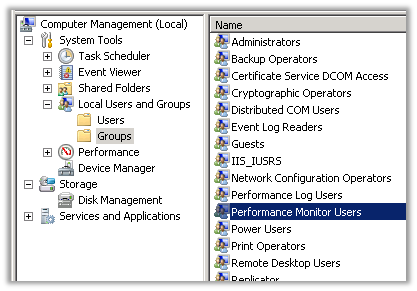
However our 2nd node of CRM 2011 was still referring to old installation. In node 2, we were not able to uninstall CRM using the add remove program features. The only option left with us was to manually uninstall CRM 2011 from that server, for which we followed the tips given in the following blog post.

http://practical-crm.blogspot.ca/2012/02/manually-uninstalling-crm-2011.html

Then we tried running our installer again. This time we got the following error

“The Product key is not compatible with installed version of Microsoft Dynamics CRM”

Which took us to following blog post

http://blogs.msdn.com/b/atif/archive/2012/01/22/the-product-key-is-not-compatible-with-installed-version-of-microsoft-dynamics-crm.aspx

It suggested using Microsoft Update option that comes in the installer before proceeding. However doing so started giving the following error to us.

“The upgrade cannot be installed by the Windows Installer service because the program to be upgraded may be missing, or the upgrade may update a different version of the program.”

The solution that worked for us for fixing this issue was to get the latest installer of CRM 2011 Server from the download center and running the setup from there.

http://www.microsoft.com/en-in/download/details.aspx?id=27822

Hope it helps.

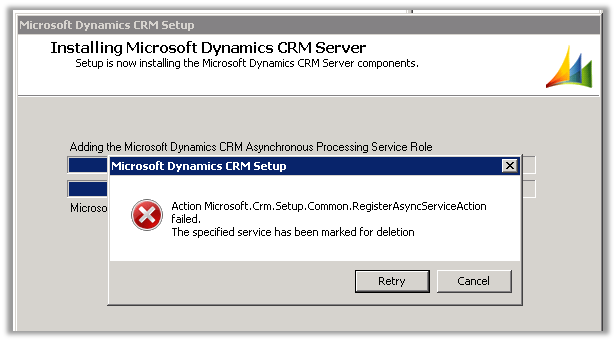
Action Microsoft.Crm.Setup.Common.RegisterAsyncServiceAction failed. The specified service has been marked for deletion. Error while installing CRM 2011.


Hi,

I got the below error while installing the CRM Server.

The issue was after uninstalling the CRM Server, we hadn’t restarted the server. So after restarting the server and running the setup again the installation went smoothly.

Hope it helps.

Fixed – Microsoft.Crm.Setup.Server.GrantConfigDBDatabaseAccessAction failed. Windows NT user or group ‘SQLAccessGroup’ not found in CRM 2011


Hi,

I was installing CRM 2011 on new set of machines and got the above error. The account that was being used had all the privileges required for doing the installation.

While searching for the solution found out one thread that mentioned that the error could be because the SQL Server Management Studio query window might be open and could be locking one of the system DB. It was hard to believe however I gave it a try, closed the Management Studio window on the SQL Server machine and retried and the installation was successful.

http://social.microsoft.com/Forums/en-US/crmdeployment/thread/15e70102-7b65-4aa8-947d-61594a253ae5

Update :- The next time i had the management studio closed but had a remote session open to the SQL Server machine, disconnecting the session resolved the issue.

http://weblogs.asp.net/pabloperalta/archive/2011/09/01/microsoft-crm-setup-server-grantconfigdbdatabaseaccessaction-failed-windows-nt-user-or-group-mydomain-sqlaccessgroup-not-found-check-the-name-again.aspx

Hope it helps.

REVIEW: Microsoft Dynamics CRM 2011 Scripting Cookbook


I recently received the e-book of Microsoft Dynamics CRM 2011 Scripting Cookbook (Packt Publishing by Nicolae Tarla) from the publisher for review.

The book has over 50 recipes divided in 10 chapters. It starts with basics of JavaScript in context of CRM and then goes into details of implementing validation, events handling, error handling, debugging etc. It also covers advanced topics like UI manipulation, using open source JavaScript libraries and framework and integration with Facebook, twitter etc. The book will be enjoyable and informative read for both the readers new as well as advanced.

Most of the recipes are nicely divided into following different sections

  • Getting Ready ( talks about what we need to implement the recipe)
  • How to do it ( step by step instructions on implementing it)
  • How it works ( this section goes into detail of the recipe)
  • There’s more… ( some additional information )
  • See Also ( references for further reading)

The book and all the recipes are so properly organized that it makes it very easy for the readers to understand and implement it, and also make reading the book a wonderful experience. A must read for everyone who loves working in Microsoft Dynamics CRM 2011.

We can get the book here

http://www.packtpub.com/microsoft-dynamics-crm-2011-scripting-cookbook/book

Integrating CRM 2011 Online and SharePoint 2013 Online using BCS oData Proxy


Here we will be creating an ASP.NET Data Service and host it in azure. This ASP.NET Data Service will be used to generate BCS Model in SharePoint 2013 online. The service will allow basic CRUD operation on Contact record in CRM 2011 from SharePoint 2013 online.

  • Create a new Windows Azure Cloud Service project in VS 2012

  • Select WCF Service Web Role

  • Remove the System.Data.Services.Client.dll from the References

  • Add a new item ASP.NET Data Service to the WCFServiceWebRole1 project


  • Add a new class to the project

  • Specify the class name in the ASP.NET Data Service class

  • Add references to the following dll’s
  1. Microsoft.crm.sdk.proxy
  2. Microsoft.xrm.sdk
  3. Microsoft.IdentityModel
  • Set Copy Local as true for the Micrsoft.IdentityModel

  • Source Code for CrmContext.cs, for CRUD Operation (we need to implement IUpdatable Interface for CRUD)
</pre>
using Microsoft.Xrm.Sdk;
using Microsoft.Xrm.Sdk.Client;
using Microsoft.Xrm.Sdk.Query;
using System;
using System.Collections.Generic;
using System.Configuration;
using System.Data.Services;
using System.Data.Services.Common;
using System.Linq;
using System.Reflection;
using System.Runtime.Serialization;
using System.Web;
namespace WCFServiceWebRole1
{
 [DataServiceKey("ContactId")]
 [Serializable]
 public class Contact
 {
 [DataMemberAttribute()]
 public Guid ContactId
 {
 get;
 set;
 }
 [DataMemberAttribute()]
 public string FirstName
 {
 get;
 set;
 }
 [DataMemberAttribute()]
 public string LastName
 {
 get;
 set;
 }
 }

public class CrmContext : IUpdatable
 {
 public static List<Contact> lstContacts;
 public static OrganizationServiceProxy orgProxy = GetOrganizationService();

public static List<Contact> GetContacts()
 {
 List<Contact> lstContact = new List<Contact>();
 QueryExpression queryExpression = new QueryExpression("contact");
 ConditionExpression conditionExpression = new ConditionExpression("statuscode", ConditionOperator.Equal, 1);
 queryExpression.ColumnSet = new ColumnSet(new String[] { "contactid", "firstname", "lastname" });
 EntityCollection contactCollection = orgProxy.RetrieveMultiple(queryExpression);

Contact contactRecord;
 foreach (Entity entity in contactCollection.Entities)
 {
 contactRecord = new Contact();
 contactRecord.ContactId = (Guid)entity.Attributes["contactid"];
 if (entity.Contains("firstname"))
 {
 contactRecord.FirstName = entity.Attributes["firstname"].ToString();
 }
 if (entity.Contains("lastname"))
 {
 contactRecord.LastName = entity.Attributes["lastname"].ToString();
 }

lstContact.Add(contactRecord);
 }

return lstContact;
 }

public IQueryable<Contact> Contacts
 {
 get
 {
 return lstContacts.AsQueryable();
 }
 }

Contact currentEntry;
 bool NewEntry = false;
 bool Delete = false;

#region implemented methods
 object IUpdatable.CreateResource(string containerName, string fullTypeName)
 {
 var objType = Type.GetType(fullTypeName);
 var resourceToAdd = Activator.CreateInstance(objType);
 lstContacts.Add((Contact)resourceToAdd);
 currentEntry = (Contact)resourceToAdd;
 NewEntry = true;
 return resourceToAdd;
 }

void IUpdatable.DeleteResource(object targetResource)
 {
 orgProxy.Delete("contact", ((Contact)targetResource).ContactId);
 lstContacts.Remove(targetResource as Contact);
 Delete = true;
 }

object IUpdatable.GetResource(IQueryable query, string fullTypeName)
 {
 object result = null;
 var enumerator = query.GetEnumerator();
 while (enumerator.MoveNext())
 {
 if (enumerator.Current != null)
 {
 result = enumerator.Current;
 break;
 }
 }
 if (fullTypeName != null && !fullTypeName.Equals(result.GetType().FullName))
 {
 throw new DataServiceException();
 }

return result;
 }

object IUpdatable.GetValue(object targetResource, string propertyName)
 {
 return targetResource.GetType().GetProperty(propertyName).GetValue(targetResource, null);

}

object IUpdatable.ResolveResource(object resource)
 {
 return resource;
 }

void IUpdatable.SaveChanges()
 {
 if (!Delete)
 {
 if (!NewEntry)
 {
 Entity contactNewRecord = new Entity();
 contactNewRecord.LogicalName = "contact";
 contactNewRecord.Attributes["contactid"] = currentEntry.ContactId;
 contactNewRecord.Attributes["firstname"] = currentEntry.FirstName;
 contactNewRecord.Attributes["lastname"] = currentEntry.LastName;
 orgProxy.Update(contactNewRecord);
 }
 else if (NewEntry)
 {
 Entity contactUpdateRecord = new Entity();
 contactUpdateRecord.LogicalName = "contact";
 contactUpdateRecord.Attributes["contactid"] = currentEntry.ContactId;
 contactUpdateRecord.Attributes["firstname"] = currentEntry.FirstName;
 contactUpdateRecord.Attributes["lastname"] = currentEntry.LastName;
 orgProxy.Create(contactUpdateRecord);
 }
 }

}

void IUpdatable.SetValue(object targetResource, string propertyName, object propertyValue)
 {
 Type TargetType = targetResource.GetType();
 PropertyInfo property = TargetType.GetProperty(propertyName);
 property.SetValue(targetResource, propertyValue, null);
 currentEntry = targetResource as Contact;
 }
 #endregion

#region not implemented methods

void IUpdatable.RemoveReferenceFromCollection(object targetResource, string propertyName, object resourceToBeRemoved)
 {
 throw new NotImplementedException();
 }

void IUpdatable.AddReferenceToCollection(object targetResource, string propertyName, object resourceToBeAdded)
 {
 throw new NotImplementedException();
 }

void IUpdatable.ClearChanges()
 {
 throw new NotImplementedException();
 }
 object IUpdatable.ResetResource(object resource)
 {
 return resource;
 }
 void IUpdatable.SetReference(object targetResource, string propertyName, object propertyValue)
 {
 throw new NotImplementedException();
 }
 #endregion
 public static OrganizationServiceProxy GetOrganizationService()
 {

 IServiceManagement<IOrganizationService> orgServiceManagement =
 ServiceConfigurationFactory.CreateManagement<IOrganizationService>(new Uri(ConfigurationManager.AppSettings["OrganizationService"]));
 AuthenticationCredentials authCredentials = new AuthenticationCredentials();
 authCredentials.ClientCredentials.UserName.UserName = ConfigurationManager.AppSettings["UserName"];
 authCredentials.ClientCredentials.UserName.Password = ConfigurationManager.AppSettings["Password"];
 AuthenticationCredentials tokenCredentials = orgServiceManagement.Authenticate(authCredentials);
 return new OrganizationServiceProxy(orgServiceManagement, tokenCredentials.SecurityTokenResponse);

}

}
}
<pre>

Source Code for CRMDataService.svc


using System;
using System.Collections.Generic;
using System.Data.Services;
using System.Data.Services.Common;
using System.Linq;
using System.ServiceModel.Web;
using System.Web;

namespace WCFServiceWebRole1
{
 public class CrmContactService : DataService<CrmContext>
 {
 // This method is called only once to initialize service-wide policies.
 public static void InitializeService(DataServiceConfiguration config)
 {
 config.SetEntitySetAccessRule("*", EntitySetRights.All);
 config.SetServiceOperationAccessRule("*", ServiceOperationRights.All);
 config.DataServiceBehavior.MaxProtocolVersion = DataServiceProtocolVersion.V3;
 }

protected override CrmContext CreateDataSource()
 {
 CrmContext.lstContacts = CrmContext.GetContacts();
 return base.CreateDataSource();
 }
 }
}

  • Build and Publish the service to Azure

  • Test the service in browser

  • Create a new SharePoint App project in Visual Studio

  • Right click the App Project and select the option “Content Types for an External Data Source”

  • Specify the URL for the WCF Data Service and give a Data Source Name and select Next

  • Select the Contacts data entity

  • Deploy the app

  • Get the URL where the app is installed

  • Append the External List path to the URL

  • The Contact records will be displayed in the list in SharePoint.

  • The list item also support update and delete operation

Hope it helps.

This organization name contains unsupported characters or reserved names error while creating new organization using Deployment Manager in CRM 2011


Hi,

I got below error when I was trying to create a new organization named dev. Dev is one the reserved names which cannot be used.

There is a table named ReservedNames in MSCRM_CONFIG database that lists all the reserved names.

  1. About
  2. Activities
  3. AdvancedFind
  4. api
  5. AppWebServices
  6. aspnet_client
  7. bi
  8. bin
  9. Biz
  10. Calendar
  11. Condition
  12. CRMReports
  13. CS
  14. dev
  15. Help
  16. Home
  17. Import
  18. MA
  19. MSCRMServices
  20. Notes
  21. Products
  22. rc
  23. Reports
  24. ReportServer
  25. ResourceCenter
  26. Sdk
  27. SFA
  28. signin
  29. SM
  30. support
  31. Tools
  32. tsweb
  33. UnitTests
  34. UserDefined
  35. Workplace

The helpful post

http://www.mscrmking.com/2012/04/list-the-reserved-word/

Hope it helps.