How to – Get OptionSet Label using FormattedValues property of Entity in Plugin in CRM


The easiest way to get the Label for the option set in plugin is using the FormattedValues property of the Entity.

The Post Create plugin on Contact record getting the label for the address type field.


if (context.InputParameters.Contains(“Target”) && 
context.InputParameters[“Target”] is Entity){

// Obtain the target entity from the input parmameters. 

Entity entity = (Entity) context.InputParameters[“Target”];

if(entity.Contains(“address1_addresstypecode”)){

string addressTypeCodeLabel = entity.FormattedValues[“address1_addresstypecode”];

entity.Attributes[“address1_city”] = addressTypeCodeLabel;

service.Update(entity);}

}

http://community.dynamics.com/crm/b/crmmitchmilam/archive/2013/04/18/crm-sdk-nugget-entity-formattedvalues-property.aspx

Hope it helps.

Advertisements

REVIEW: Microsoft Dynamics CRM 2011 Scripting Cookbook


I recently received the e-book of Microsoft Dynamics CRM 2011 Scripting Cookbook (Packt Publishing by Nicolae Tarla) from the publisher for review.

The book has over 50 recipes divided in 10 chapters. It starts with basics of JavaScript in context of CRM and then goes into details of implementing validation, events handling, error handling, debugging etc. It also covers advanced topics like UI manipulation, using open source JavaScript libraries and framework and integration with Facebook, twitter etc. The book will be enjoyable and informative read for both the readers new as well as advanced.

Most of the recipes are nicely divided into following different sections

  • Getting Ready ( talks about what we need to implement the recipe)
  • How to do it ( step by step instructions on implementing it)
  • How it works ( this section goes into detail of the recipe)
  • There’s more… ( some additional information )
  • See Also ( references for further reading)

The book and all the recipes are so properly organized that it makes it very easy for the readers to understand and implement it, and also make reading the book a wonderful experience. A must read for everyone who loves working in Microsoft Dynamics CRM 2011.

We can get the book here

http://www.packtpub.com/microsoft-dynamics-crm-2011-scripting-cookbook/book

Programmatically working with Service Scheduling in CRM


Hi,

Please check out the following post that explains in detail the concept of Service Scheduling programmatically.

Calendar, Inner Calendar etc..

http://blogs.msdn.com/b/crm/archive/2008/02/15/service-scheduling-exposed-partially.aspx

This is the other helpful post

http://dotnetdevlife.blogspot.com/2011/07/crm-2011-creating-service-restrictions.html

Hope it helps.

Programmatically set Time Off for the System User in CRM 2011


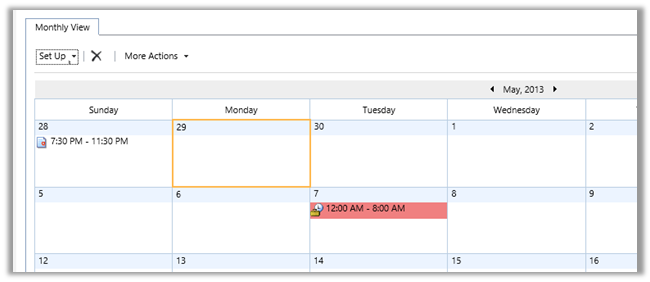
We can make use of below sample code to set the Time Off for the user programmatically. In the below code we are setting time off of duration 8 hours on 7th May 2013.

IServiceManagement<IOrganizationService> orgServiceManagement =
 ServiceConfigurationFactory.CreateManagement<IOrganizationService>(new Uri("https://orgname.crm5.dynamics.com/XRMServices/2011/Organization.svc"));

AuthenticationCredentials authCredentials = new AuthenticationCredentials();
 authCredentials.ClientCredentials.UserName.UserName = "user@domain.onmicrosoft.com";
 authCredentials.ClientCredentials.UserName.Password = "password";
 AuthenticationCredentials tokenCredentials = orgServiceManagement.Authenticate(authCredentials);

OrganizationServiceProxy organizationProxy = new OrganizationServiceProxy(orgServiceManagement, tokenCredentials.SecurityTokenResponse);

 // Get the user id
 Guid userid = ((WhoAmIResponse)organizationProxy.Execute(new WhoAmIRequest())).UserId;

// Get the calendar id of the user
 Entity systemUserEntity = organizationProxy.Retrieve("systemuser", userid, new ColumnSet(new String[] { "calendarid"}));

// Retrieve the calendar of the user
 Entity userCalendarEntity = organizationProxy.Retrieve("calendar", ((Microsoft.Xrm.Sdk.EntityReference)(systemUserEntity.Attributes["calendarid"])).Id, new ColumnSet(true));

// Retrieve the calendar rules defined in the calendar
 EntityCollection calendarRules = (EntityCollection)userCalendarEntity.Attributes["calendarrules"];

// Create a new inner calendar
 Entity newInnerCalendar = new Entity("calendar");
 newInnerCalendar.Attributes["businessunitid"] = new EntityReference("businessunit", ((Microsoft.Xrm.Sdk.EntityReference)(userCalendarEntity["businessunitid"])).Id);
 Guid innerCalendarId = organizationProxy.Create(newInnerCalendar);

// Create a new calendar rule and assign the inner calendar id to it
 Entity calendarRule = new Entity("calendarrule");
 calendarRule.Attributes["description"] = "Time Off Rule";
 calendarRule.Attributes["duration"] = 480;
 calendarRule.Attributes["extentcode"] = 2;
 calendarRule.Attributes["pattern"] = "FREQ=DAILY;INTERVAL=1;COUNT=1";
 calendarRule.Attributes["rank"] = 0;
 calendarRule.Attributes["timezonecode"] = 190;
 calendarRule.Attributes["innercalendarid"] = new EntityReference("calendar", innerCalendarId);

// starting at 12:00 on 7 May
 calendarRule.Attributes["starttime"] = new DateTime(2013, 5, 7,0,0,0,DateTimeKind.Utc);
 calendarRules.Entities.Add(calendarRule);

// assign all the calendar rule back to the user calendar
 userCalendarEntity.Attributes["calendarrules"] = calendarRules;
 // update the user calendar entity that has the new rule
 organizationProxy.Update(userCalendarEntity);

Entity calendarRule1 = new Entity("calendarrule");

// duration of 8 hours
 calendarRule1.Attributes["duration"] = 480;
 calendarRule1.Attributes["effort"] = 2.0;
 calendarRule1.Attributes["issimple"] = true;


 calendarRule1.Attributes["offset"] = 0;
 calendarRule1.Attributes["rank"] = 0;
 // subcode 6= vacation
 calendarRule1.Attributes["subcode"] = 6;
 // time code 2 = unavailable
 calendarRule1.Attributes["timecode"] = 2;
 calendarRule1.Attributes["timezonecode"] = -1;
 calendarRule1.Attributes["calendarid"] = new EntityReference("calendar", innerCalendarId);

EntityCollection innerCalendarRules = new EntityCollection();
 innerCalendarRules.EntityName = "calendarrule";
 innerCalendarRules.Entities.Add(calendarRule1);

newInnerCalendar.Attributes["calendarrules"] = innerCalendarRules;
 newInnerCalendar.Attributes["calendarid"] = innerCalendarId;
 organizationProxy.Update(newInnerCalendar);

Hope it helps

“InsufficientMemoryException” An error has occurred issue while trying to open Organization.svc in CRM 2011.


Hi,

Got the below error while trying to open the organization.svc in browser. Although rest of the CRM was working properly.

Checked the event log and got this interesting error message over there.

Exception information:

Exception type: InsufficientMemoryException

Exception message: Memory gates checking failed because the free memory (208502784 bytes) is less than 5% of total memory. As a result, the service will not be available for incoming requests. To resolve this, either reduce the load on the machine or adjust the value of minFreeMemoryPercentageToActivateService on the serviceHostingEnvironment config element.

at System.ServiceModel.Activation.ServiceMemoryGates.Check(Int32 minFreeMemoryPercentage, Boolean throwOnLowMemory, UInt64& availableMemoryBytes)

at System.ServiceModel.ServiceHostingEnvironment.HostingManager.CheckMemoryCloseIdleServices(EventTraceActivity eventTraceActivity)

at System.ServiceModel.ServiceHostingEnvironment.HostingManager.EnsureServiceAvailable(String normalizedVirtualPath, EventTraceActivity eventTraceActivity)

As suggested by the error message, increasing the RAM resolved the issue.

Bye.

Fixed – You do not have sufficient privileges to view this chart. Contact your system administrator in CRM 2011


Hi,

We might receive the below error in CRM 2011 even though the user has the System Administrator Role assigned.

We need to check that the Access Mode for the system user is set to Read-Write and not Administrative.

In case if we receive the Insufficient Permission error

Go to Admin Section of your portal and select Assign User Licenses link in it

Assign License to the user

This will resolve the issue.

Bye.

Advertisements