Determining the Update Rollup Version of the CRM installed


Hi,

Just sharing two useful posts which would help us to identify the update rollup version installed in our CRM environment.

For CRM 2011

http://crmdynamo.com/2011/09/crm-2011-update-rollup-release-build-numbers-and-how-to-find-them/

For CRM 4.0

http://crmdynamo.com/2010/03/check-which-update-rollup-version-is-installed-on-your-crm-environments/

Bye.

Sample Code for adding a button for SubGrid and passing id of the selected records (CRM 2011)


Simply replace the entity schema name with your entity

  <RibbonDiffXml>
        <CustomActions>
          <CustomAction Id="MyOrg.CustomAction" Location="Mscrm.SubGrid.entitySchemaName.MainTab.Management.Controls._children" Sequence="50">
            <CommandUIDefinition>
              <Button Id="MyOrg.Button" ToolTipTitle="Upload Required Document" ToolTipDescription="Upload Required Documents for the Case" Command="MyOrg.Command" Sequence="50" LabelText="Upload Document" Alt="Upload Document To Portal" Image16by16="/_imgs/ribbon/AddEmail_16.png" Image32by32="/_imgs/ribbon/Email_32.png" TemplateAlias="o1" />
            </CommandUIDefinition>
          </CustomAction>
        </CustomActions>
        <Templates>
          <RibbonTemplates Id="Mscrm.Templates"></RibbonTemplates>
        </Templates>
        <CommandDefinitions>
          <CommandDefinition Id="MyOrg.Command">
            <EnableRules />
            <DisplayRules />
            <Actions>
              <JavaScriptFunction Library="$webresource:new_test" FunctionName="showvalue">
                <StringParameter Value="Guid(s) Selected" > </StringParameter>
                <CrmParameter Value="SelectedControlSelectedItemIds"></CrmParameter>
              </JavaScriptFunction>
            </Actions>
          </CommandDefinition>
        </CommandDefinitions>
        <RuleDefinitions>
          <TabDisplayRules>
          </TabDisplayRules>
          <DisplayRules />
          <EnableRules />
        </RuleDefinitions>
        <LocLabels />
      </RibbonDiffXml>

Function for the jscript web resource.

function showvalue(){

alert(value);

}

Hope it helps.

value cannot be null. parameter name value error in CRM 2011


I was getting the above error while trying to create a SharePointDocumentLocation programmatically. However I was able to create an incident record without any issue.

As it turned out, this is what I was missing


OrganizationServiceProxy orgService = new


OrganizationServiceProxy(organizationUri, homeRealmUri, credentials, null);


orgService.EnableProxyTypes();

Hope it helps!

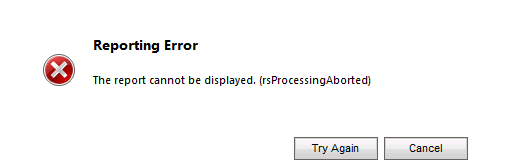
Fxied – Reporting error. Report cannot be displayed. (rsProcessingAborted)


I was getting the above error while running one of the custom SSRS report inside CRM 2011.


To resolve this issue I had to follow these steps

  1. Start SQL Server Management Studio
  2. Expand Security, then expand Logins
  3. Select and right click the account under which the SQL Server Reporting Services is running.
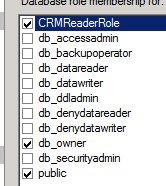
  4. Select User Mapping and select YouOrg_MSCRM database and specify following role membership
  • CRMReaderRole,
  • db_owner
  • public.


Hope it helps.

Advertisements

Using Bulk Data Export tool of CRM 4.0 with CRM 2011


We need to make following changes to get the Bulk Data Export tool for CRM 4.0(http://mscrmbulkdataexport.codeplex.com/workitem/list/basic) to work with CRM 2011.

Change the app.config of the tool

http://mscrmuk.blogspot.com/2011/02/using-crm-40-assemblies-on-crm-2011.html

<runtime>
<assemblyBinding
xmlns=urn:schemas-microsoft-com:asm.v1>
<dependentAssembly>
<assemblyIdentity
name=Microsoft.Crm.Sdk
publicKeyToken=31bf3856ad364e35
culture=neutral/>

<publisherPolicy
apply=no/>
</dependentAssembly>
</assemblyBinding>
</runtime>

And add references to the 64 bit version of Microsoft.crm.sdk and Microsoft.crm.sdktypeproxy dlls. (Which we can get from its SDK)

http://www.microsoft.com/downloads/en/confirmation.aspx?familyid=82e632a7-faf9-41e0-8ec1-a2662aae9dfb&displaylang=en

http://www.box.net/shared/z6z1dcby0k

Hope it helps.

Plugin for Resolve Case action against Incident Entity. (CRM 4.0)


We had a requirement wherein we wanted to update one of the fields in the incident record when we are resolving it through (Actionà Resolve Case).

Here we had to write a Pre-Update plugin registered on Child Pipeline against incident entity.

More on that

http://roman20007.wordpress.com/2010/04/25/resolve-case-event-in-plugin/

http://social.microsoft.com/Forums/en-HK/crmdevelopment/thread/ef1e594f-f50b-484e-a166-285429df8e4d

Hope it helps.