Missing Activities tab in Social Pane in CRM 2013


Hi,

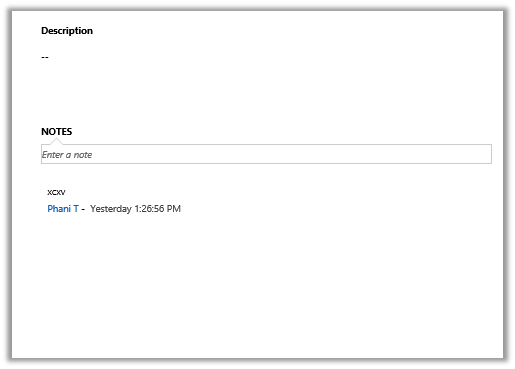
Was working on a task wherein we had to add Social Pane to a form of a custom entity. We enabled the Notes for the entity (Activities was already enabled).

However after adding it to the form it was only showing only Notes tab.

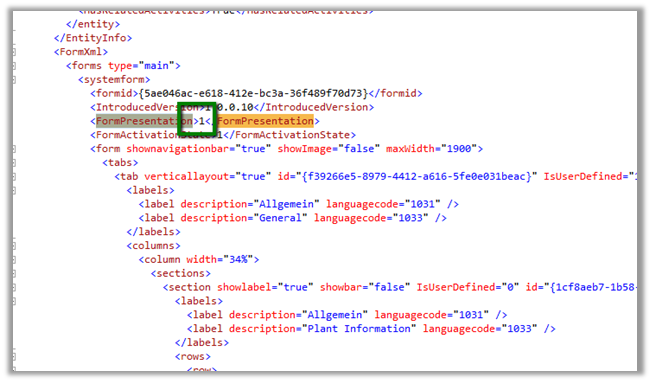
The solution we found was to export the entity and change the following value to 1 for the particular form.

Saving and importing back the solution fixed the issue.


The helpful post

https://thecrmgrid.wordpress.com/2013/11/22/social-pane-control-not-working-in-custom-forms/

Hope it helps..

“The formula is empty” exception while importing solution in CRM 2015


Got this error while trying to import a managed solution.

It was giving this error for Calculated fields.

On checking these fields in the source CRM realized that these fields were missing Action in them.

Adding appropriate action to them and then exporting and importing the same solution worked fine.

Hope it helps..

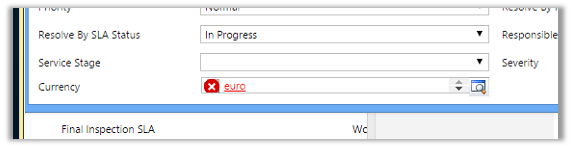
“The entity referenced by this process includes a currency value that does not exist in your organization. Select a different currency and try again.” Error in Workflow in CRM.


After importing one of the solution was getting the below error in one of the processes

The solution was to find out the Currency field and set it to the currency that existed in our organization.

Hope it helps..

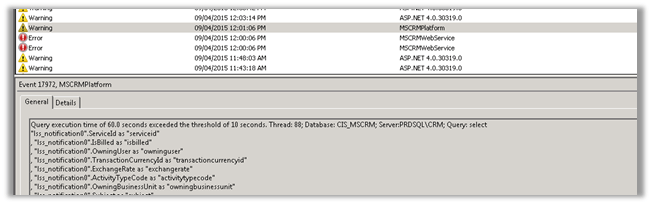
Query execution time of 60 seconds exceeded the threshold of 10 seconds warning in CRM 2013.


Query execution time of 60 seconds exceeded the threshold of 10 seconds warning in CRM 2013.

We were getting the below warning in one of our test environment

On analyzing figured out that one of the plugin was using retrieve with ColumnSet(true) option i.e. retrieving all the columns of the entity which was not required in this case.

Fetching only the required columns fixed the warning.

The other option could have been indexing or increate the value for LongQueryThersholdInSeconds column in ServerSetingProperties table of MSCRM_Config.

Helpful posts

http://blog.edgewater.com/2013/01/07/microsoft-dynamics-crm-querying-data-using-late-binding-versus-early-binding/

http://www.dynamicscrmpros.com/mscrmplatform-warning-in-event-viewer-in-microsoft-dynamics-cr-event-id-17972/

Hope it helps..


Plugin when a case (incident) is resolved in CRM 2013.


Hi,

To fire a plugin when an incident is resolved we need to register the plugin in

Close message for the incident entity.

And in the input parameters of the context we need to check for IncidentResolution.

This entity is a special entity that holds the information about the incident record that is being closed.

The sample plugin below gets the actual end attribute value of IncidentResolution and subtracts created on attribute value of Incident to get the duration and updates the duration (custom field) in the case being resolved.


public void Execute(IServiceProvider serviceProvider)
{
// Obtain the execution context from the service provider.
IPluginExecutionContext context = (IPluginExecutionContext)
serviceProvider.GetService(typeof(IPluginExecutionContext));

if (context.InputParameters.Contains("IncidentResolution"))
{
Entity incidentResolution = (Entity)context.InputParameters["IncidentResolution"];
Guid relatedIncidentGuid = ((EntityReference)incidentResolution.Attributes["incidentid"]).Id;
DateTime actualEnd = DateTime.Now;
if (incidentResolution.Contains("actualend"))
{
actualEnd = (DateTime)incidentResolution.Attributes["actualend"];
}
// Obtain the organization service reference.
IOrganizationServiceFactory serviceFactory = (IOrganizationServiceFactory)serviceProvider.GetService(typeof(IOrganizationServiceFactory));
IOrganizationService service = serviceFactory.CreateOrganizationService(context.UserId);

// Get created on of incident

Entity retrievedIncident = service.Retrieve("incident", relatedIncidentGuid, new ColumnSet(true));
DateTime createdOn = (DateTime)retrievedIncident.Attributes["createdon"];

TimeSpan totalTimeSpent = actualEnd.Subtract(createdOn);

Entity incident = new Entity("incident");
incident.Id = relatedIncidentGuid;
incident.Attributes["new_duration"] = totalTimeSpent.TotalMinutes;
service.Update(incident);

}
}

The helpful post

http://varghesedanny.com/2011/02/24/plug-in-when-case-incident-is-closed/


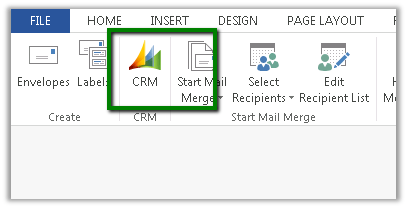
Fixed – CRM Mail Merge button missing in Word 2013.


Hi,

The way we got it working was to download the following template

CRMTemplate.dotm

From the following location

http://server:port/_static/Tools/MailMerge/CRMTemplate.dotm

And place it at the following location

C:\Users\[username]\AppData\Roaming\Microsoft\Templates

Followed by restarting Word.

The helpful post

http://www.experts-exchange.com/Software/Microsoft_Applications/Microsoft_Dynamics/Q_27749742.html