Charts in CRM 2011


Only a few days back I realized that it is so easy to convert our 2-d charts to 3-d in CRM 2011.

Steps are as following:-

Open the chart we want to convert to 3-d.

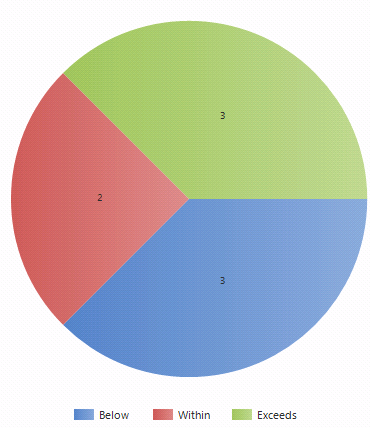
Suppose this is our chart

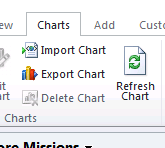
Select the Export Chart button from the Ribbon

In the exported xml for the chart add the following line (Area3DStyle), before the closing tag of ChartArea.

</AxisX>

<Area3DStyle Enable3D=”True” />

</ChartArea>

</ChartAreas>

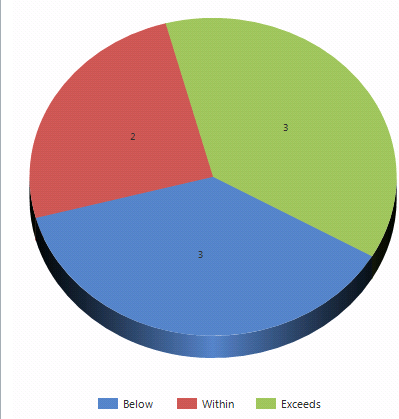
Using Import Chart option import it back, this is how now it is gonna look like

One more thing we  can also add filter criteria to the fetch used in Chart’s xml.

Do check out these wonderful posts

http://niiranen.eu/crm/2010/10/turn-the-flat-dynamics-crm-2011-charts-into-3d/

http://blogs.msdn.com/b/crm/archive/2011/01/04/crm-2011-charts-know-the-real-potential-part-i.aspx

http://blogs.msdn.com/b/crm/archive/2011/05/02/crm-2011-charts-know-the-real-potential-part-deux.aspx

http://gtcrm.wordpress.com/2011/03/22/quick-reference-for-common-crm-2011-chart-customisations/

Hope it helps.

Send mail to a custom entity in CRM 2011


In CRM 4, to send a mail to a custom entity we used to create a new email attribute for that entity and then had to write a custom workflow activity or plugin for sending mail or some complex logic.

http://social.microsoft.com/Forums/en/crmdevelopment/thread/634aa49d-d8fc-4a8c-b3af-6c00b72f8df9

http://blogs.inetium.com/blogs/azimmer/archive/2009/08/08/crm-4-0-using-unresolved-email-addresses.aspx

Good news is that in CRM 2011 we have a new feature to Send e-mail for custom entities.

http://www.avanadeblog.com/xrm/2010/11/crm-2011-feature-of-the-week-11222010-new-entity-creation-flexibility.html

Just need to enable that option in Entity Customization form. It will create a new email field for that entity or will use an existing email field if it is already there.

Bye.

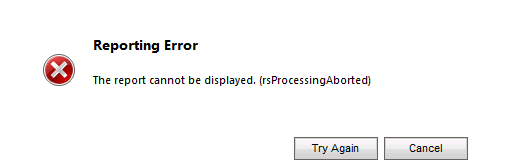
Fxied – Reporting error. Report cannot be displayed. (rsProcessingAborted)


I was getting the above error while running one of the custom SSRS report inside CRM 2011.


To resolve this issue I had to follow these steps

  1. Start SQL Server Management Studio
  2. Expand Security, then expand Logins
  3. Select and right click the account under which the SQL Server Reporting Services is running.
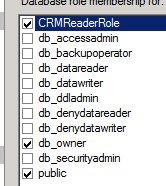
  4. Select User Mapping and select YouOrg_MSCRM database and specify following role membership
  • CRMReaderRole,
  • db_owner
  • public.


Hope it helps.

Advertisements

Set Organizer for appointment or working with ActivityParty in CRM 2011


Hi,
Just posting a sample code for creating appointment record in CRM 2011.

Uri organizationUri = new Uri(<a href="http://CRM2011/orgName/XRMServices/2011/Organization.svc">http://CRM2011/orgName/XRMServices/2011/Organization.svc</a>);
Uri homeRealmUri = null;
ClientCredentials credentials = new ClientCredentials();
credentials.Windows.ClientCredential = new System.Net.NetworkCredential("administrator", "password", "contoso");

OrganizationServiceProxy orgProxy = new OrganizationServiceProxy(organizationUri, homeRealmUri, credentials, null);
// Get the IOrganizationService
IOrganizationService orgService = (IOrganizationService)orgProxy;

// create entity record
Entity appointment = new Entity();
appointment.LogicalName = "appointment";
appointment.Attributes["subject"] = "App at " + DateTime.Now.ToString();
appointment.Attributes["scheduledstart"] = new DateTime();
appointment.Attributes["scheduledstart"] = DateTime.Now.AddDays(1);
appointment.Attributes["scheduledend"] = new DateTime();
appointment.Attributes["scheduledend"] = DateTime.Now.AddDays(1).AddHours(2);

// create activity party record
Entity activityParty = new Entity();
activityParty.LogicalName = "activityparty";
activityParty.Attributes["partyid"]=new EntityReference("systemuser",new Guid("userGuid"));
EntityCollection colAP = new EntityCollection();
colAP.Entities.Add(activityParty);

appointment.Attributes["organizer"] = new EntityCollection();
appointment.Attributes["organizer"] = colAP;

// If we use the bookrequest class it will fail
// and gives ResourceBusy error in case of scheduling conflict
// so simply create the appointment without using book request
// to make it appear in the calendar

//   BookRequest bookRequest = new BookRequest();
//   bookRequest.Target = appointment;

try
{
//  BookResponse booked = (BookResponse)orgService.Execute(bookRequest);
string appGuid = orgService.Create(appointment).ToString();
}
catch (Exception ex)
{
string exMessage = ex.Message;
}

Hope it helps !

Exception message “entityName” in CRM 2011


Hi,

We get the “entityName” exception if we haven’t specified value for LogicalName property of Entity class. (easy to figure out 🙂 )
Hope it helps!

Using Bulk Data Export tool of CRM 4.0 with CRM 2011


We need to make following changes to get the Bulk Data Export tool for CRM 4.0(http://mscrmbulkdataexport.codeplex.com/workitem/list/basic) to work with CRM 2011.

Change the app.config of the tool

http://mscrmuk.blogspot.com/2011/02/using-crm-40-assemblies-on-crm-2011.html

<runtime>
<assemblyBinding
xmlns=urn:schemas-microsoft-com:asm.v1>
<dependentAssembly>
<assemblyIdentity
name=Microsoft.Crm.Sdk
publicKeyToken=31bf3856ad364e35
culture=neutral/>

<publisherPolicy
apply=no/>
</dependentAssembly>
</assemblyBinding>
</runtime>

And add references to the 64 bit version of Microsoft.crm.sdk and Microsoft.crm.sdktypeproxy dlls. (Which we can get from its SDK)

http://www.microsoft.com/downloads/en/confirmation.aspx?familyid=82e632a7-faf9-41e0-8ec1-a2662aae9dfb&displaylang=en

http://www.box.net/shared/z6z1dcby0k

Hope it helps.