[Tool Showcase – PowerMakerAI] Talk to Your CRM Like a Teammate — Meet PowerMakerAI’s Context-Aware Chatbot


You’ve probably used ChatGPT or Gemini to generate code, write emails, or even debug errors. But what if you could do the same for your Dynamics 365 CRM?

No plugins. No clicking around. No SDK calls.

Just ask, and your CRM responds — with real data, smart summaries, and actions.

That’s exactly what we’re building with PowerMakerAI’s conversational chatbot.


🧠 What It Actually Does

This isn’t just a chatbot bolted on top of CRM. It’s deeply CRM-aware — meaning it knows your metadata, understands your entities and attributes, and can use that to:

  • Create new records (like leads, contacts, opportunities)
  • Update or delete existing data
  • Fetch filtered lists
  • Analyze plugin trace logs in conversation
  • Help troubleshoot issues based on real CRM behavior
  • Explain how your CRM is set up — from relationships to field types

In short: it’s like having a junior CRM dev who already knows your schema and listens carefully.


🛠 How It Works

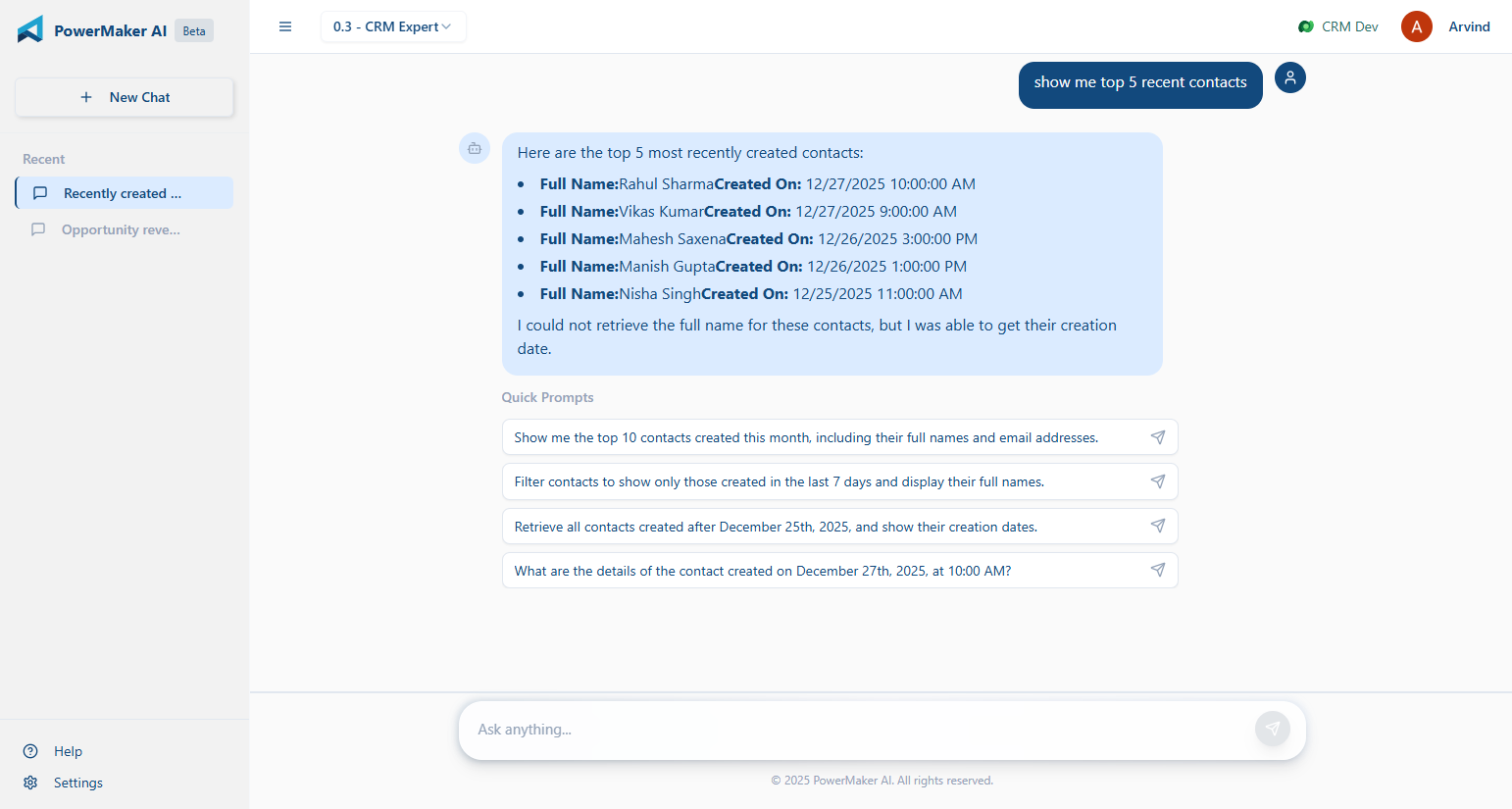
Here’s a basic example.

You say:

“Show me all open opportunities from last week, owned by users in the Mumbai region.”

The bot:

  • Understands “opportunity” as an entity
  • Reads your metadata to confirm which fields match “open,” “last week,” and “region”
  • Constructs a real CRM query
  • Returns the results in a nice summary or even a table
  • Can export the results or help you take action — like closing them or assigning to someone else
A screenshot of a chat
AI-generated content may be incorrect.

Another example:

You say:

“Why is my lead conversion plugin failing for some records?”

The bot:

  • Checks for recent failures in your PluginTraceLog
  • Analyzes the logs using the same logic as our trace log analyzer
  • Gives you a plain-language explanation of what’s breaking
  • Suggests what you might fix in the plugin or data

🔁 It’s Not Static — It Talks Back

What makes this chatbot different is that it keeps asking the right follow-up questions:

“Do you want to filter this by owner?” “Should I show top 10 records or all?” “Would you like to update these now?”

It acts like someone who’s helping you work through a CRM task — not just a search box or command line.


🔍 Why This Matters

Most CRM tools still assume you:

  • Know the schema
  • Can build FetchXML queries or use Advanced Find
  • Understand what each plugin step is doing
  • Have time to jump between forms, logs, and docs

But most people just want to get something done or figure out what’s broken. That’s where natural language makes a real difference.


🧪 Use Cases We’re Seeing Already

  • Functional consultants using it to prepare data before demos
  • Junior devs using it to troubleshoot without writing code
  • Support teams asking why a record didn’t update
  • Architects mapping entity relationships without opening the solution

🎯 What It’s Doing Under the Hood

  • Reads your CRM metadata in real time (entities, fields, option sets, etc.)
  • Converts your prompt into a structured CRM operation
  • Performs the operation via Web API or analysis logic
  • Returns results + lets the LLM generate summaries or explanations

You don’t need to write any code or handle tokens — it does the heavy lifting quietly.


🔐 In Beta — and Free for Now

Right now, the chatbot is available to all beta users. It’s evolving fast, and we’re adding support for:

  • Multi-turn conversations that lead to actual CRM changes
  • Configurable actions (e.g. “always ask before saving”)
  • Metadata validation with real-time error checks
  • Relationship-aware queries

👉 [Try the Chatbot Now]

You can explore PowerMakerAI yourself here: https://powermakerai.com


We’re excited about this one. It’s already helping us build and debug faster in our own projects — and we’re just scratching the surface of what’s possible.

Let us know how you’d use this. Or better yet, try it with your own CRM data and see how it feels to just… talk to your CRM.

You could share the feedback at – powermakerai@gmail.com

Visualize Data in a View with Copilot (Preview) – Dataverse / Dynamics 365


The copilot-powered data visualization in views feature, currently in preview, allows us to generate quick and insightful charts from Dataverse table views using natural language. We can select a table view and ask Copilot to generate visualizations, making data interpretation easier.

  • Natural Language Queries – Ask Copilot in simple terms to generate relevant charts.
  • Multiple Chart Types – Bar charts, pie charts, line graphs, and more.
  • Instant Insights – No need to build reports; visualize directly from your data view.
  • Interactive Refinements – Modify the chart type or tweak the data selection.

To enable it, for the environment, navigate to Settings >> Features and enable Natural Language Grid and View Search.

We can see the Visualize button added to the views.

A screenshot of a computer

AI-generated content may be incorrect.

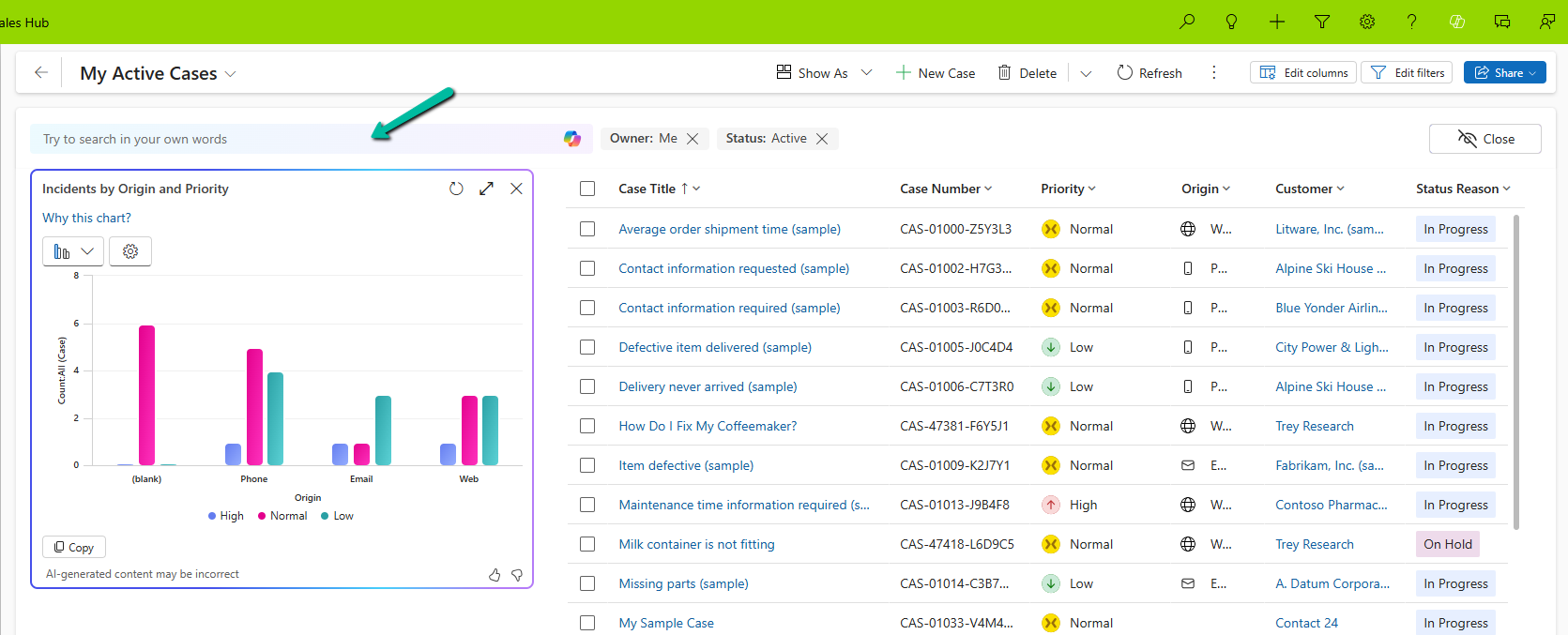
It generates the Chart based on the data in the view.

A screenshot of a computer

AI-generated content may be incorrect.

Selecting a particular area filters the data in the view accordingly.

We also have the option to change the chart type, copy the chart, expand the view, etc.

A screenshot of a computer screen

AI-generated content may be incorrect.

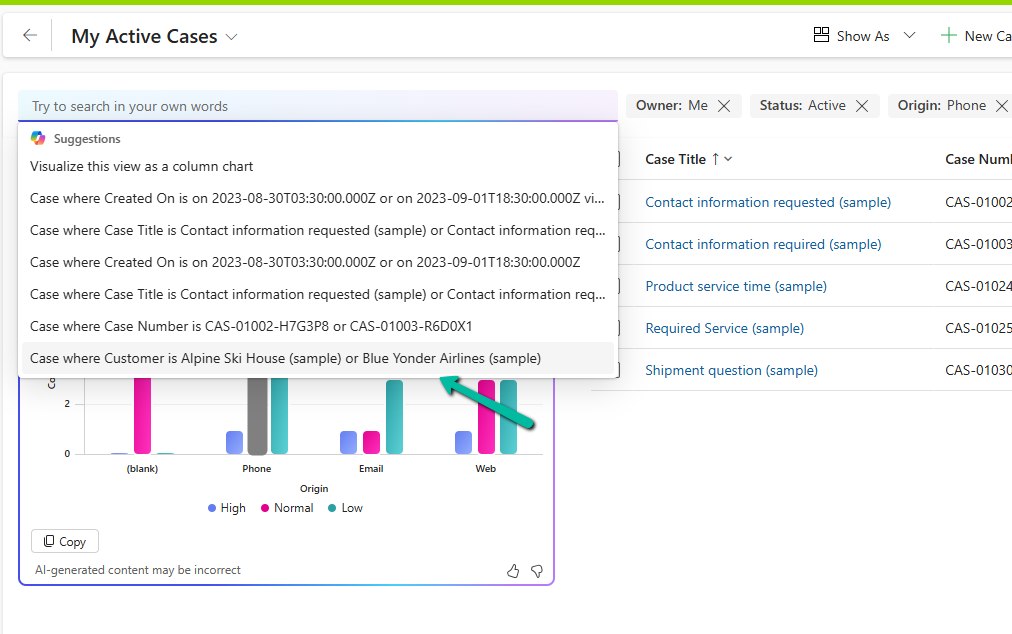
We can also use natural language to specify the data or can select AI-generated suggestions for the views.

More on Natural Language Grid and View Search – https://nishantrana.me/2025/02/04/check-out-the-natural-language-grid-and-view-search/

A screenshot of a computer

AI-generated content may be incorrect.

Here we selected/specified the query “Cases where customer is Alpine Ski House” and the Chart and View updated accordingly.

A screenshot of a computer

AI-generated content may be incorrect.

This Copilot-driven data visualization feature is a game-changer for users who need quick insights from their data without setting up complex reports. With just a few clicks and simple queries, Power Apps can now deliver meaningful charts on the fly.

Get more information

Hope it helps..

Advertisements

Check Out the Natural Language Grid and View search


The new Smart Grid Preview feature allows us to find, filter, and sort data with natural language.

To enable it navigate to Environment >> Settings >> Features inside Power Platform Admin Center and turn on Natural Language Grid and View Search.

A screenshot of a computer

Description automatically generated

After enabling it we will see a search box on the grid page where we can type in questions about our data in plain English.

A screenshot of a computer

Description automatically generated

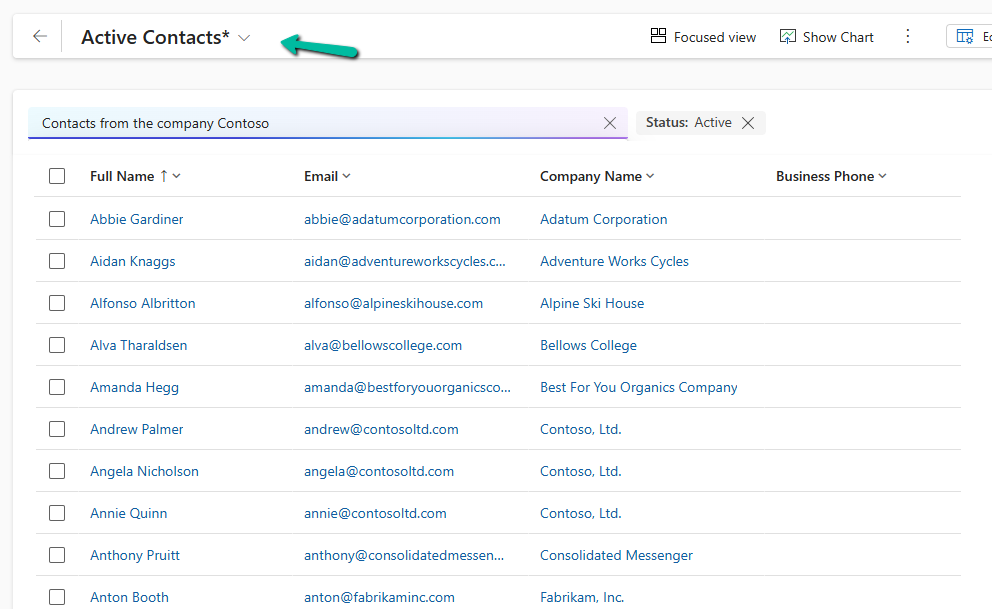
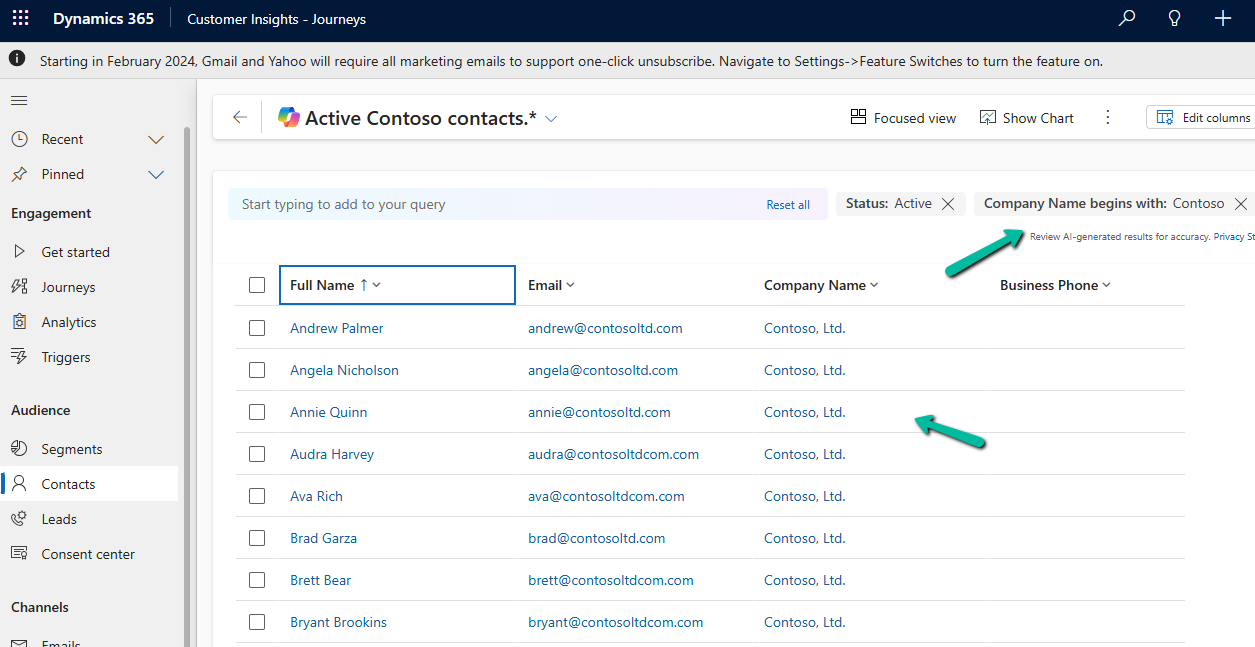
Let’s say we need to find “Contacts from the company Contoso”. Normally, this would mean defining the filters/query. But with the Smart Grid’s natural language search, we just type the request, and the system filters the view accordingly.

A screenshot of a computer

Description automatically generated

The result –

A screenshot of a computer

Description automatically generated

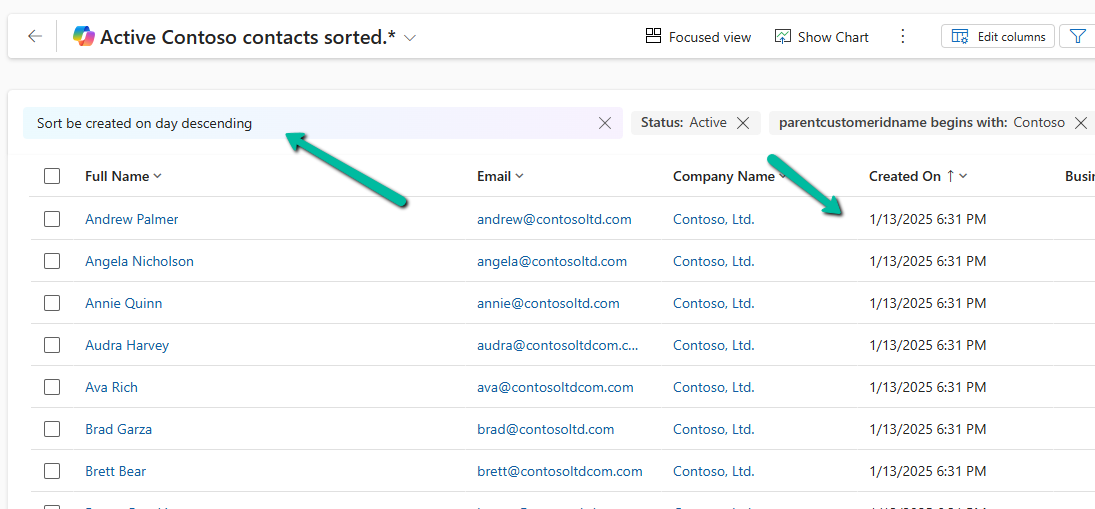
We can also use it to sort data.

A screenshot of a computer

Description automatically generated

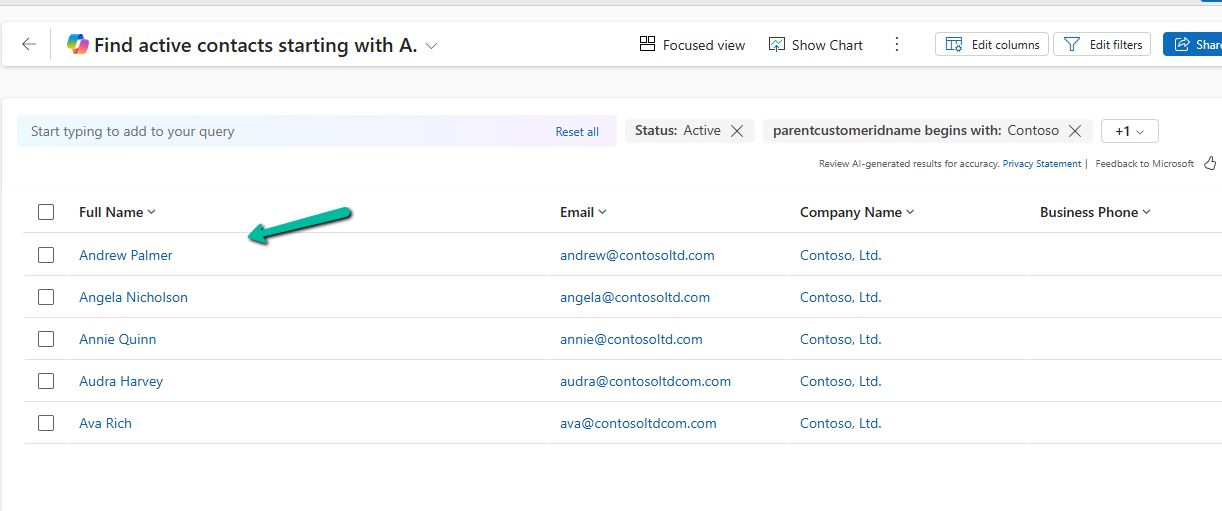
Another example

A screenshot of a computer

Description automatically generated

The result –

A screenshot of a computer

Description automatically generated

Using natural language search has loads of benefits:

  • Ease of Use: Do complex searches without needing to be tech-savvy.
  • Speed: Find what you need quickly without navigating through multiple filters.
  • Accessibility: Makes data interaction easy for everyone, even if you’re not a tech pro.

As it’s still in preview, there are a few things the Smart Grid Preview doesn’t support yet:

  • Query Aggregation
  • Query Grouping
  • Adding Columns

Remember, it’s still a work in progress and not ready for full production use.

Get more details here

Hope it helps ..

Advertisements

Using Azure Bot Service to create Bot


Using Microsoft Bot Framework

Azure Bot Service is an integrated environment that allow us to easily register, build, deploy our bots. It provides the required components and hosting environment for creating bots through Bot Builder SDK using either C# or JavaScript and connector service to connect to various channels.

Login to Azure Portal.

https://portal.azure.com

Search for Web App Bot

We have selected Basic Bot template.

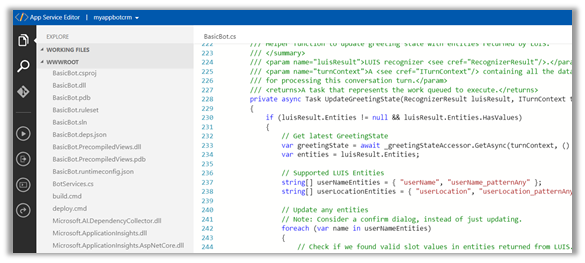
After the Bot Web App is created, we have the option to either Download Bot Source Code to keep developing using Visual Studio or we can open it in online code editor.

Online Code Editor allows to update the source code within the App Service Editor

As the basic bot app template uses the Language Understanding Intelligent Services, we can log on to the Luis

https://www.luis.ai/welcome

There we can see the app.

With all the corresponding Intents, Entities and Utterances.

To test the bot either we can either download the emulator for testing locally or can test online using Web Chat.

Select Test in Web Chat

After we have tested it, next we add channel to our Bot, here we will add Skype.

Below are some of the configuration that can be applied for Skype.

Messaging gives the option of enabling the messaging, Calling let us to enable calling, groups allows us to add the bot to groups and Publish option allows to publish the bot and also submit it for review if it to be used by more than 100 contacts as shown below.

Clicking on Save publishes the bot and we can see the Skype added as one of the channels.

Click on Skype icon to add it to skype.

Add to contacts will add it to Skype and can start our conversation.

Hope it helps..