We had a requirement of creating an InfoPath form that would use a repeating table and to do certain calculations on the values in rows of the repeating tables and display the result in a separate section.
Here is a screen shot of the same !
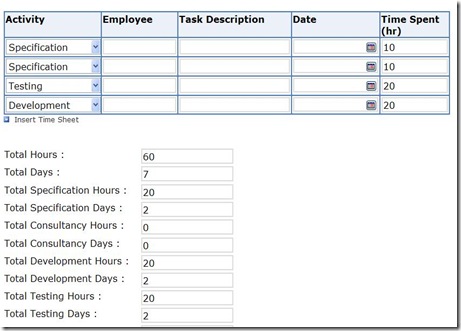
So above here, based on activity selected and time spent specified for it, the Total hours and Total days ( total hours/ 8) needs to be calculated.
Here is the sample code for that
public void group7_Changed(object sender, XmlEventArgs e)
{
// Create an XPathNavigator from the main data source
XPathNavigator domNav = MainDataSource.CreateNavigator();
// Create an XPathNodeIterator to iterate through all the rows
XPathNodeIterator rows = domNav.Select(
"/my:myFields/my:group6/my:group7", NamespaceManager);
// Create Navigator for each of the fields where total needs to be displayed
XPathNavigator lblTotalSpecHours = MainDataSource.CreateNavigator().SelectSingleNode("/my:myFields/my:lblSpecHours", NamespaceManager);
Int32 intTotalSpecHours = 0;
XPathNavigator lblTotalConsultancyHours = MainDataSource.CreateNavigator().SelectSingleNode("/my:myFields/my:lblTotalConsulHours", NamespaceManager);
Int32 intTotalConsultancyHours = 0;
XPathNavigator lblTotalDevelopmentHours = MainDataSource.CreateNavigator().SelectSingleNode("/my:myFields/my:lblTotalDevHours", NamespaceManager);
Int32 intTotalDevelopmentHours = 0;
XPathNavigator lblTotalTestingHours = MainDataSource.CreateNavigator().SelectSingleNode("/my:myFields/my:lblTotalTestingHours", NamespaceManager);
Int32 intTotalTestingHours = 0;
XPathNavigator lblTotalDeploymentHours = MainDataSource.CreateNavigator().SelectSingleNode("/my:myFields/my:lblTotalDepHours", NamespaceManager);
Int32 intTotalDeploymentHours = 0;
// loop through all the rows of repeating table
while (rows.MoveNext())
{
// Get values for Activity dropdown field and Time Spent field
string fldActivity = rows.Current.SelectSingleNode(
"my:ddlActivity", NamespaceManager).Value;
string fldTimeSpent = rows.Current.SelectSingleNode(
"my:txtTimeSpent", NamespaceManager).Value;
if (fldActivity == "Specification" && fldTimeSpent!="")
{
intTotalSpecHours += Convert.ToInt32(fldTimeSpent);
}
if (fldActivity == "Consultancy" && fldTimeSpent != "")
{
intTotalConsultancyHours += Convert.ToInt32(fldTimeSpent);
}
if (fldActivity == "Development" && fldTimeSpent != "")
{
intTotalDevelopmentHours += Convert.ToInt32(fldTimeSpent);
}
if (fldActivity == "Testing" && fldTimeSpent != "")
{
intTotalTestingHours += Convert.ToInt32(fldTimeSpent);
}
if (fldActivity == "Deployment" && fldTimeSpent != "")
{
intTotalDeploymentHours += Convert.ToInt32(fldTimeSpent);
}
}
// for Specification
RemoveNilAndSetHours(lblTotalSpecHours, intTotalSpecHours);
XPathNavigator lblTotalSpecDays = MainDataSource.CreateNavigator().SelectSingleNode("/my:myFields/my:lblSpecDays", NamespaceManager);
RemoveNilAndSetDays(lblTotalSpecDays, intTotalSpecHours);
// for Consultancy
RemoveNilAndSetHours(lblTotalConsultancyHours, intTotalConsultancyHours);
XPathNavigator lblTotalConsultancyDays = MainDataSource.CreateNavigator().SelectSingleNode("/my:myFields/my:lblTotalConsulDays", NamespaceManager);
RemoveNilAndSetDays(lblTotalConsultancyDays, intTotalConsultancyHours);
//// for Development
RemoveNilAndSetHours(lblTotalDevelopmentHours, intTotalDevelopmentHours);
XPathNavigator lblTotalDevelopmentDays = MainDataSource.CreateNavigator().SelectSingleNode("/my:myFields/my:lblTotalDevDays", NamespaceManager);
RemoveNilAndSetDays(lblTotalDevelopmentDays, intTotalDevelopmentHours);
//// for Testing
RemoveNilAndSetHours(lblTotalTestingHours, intTotalTestingHours);
XPathNavigator lblTotalTestingDays = MainDataSource.CreateNavigator().SelectSingleNode("/my:myFields/my:lblTotalTestingDays", NamespaceManager);
RemoveNilAndSetDays(lblTotalTestingDays, intTotalTestingHours);
//// for Deployment
RemoveNilAndSetHours(lblTotalDeploymentHours, intTotalDeploymentHours);
XPathNavigator lblTotalDeploymentDays = MainDataSource.CreateNavigator().SelectSingleNode("/my:myFields/my:lblTotalDepDays", NamespaceManager);
RemoveNilAndSetDays(lblTotalDeploymentDays, intTotalDeploymentHours);
}
// RemoveNil for the fields and set value
public void RemoveNilAndSetDays(XPathNavigator xpathNav, int totalHours)
{
if (xpathNav.MoveToAttribute("nil", "http://www.w3.org/2001/XMLSchema-instance"))
xpathNav.DeleteSelf();
int days = totalHours / 8;
xpathNav.SetValue(days.ToString());
}
public void RemoveNilAndSetHours(XPathNavigator xpathNav, int totalHours)
{
if (xpathNav.MoveToAttribute("nil", "http://www.w3.org/2001/XMLSchema-instance"))
xpathNav.DeleteSelf();
xpathNav.SetValue(totalHours.ToString());
}
Change the extension of the file from .doc to .xsn !!!
Bye..




 Nishant Rana's Weblog