Initializing and setting DefaultCrendentials for OrganizationService in CRM 2011


I created a simple windows application just to see how to make use of IOrganizationService within CRM 2011.

Here we need to add references to the following dlls

  1. Microsoft.Xrm.Sdk.
  2. System.ServiceModel.
  3. System.Runtime.Serialization.

This is the sample code

Uri organizationUri = new Uri("http://crmservername/orgname/XRMServices/2011/Organization.svc");
Uri homeRealmUri = null;
ClientCredentials credentials = new ClientCredentials();
// set default credentials for OrganizationService
credentials.Windows.ClientCredential = (NetworkCredential)CredentialCache.DefaultCredentials;
// or
credentials.Windows.ClientCredential = System.Net.CredentialCache.DefaultNetworkCredentials;
OrganizationServiceProxy orgProxy = new OrganizationServiceProxy(organizationUri, homeRealmUri, credentials, null);
IOrganizationService _service = (IOrganizationService)orgProxy;
try
{
    Entity myAccount = new Entity("account");
    myAccount["name"] = "Test Account";
    _service.Create(myAccount);
}
catch (Exception ex)
{
    MessageBox.Show(ex.Message);
}
}

Dependent Picklist (OptionSet) in CRM 2011


Hi,

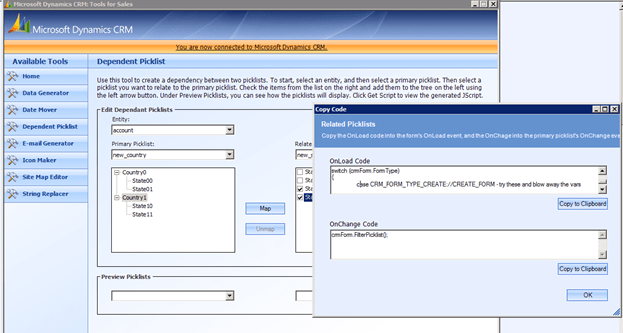
Today i was just trying to check if the dependent picklist code generated using Microsoft Dynamics CRM Demonstartion Tools for CRM 4.0 will work for CRM 2011 or not.

So i downloaded the tool

http://www.microsoft.com/downloads/en/details.aspx?FamilyID=634508DC-1762-40D6-B745-B3BDE05D7012&displaylang=en

I was able to connect CRM 2011 using that tool. Then i generated the code using the tool.


I tried using that code inside CRM 2011 and it worked properly.

Only thing we need to do is to wrap the entire onload code generated by tool inside a function and call that function on the onload of the form and same thing for the onchange code.

Bye.

SPUpgradeException Exception message: An error has occurred on the server.http://go.microsoft.com/fwlink?LinkID=96177


Hi I got the error while trying to open the SharePoint Site after applying the MOSS SP2 update to it.

This post was helpful in resolving that error

http://social.technet.microsoft.com/forums/en-US/sharepointadmin/thread/4cce44de-4b5a-4dcb-a369-be65654ff80e/

  • Nachrichten dieses Autors suchen

    Hi Guys

    I had the same problem. and i fixed it by going here
    http://www.microsoft.com/downloads/details.aspx?familyid=A49472F9-93E…

    download the file that matches your OS. ie x32 or x64
    If you try to run the file it will tell you the patch is already installed.
    but run the file with “/extract” extrace the file to someware and run
    “dw20w.msp”
    Let it do its thing. It takes a while……Then presto. well as least for
    me.

    Let me know how you guys go with it.

    Hope it helps!

Exception: Microsoft.SharePoint.Upgrade.SPUpgradeException: Sequence [Microsoft.SharePoint.Upgrade.SPConfigurationDatabaseSequence] cannot upgrade an object [SPConfigurationDatabase Name=””] whose build version [12.0.0.6219] is too old. Upgrade requires [12.0.0.6421] or higher.


Hi I got the error while trying to upgrade MOSS 2007 Content Database to SharePoint 2010.

http://blog.tallan.com/2011/03/29/upgrading-a-sharepoint-2007-content-database-to-sharepoint-2010/

The reason was the update requires that MOSS 2007 has the SP2 applied to it.

Check out this extremely helpful post

http://mosshowto.blogspot.com/2010/06/migrating-to-sharepoint-2010.html

Bye

“An Error Has Occurred” while opening form in CRM 2011.


I was getting the following error while opening form of one of the entity (new_client) after upgrading the CRM server from beta version to RTM.

and inside application log

Exception information:

Exception type: NullReferenceException

Exception message: Object reference not set to an instance of an object.

at Microsoft.Crm.Application.Controls.AppNavigationBar.CreateOrderedAreas(NavPaneItems navPaneItems)

at Microsoft.Crm.Application.Controls.AppNavigationBar.ConfigureControl()

at Microsoft.Crm.Application.Components.UI.CrmUIControlBase.ConfigureControlInternal()

at System.Web.UI.Control.PreRenderRecursiveInternal()

at System.Web.UI.Control.PreRenderRecursiveInternal()

at System.Web.UI.Control.PreRenderRecursiveInternal()

at System.Web.UI.Control.PreRenderRecursiveInternal()

at System.Web.UI.Control.PreRenderRecursiveInternal()

at System.Web.UI.Control.PreRenderRecursiveInternal()

at System.Web.UI.Control.PreRenderRecursiveInternal()

at System.Web.UI.Page.ProcessRequestMain(Boolean includeStagesBeforeAsyncPoint, Boolean includeStagesAfterAsyncPoint)

The issue was we had commented some of the NavBarArea tag within the FormXml of the Entity.

<!–<NavBarArea Id=”Service”><Titles><Title LCID=”1033″ Text=”Service”/></Titles></NavBarArea><NavBarArea Id=”Marketing”><Titles><Title LCID=”1033″ Text=”Marketing”/></Titles></NavBarArea>–>

Uncommenting it and importing it again resolved the issue.

This was not creating issue for the beta version, however it seems that it won’t allow us to do that in the RC or RTM version.

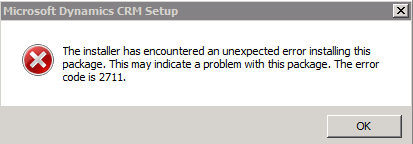
The installer has encountered an unexpected error installing this package. This may indicate a problem with this package. The error code is 2711.


I was getting the above error while uninstalling CRM 2011 Server beta.

Uninstalling Microsoft Dynamics CRM 2011 for Microsoft Office Outlook before uninstalling Server resolved the issue.

Nishant Rana's Weblog

Everything related to Microsoft .NET Technology

Skip to content ↓