Creating a custom Weather Web Part in SharePoint 2010


Update :- The below solution doens’t work any more

http://www.tropicdesigns.net/blog/weather-com-suddenly-cancels-their-free-xml-data-feed-for-developers/


Recently we had a requirement to create a web part that will show the weather information based on the address of the user, which we were pulling from Microsoft Dynamics CRM’s database.

These following two links were of immense help

http://svintinner.blogspot.com/2007/02/how-to-use-weathercom-to-replace-msnbc.html

http://weatherwebpart.codeplex.com/

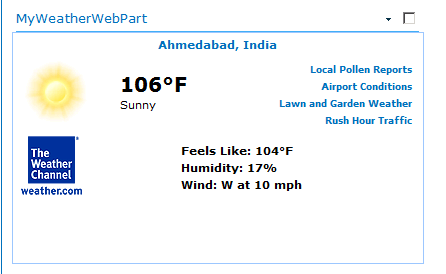
This is how the web part looks
Below is the sample source code for the web part

public class MyWeatherWebPart : WebPart
{
String UserLocation = "Ahmedabad"; // user city
String UserCountry = "India"; // user country
String RequestforURL = string.Empty; // URL which use to get xml data ( rss feed response ) from weather.com
System.Web.UI.WebControls.Xml xmlResults = new System.Web.UI.WebControls.Xml(); // this object contain final data we need to publish(write on sharepoint site)

protected override void Render(HtmlTextWriter writer)
{
try
{
String reqUrl = "<a href="http://xoap.weather.com/weather/local/">http://xoap.weather.com/weather/local/</a>" + GetLocaleID() + "?cc=*&dayf=5&link=xoap&prod=xoap&par=xxxxxxxx&key=xxxxxxxxxxxxxxx";
HttpWebRequest wr = (HttpWebRequest)WebRequest.Create(reqUrl);
//load the response into a response object
WebResponse resp = wr.GetResponse();
// create a new stream that can be placed into an XmlTextReader
Stream str = resp.GetResponseStream();
XmlTextReader reader = new XmlTextReader(str);
reader.XmlResolver = null;
// create a new Xml document and locading feed data in to it
XmlDocument doc = new XmlDocument();
doc.Load(reader);

// as xml style sheet is use for publishing data so we loading it into envornment
HttpContext context = HttpContext.Current; // getting refrence of current environment
// getting reference of path where sml style sheet stays
string path = context.Request.MapPath("/_layouts/RSSWeatherXSL.xsl");

// this object need to convert xml data into xml style sheet view
XslTransform trans = new XslTransform();

trans.Load(path); // loading xsl file
xmlResults.Document = doc; // loading xml data
xmlResults.Transform = trans; // transforming xml to xsl
xmlResults.DataBind(); // binding data
xmlResults.Visible = true; // setting property
xmlResults.RenderControl(writer); // rendering/publishing data as html

}
catch (Exception ex)
{
writer.Write(ex.Message);
}

}
/// <summary>
///   GetLocaleID() THIS METHOD USED TO GET LOCATION ID WHICH we NEED TO GET WEATHER RSS FEED
/// THIS METHOD USE USER CITY AND COUNTRY INFORMATION
/// </summary>
/// <returns></returns>
public string GetLocaleID()
{
try
{
RequestforURL = "<a href="http://xoap.weather.com/search/search?where">http://xoap.weather.com/search/search?where</a>=" + UserLocation.ToString() + "," + UserCountry.ToString();
// First we request our content from our provider source .. in this case .. The Weather Channel
HttpWebRequest wr = (HttpWebRequest)WebRequest.Create(RequestforURL);
//load the response into a response object
WebResponse resp = wr.GetResponse();
// converting it into stream
Stream str = resp.GetResponseStream();
// creating xml reader
XmlTextReader XmlTextReader = new XmlTextReader(str);
XmlTextReader.XmlResolver = null;
XmlDocument doc = new XmlDocument();
// loading xml data in xml doc
doc.Load(XmlTextReader);
// searching location id
return doc.DocumentElement.ParentNode.LastChild.FirstChild.Attributes[0].Value;
}
catch(Exception ex)
{
throw ex; // any exception then default value i.e toronto, canada
}
}
}

Bye.

Creating a custom Virtual Earth Web Part in SharePoint 2010


I had a requirement to create a web part that will pull the address information from one of the records in CRM and show it on the map.

One of the issues I faced while trying out different approaches was that after adding the web part to the SharePoint page, the scrollbar used to go missing in that page.

Finally with help of below two links I managed to develop a the web part.

http://sundium.wordpress.com/2008/06/15/dynamics-crm-40-virtual-earth/

http://virtualearthwebpart.codeplex.com/

Well we could make use of the below code to achieve that

public class MyVirtualEarthWebPart : WebPart
{
protected override void OnLoad(EventArgs e)
{
System.Web.UI.ClientScriptManager csm = Page.ClientScript;
StringBuilder builder = new StringBuilder();
string SCRIPT_NAME = "MapScript" + this.ID;

builder.Append("<meta http-equiv=\"Content-Type\" content=\"text/html; charset=utf-8\"> \n");
builder.Append("<script type=\"text/javascript\" src=\"http://dev.virtualearth.net/mapcontrol/mapcontrol.ashx?v=6.2\"></script> \n");
builder.Append("<script type=\"text/javascript\"> \n");
builder.Append("    var map = null; \n");
builder.Append("    var latitude = null; \n");
builder.Append("    var longitude = null; \n");
builder.Append("    var address = ''; \n");
builder.Append("    var titles = new Array(); \n");

builder.Append("    function GetMap() \n");
builder.Append("    { \n");
builder.Append("        try  \n");
builder.Append("        { \n");
builder.Append("            address = 'New C G Road, chandkheda, gandhinagar';\n");
builder.Append("            map = new VEMap('myMap');\n");
builder.Append("            map.LoadMap(null,4,VEMapStyle.Hybrid); \n");
builder.Append("            map.Find(null,address,null,null,0,10,true,true,true,true,FindCallBack); \n");
builder.Append("        } \n");
builder.Append("        catch (e) \n");
builder.Append("        { \n");
builder.Append("            alert('GetMap: ' + e.message); \n");
builder.Append("        } \n");
builder.Append("    } \n");

builder.Append("    function FindCallBack(shapeLayer, results, positions, moreResults, e) \n");
builder.Append("    { \n");
builder.Append("        try  \n");
builder.Append("        { \n");
builder.Append("             if(positions != null && positions.length > 0) \n");
builder.Append("              { \n");
builder.Append("                PlacePushPin(positions[0].LatLong.Latitude,positions[0].LatLong.Longitude); \n");
builder.Append("                latitude = positions[0].LatLong.Latitude; \n");
builder.Append("                longitude = positions[0].LatLong.Longitude; \n");
builder.Append("               } \n");
builder.Append("        } catch (e) { \n");
builder.Append("            alert('FindCallBack: ' + e.message); \n");
builder.Append("        } \n");
builder.Append("      }      \n");

builder.Append("    function PlacePushPin(lat, lon){ \n");
builder.Append("                latlong = new VELatLong(lat,lon); \n");
builder.Append("                customerPushPin = new VEShape(VEShapeType.Pushpin,latlong); \n");
builder.Append("                customerPushPin.SetTitle(address); \n");
builder.Append("                map.AddShape(customerPushPin); \n");
builder.Append("                map.SetCenterAndZoom(latlong,15);  \n");
builder.Append("                } \n");

builder.Append("_spBodyOnLoadFunctionNames.push('GetMap'); \n</script> \n");
csm.RegisterClientScriptBlock(
this.GetType(),
SCRIPT_NAME,
builder.ToString(),
false);

}
protected override void CreateChildControls()
{
base.CreateChildControls();
StringBuilder builder = new StringBuilder();
builder.Append("<div id='myMap' style='position: relative; width: 300px; height: 300px;'></div>");
this.Controls.Add(new LiteralControl(builder.ToString()));
}
}

Bye.

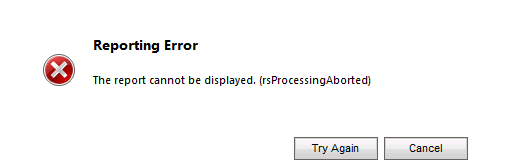
Fxied – Reporting error. Report cannot be displayed. (rsProcessingAborted)


I was getting the above error while running one of the custom SSRS report inside CRM 2011.


To resolve this issue I had to follow these steps

  1. Start SQL Server Management Studio
  2. Expand Security, then expand Logins
  3. Select and right click the account under which the SQL Server Reporting Services is running.
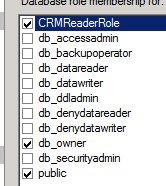
  4. Select User Mapping and select YouOrg_MSCRM database and specify following role membership
  • CRMReaderRole,
  • db_owner
  • public.


Hope it helps.

Advertisements

The remote name could not be resolved while using HttpWebRequest


The issue could be because of proxy setting not specified for the web application. The solution to this is to add the following conifig info in the application’s web.config
<system.net><defaultProxy  enabled=true” useDefaultCredentials=true>
<proxy  bypassonlocal=True”  proxyaddress=proxyaddress />
</defaultProxy
</system.net

Hope it helps.

Error: ‘VEMap’ is undefined


If we get the above error while working with Virtual Earth first thing we need to check is whether the internet connection is working or not.

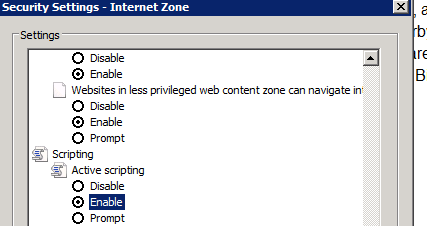
Next thing to check is whether JavaScript is disabled for the browser. And if this is the case, to enable it in case of IE.

Go to Tools à Internet Options à Security Tab

Find the entry Active Scripting and enable it.

Hope it helps.

Data Audit in CRM 2011 (while updating record programmatically)


Suppose we have enabled (out of the box) data audit feature for a particular entity and then we are updating its record programmatically in the following manner (the way we usually do)

myEntityRecord.new_addressname = txtAddressName.Text;

myEntityRecord.new_street2 = txtStreet2.Text;

myEntityRecord.new_city = txtCity.Text;

myEntityRecord.new_state = txtState.Text;

myEntityRecord.new_zip = txtZipCode.Text;

service.Update(serviceMember);

Now what happens over here is that all of these fields will appear as “changed field” in Audit History even if we haven’t changed its value.

Here in the above screen shot we can see the same value for fields in old value and new value column. This is something we should be aware of while updating records programmatically in CRM.

Bye.

Nishant Rana's Weblog

Everything related to Microsoft .NET Technology

Skip to content ↓